These instructions apply to the Suzuki Swift Mk3 (AZG/AZH) 2010-2017.
For other models, please choose your vehicle here.
The third-generation Suzuki Swift (FZ/NZ, 2010–2017) got Suzuki’s ENG A-STOP stop/start system on SZ-L and Sport trims from late 2012, badged “A-STOP” on the dash. It defaults to ON every key cycle and can’t be permanently switched off at the factory, but you can deactivate it for the current drive three ways.
Before you start
- The A-STOP button is on the centre console on UK-spec Swifts (RHD) or just below the climate controls on LHD EU cars, marked with an “A” and a circular arrow. A green cluster light means A-STOP is armed; “A OFF” with an amber light means it’s deactivated.
- Deactivation lasts for the current ignition cycle only. Switch off and restart and A-STOP defaults to ON — there is no factory option to make “OFF” the default.
- Some workshops can permanently disable A-STOP via the ECU, but this affects type-approval and isn’t strictly legal in the UK or EU, so we don’t recommend it. Aftermarket “permanent A-OFF” modules that work via the dashboard button signal are road-legal because they don’t alter the ECU.
Method 1 — dashboard A-OFF button
This is the standard, factory-intended way to disable A-STOP for a drive.
- Press the A-OFF button on the centre console.
- The amber “A OFF” warning lamp illuminates on the cluster to confirm A-STOP is now deactivated.
- The engine will continue to run at idle when stationary — it will not auto-stop.
- To re-enable A-STOP for the current drive: press the button again. The amber lamp extinguishes; the system rearms within a few seconds, contingent on the operating-condition gates.
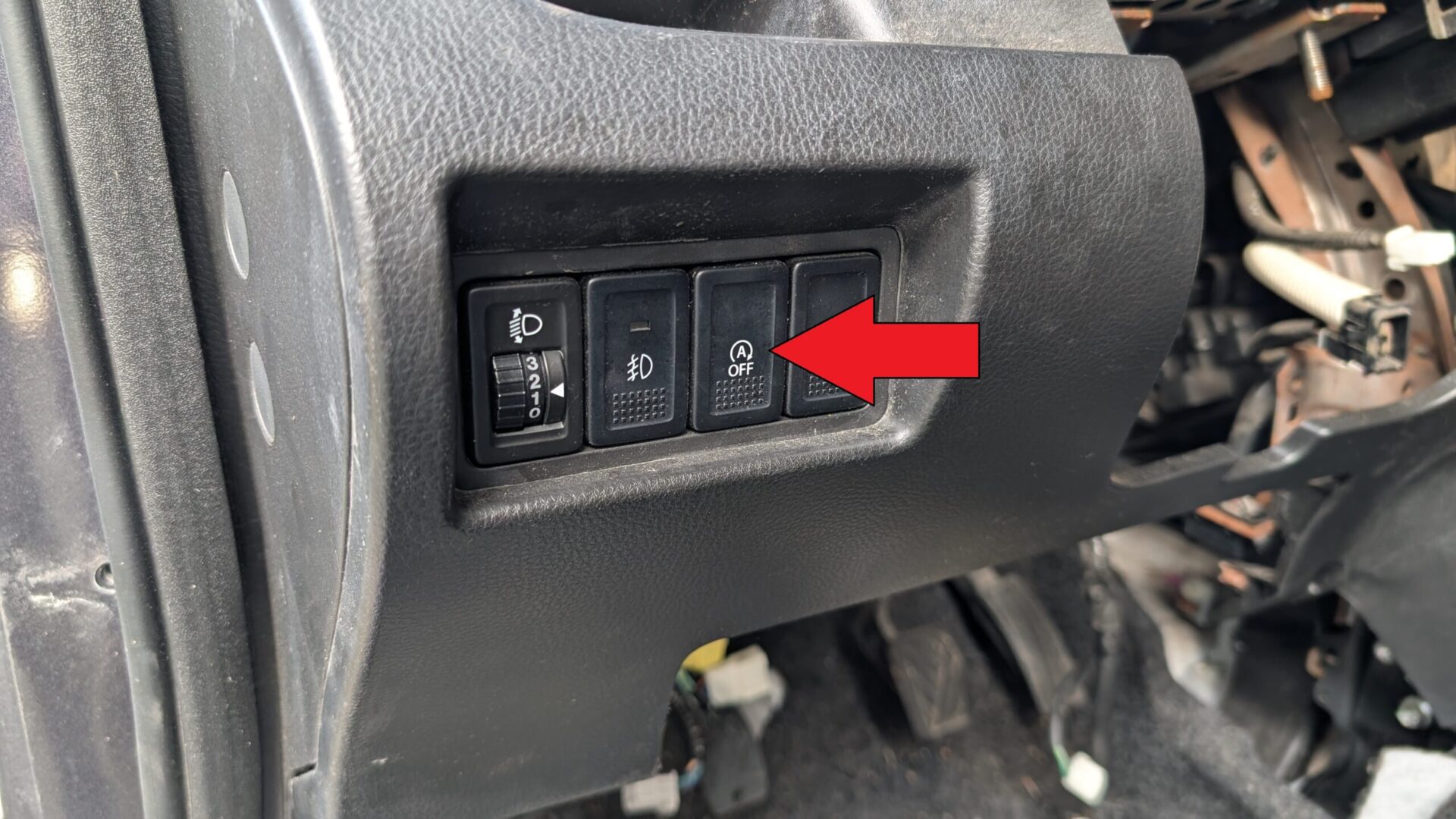
Method 2 — driver’s seat belt unbuckle
Unbuckling the driver’s seat belt or opening the driver’s door while stopped triggers A-STOP’s safety override:
- It immediately disables the next auto-stop if the engine is still running.
- If the engine has already auto-stopped, it restarts within about 0.5 seconds.
It’s handy when working in the engine bay — releasing your belt while seated takes the system out of arming range without reaching for the button.
Method 3 — open the bonnet
Lifting the bonnet trips the bonnet-ajar microswitch, which A-STOP reads as a “do not auto-stop” condition to keep the engine from restarting with your hands in the bay. For any under-bonnet work with the engine running (idle-quality check, vacuum-leak hunt), open the bonnet fully and A-STOP will not trigger.
When you should disable A-STOP
- Before under-bonnet work with the engine running.
- In heavy stop-go traffic where frequent auto-stops in hot weather stress the starter motor and the AC compressor cycle.
- When towing (the Swift is rated for light towing only) — the extra mass means each restart pulls more torque from the starter.
- If the battery is showing its age — A-STOP cycles the starter far more than a conventional car (5,000–10,000 starts a year is typical), so a tired battery struggles. A new battery normally restores A-STOP after a drive cycle.
When It Won’t Cooperate
“A OFF” is permanently illuminated and pressing the button doesn’t help. The system has self-disabled on one of the gate conditions: weak battery, cold engine, AC compressor running flat-out, or a stored fault code. Check the battery first (load test if possible). If it’s healthy and the engine is at temperature, a scan tool that supports Suzuki body codes is needed to read why the system is locked out.
Engine auto-stops but won’t restart automatically. Two common causes. (1) Battery state of charge dropped below the gate while the engine was off — happens if you keep the radio and AC running while parked with the engine off; crank manually with the key. (2) On manual cars, the clutch pedal switch is faulty (a known Swift wear item) — the ECU doesn’t see the signal, so the engine won’t restart on clutch press. Replacement is straightforward and a £20 part.
A-STOP works yesterday but not today. Usually ambient temperature — A-STOP needs coolant above about 50 °C and ambient above about 3 °C. On a cold morning, drive for 10 minutes before expecting it to arm.
Frequently asked questions
Does A-STOP use a special starter motor?
Yes. The Swift A-STOP starter has a reinforced solenoid and uprated brushes rated for 300,000–500,000 starts vs the conventional starter’s typical 30,000. Replacing an A-STOP starter with a non-A-STOP unit means the system needs to be permanently disabled to avoid premature starter failure.
Will the AC keep working when the engine auto-stops?
Briefly — the cabin stays cool for about 30 seconds via residual cold in the evaporator, then the AC pauses (the compressor needs the engine running). Turning the AC to full or setting climate control to “MAX A/C” suppresses auto-stop entirely until demand drops.
My A-STOP works in summer but never in winter — is something wrong?
Probably not. The gate thresholds tighten in cold weather, especially with the heater running. If the dash shows “Battery condition does not allow A-STOP”, the algorithm has decided the battery couldn’t sustain a cold-start restart. This usually clears as the engine warms.
Can I retrofit A-STOP to a Swift that didn’t come with it?
Not realistically. It requires the uprated starter, the EFB battery, the dashboard button, the BMS sensor, and the matching ECU calibration — at parts cost alone it’s £600+. Buying a Swift with A-STOP from new is the only sensible route.
For DTCs related to A-STOP or the battery management sensor, see autodtcs.com.
Independent guide — not affiliated with Suzuki. Always follow your official service manual and safety precautions. Read our full disclaimer.