These instructions apply to the Nissan Note Mk2 (E12) 2013-2017.
For other models, please choose your vehicle here.
The Nissan Note E12 (2013–2017) — sold as the Versa Note in North America — shows a service reminder on the instrument cluster when its internal counter reaches the next scheduled-maintenance threshold. The cluster’s trip button doubles as the service-reset interface; no diagnostic tool required, but the procedure has a precise sequence that’s easy to get wrong on the first try.
When to Reset the Service Indicator
- After completing an oil and filter change.
- After any scheduled service item where the reminder was due.
- If the reminder appears but service has already been done — common when a garage performed the work without resetting.
Before You Start
- Park safely and switch off all electrical accessories.
- Confirm the maintenance has actually been completed.
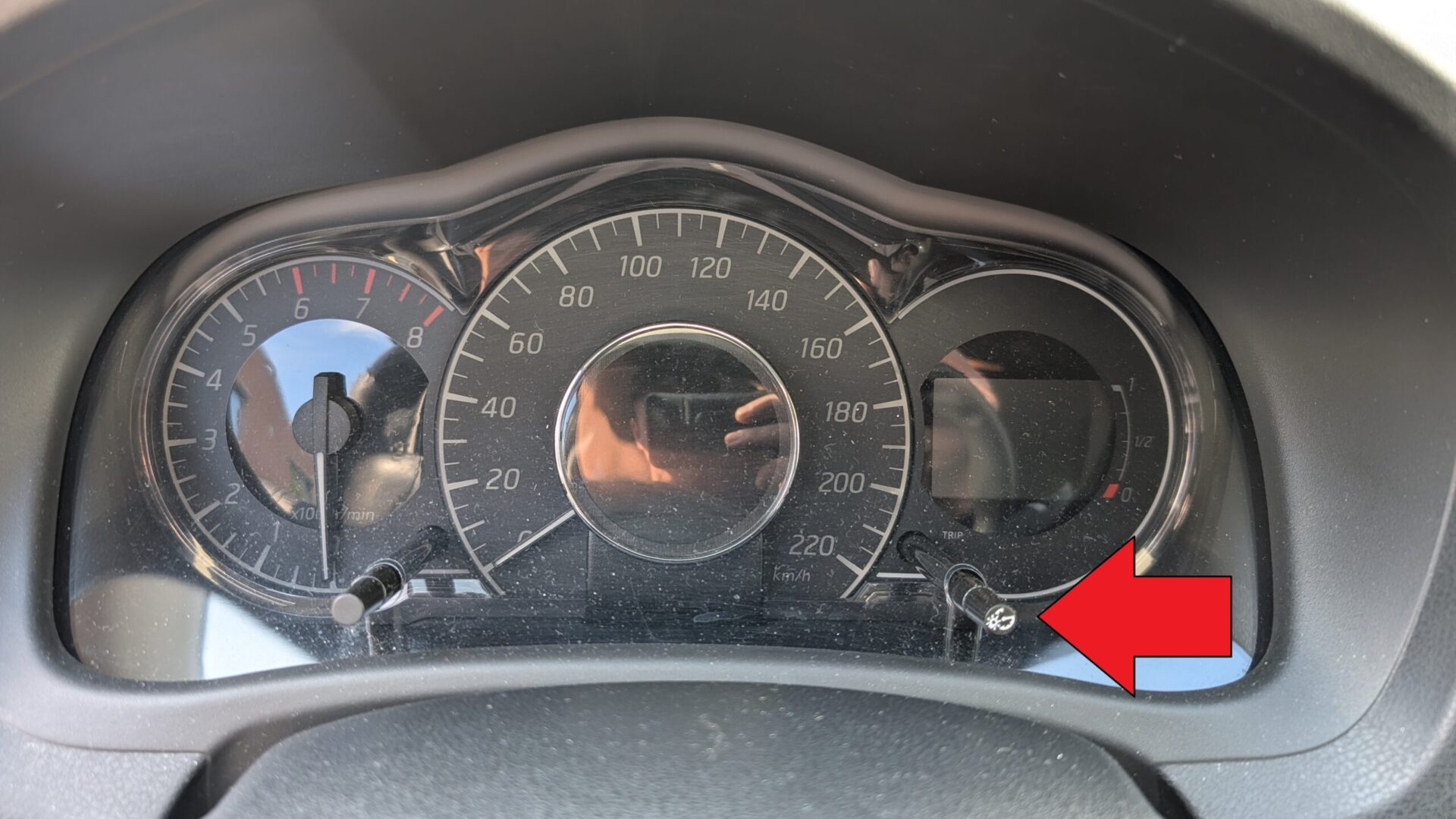
- Locate the trip button on the instrument cluster. On the Note E12 it’s a small black push-button on the lower-right of the speedometer face — same button used to cycle Trip A / Trip B / odometer.
Tools and Supplies
None. The reset is entirely cluster-button based.
Manual Reset Procedure
- Switch the ignition to ON (do not start the engine). The cluster should fully wake up.
- Within 5 seconds of switching ignition on, press and hold the trip button for roughly 3 seconds.
- The service-key symbol and the remaining-distance value will begin to flash. This signals the cluster has entered service-edit mode.
- Release the button.
- Press the trip button briefly and repeatedly to set the desired distance to the next service. Each press increments the value in 1,000 km steps (or the imperial equivalent in mile-display markets).
- Stop pressing once you’ve reached the desired interval (typically 10,000 or 15,000 km depending on your maintenance schedule).
- Wait about 5 seconds without pressing the button — the cluster stores the value and exits service-edit mode automatically.
- Switch the ignition OFF. The service interval is now reset.
Verify the Reset Worked
Turn the ignition back to ON and check the cluster. The service-key symbol should be gone. The trip-computer’s “distance to next service” readout (if your trim shows it) should now reflect the new full interval.
Troubleshooting
- Service icon doesn’t flash on the long-press. The 3-second hold was either too short or initiated outside the 10-second window after ignition ON. Switch ignition off for 30 seconds, then ON, and immediately do the 3-second hold.
- Value doesn’t store. You either kept pressing the button past the timeout or switched off too quickly. Wait the full 5 seconds without any button activity before turning ignition off.
- Service reminder reappears at next start. If the reset didn’t fully commit, the cluster reverts to its prior state. Redo the procedure, paying particular attention to the 5-second wait at the end.
- Trip button doesn’t seem to do anything. Make sure the ignition is fully ON (not ACC). The Note’s cluster lights up partially at ACC but the service-reset path only opens at ON.
- Cluster wording is different. Different markets and trims show the service reminder as “Service,” “Maintenance,” a spanner icon, or a wrench-with-clock. The reset procedure works regardless of the displayed wording.
US Models (Versa Note)
On the North-American Versa Note the same reminder appears as a wrench symbol with a “distance to oil change” readout in miles, next to an approximate engine-oil-level display. The reset works the same way: with the wrench and oil-change information showing just after you switch the ignition on, hold the trip-computer change button by the speedometer for about 3 seconds, then press it to set the interval — each press adds 500 mi (1,000 km), up to 18,000 mi (30,000 km).
Frequently Asked Questions
What’s the recommended service interval on a Nissan Note E12?
Nissan’s official European interval is 15,000 km or 12 months, whichever comes first, for the 1.2L petrol and 1.5 dCi diesel trims. North-American Versa Note markets typically run a shorter 12,000 km (7,500 mile) interval. Severe-service conditions tighten to 10,000 km / 6 months. Confirm your specific market’s recommendation in the owner’s handbook.
Can I set the next-service distance to whatever I want?
The cluster lets you set values typically between 5,000 and 30,000 km in 1,000 km increments. There’s no benefit to setting it longer than Nissan’s recommendation — the engine doesn’t care, but skipping recommended oil changes can void warranty (still relevant on imports / late-build cars) and shorten engine life.
Will this reset clear engine fault codes?
No — this is purely the service-counter reset. Engine and transmission fault codes need a scan-tool reset. The Note E12 stores codes in the engine ECU, transmission ECU (if CVT), and body computer. See autodtcs.com for DTC interpretation.
Does this work the same on the Note E11 (2006–2013)?
No. The previous-generation Note E11 used a different cluster with a different reset procedure (closer to the Toyota-style hold-button-during-ignition-on). The E12 (2013–2017) procedure above is specific to that generation.
Independent guide — not affiliated with Nissan. Always follow your official service manual and safety precautions. Read our full disclaimer.