These instructions apply to the Kia Picanto Mk2 (TA) 2011-2017.
For other models, please choose your vehicle here.
The Kia Picanto (2011–2017) uses a safety-calibrated power window system with automatic up/down operation and an anti-pinch feature on the driver’s side. If the window switch or battery has been disconnected, the automatic function may stop working. This guide explains how to reinitialize or reset the system manually.
When to Perform This Procedure
- After reconnecting or replacing the 12-volt battery.
- After replacing a window regulator or motor.
- If the auto up/down or one-touch function no longer works.
Power Window Initialization Procedure
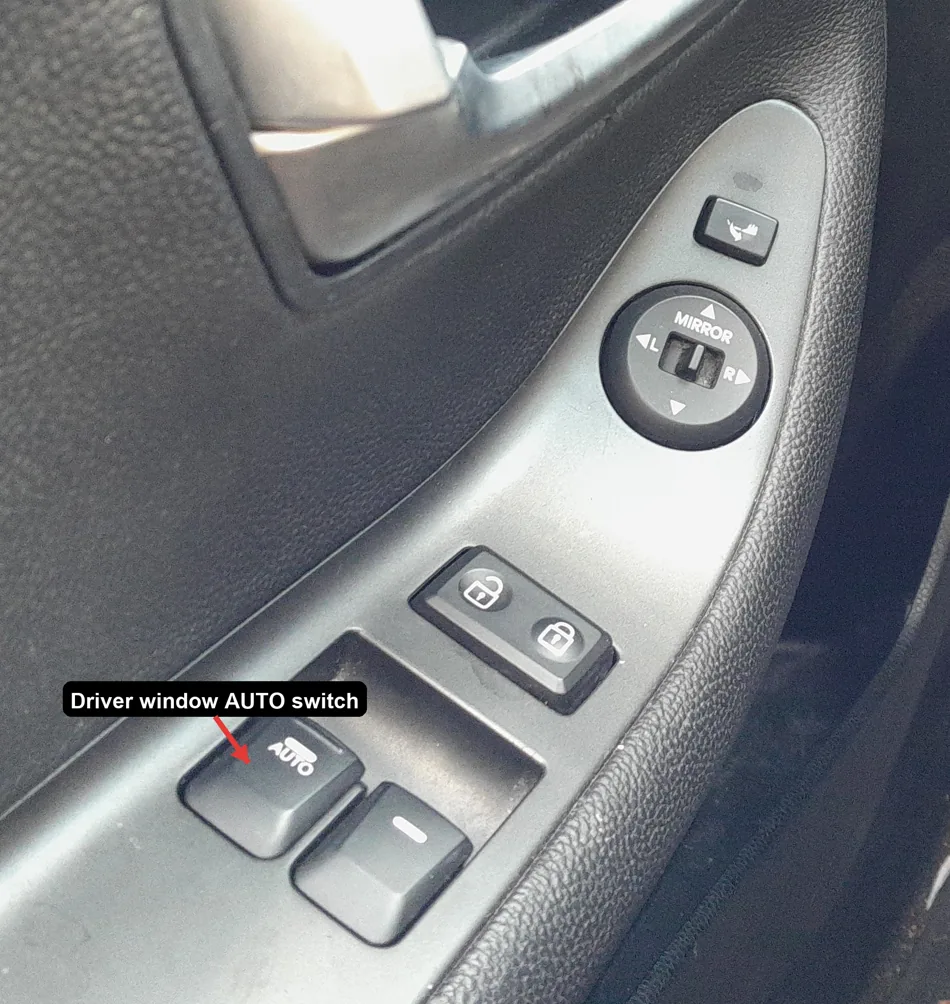
- Switch the ignition ON (do not start the engine).
- Fully close the driver’s window using the switch.
- Once fully closed, keep pulling the switch up for approximately 3 seconds.
- Release the switch.
- Repeat the same process for the front passenger’s window if equipped with an auto function.
Understanding the Automatic Function
- The driver’s window supports one-touch auto up/down operation.
- Pull or press the switch fully to the second detent for automatic movement.
- To stop movement midway, tap the switch in the opposite direction.
Anti-Pinch Protection (Automatic Reversal)
If the window detects an obstruction during upward movement, it automatically lowers a short distance to prevent injury. However, the system may not detect very small objects (under approximately 4 mm), so always check before closing.
Power Window Lock Function
The driver can disable other window switches using the lock button on the driver’s door panel. When locked, only the driver’s master control can operate the windows.
Troubleshooting
- Auto up/down not working: Perform the initialization steps again; ensure the ignition is ON during the procedure.
- Window stops mid-way: Check for obstructions or verify anti-pinch activation.
- No response from switch: Inspect related fuses and relays in the interior fuse panel.
Safety Tips
- Always keep hands and objects away from the window path.
- Do not operate multiple windows simultaneously to avoid voltage drops.
- Never press opposite-direction switches at the same time; this can stop the motor.
- In freezing weather, make sure windows are not frozen before operating them.
Independent guide — not affiliated with Kia. Always follow your official service manual and safety precautions. Read our full disclaimer.