These instructions apply to the Opel Zafira Mk3 (P12) 2011-2019.
For other models, please choose your vehicle here.
The Opel Zafira Tourer (also Vauxhall Zafira Tourer in the UK, P12 chassis, 2011–2019) moved to a menu-based service-indicator reset accessed through the steering-wheel buttons and the multi-function display. This replaced the Zafira B’s button-and-brake-pedal procedure with a more modern menu-driven flow centred on the “Oil Life System” menu. The reset still requires the brake pedal as a confirmation interlock, but the entry path is via the cluster menu rather than a dedicated reset button.

Before you start
The Zafira Tourer’s Oil Life System is a calendar + mileage tracker with no oil-condition sensor — it’s interval-based, like the earlier Zafira A and B. After an oil change, the indicator must be reset manually; the system cannot detect fresh oil. The procedure is the same regardless of engine (1.4 Turbo, 1.6 Turbo, 1.8 NA, 2.0 CDTi).
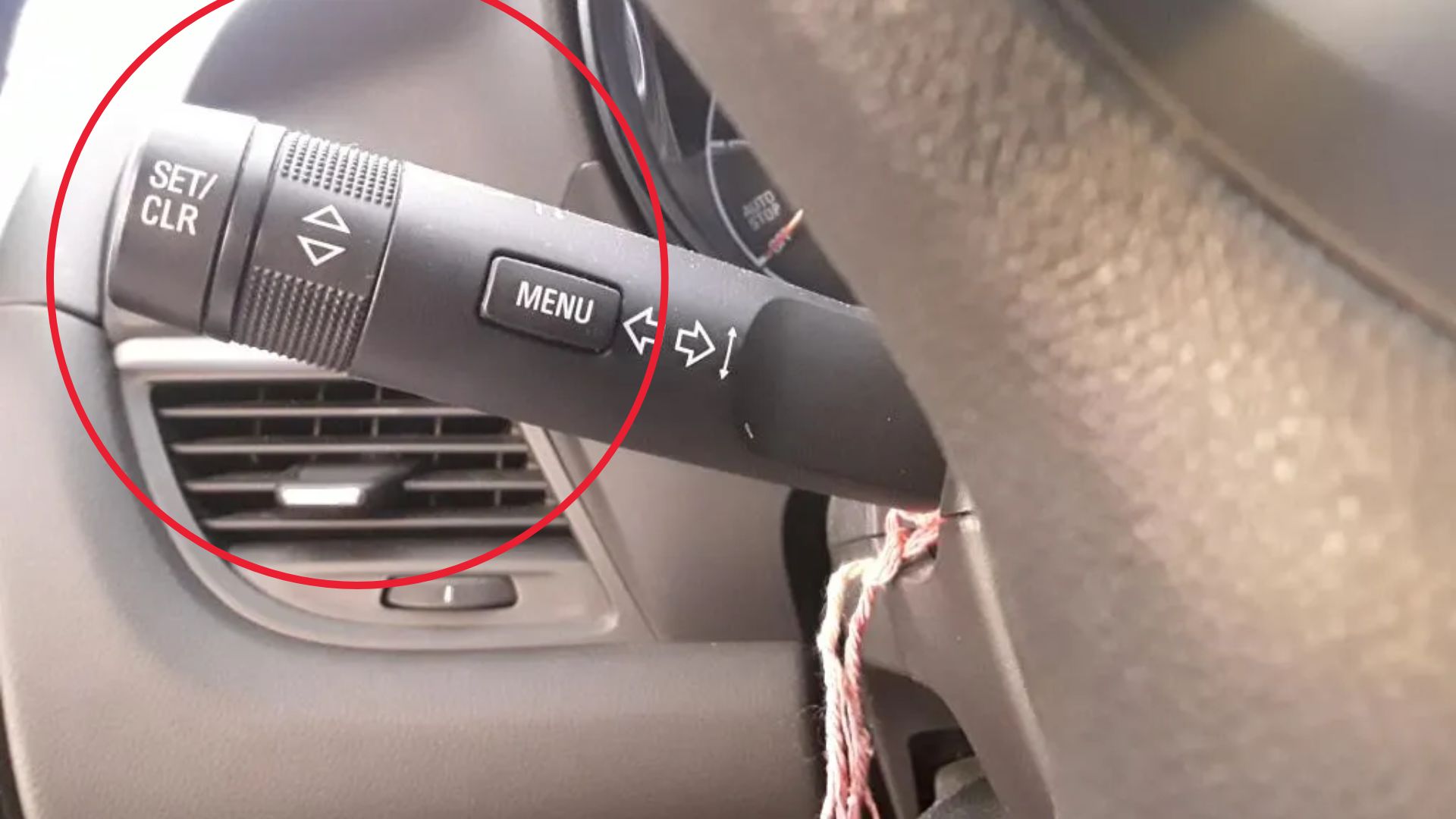
- The MENU button is on the right-hand side of the steering wheel on cars with the leather multifunction wheel, or on the dashboard centre stack on lower-trim cars. The button cycles through Vehicle Information System menus.
- The SET/CLR button is the small rocker switch immediately below or above MENU. It acts as the “confirm/reset” trigger.
- Brake pedal interlock. The procedure requires the brake pedal pressed during the reset — a safety feature that prevents accidental resets while driving. The brake switch must be working correctly (a failed brake switch is a common Zafira Tourer issue; symptoms include rear lights stuck on, cruise control unavailable).
- Don’t start the engine. Run the procedure in ignition position II only.
Tools required
None.
Reset procedure
- Switch the ignition ON without starting the engine. All warning lights illuminate briefly, then settle.
- Press the MENU button on the steering wheel (or dashboard controls). The cluster’s central display shows the first menu item.
- Scroll through the menu until “Vehicle Information System” appears. Use the up/down arrows on the steering wheel or the rotary control on lower trims.
- Continue scrolling within the Vehicle Information System until “Oil Life System” or “Remaining Oil Life: XX%” is displayed.
- Press and hold the SET/CLR button on the steering wheel.
- At the same time, press and hold the brake pedal with your right foot.
- Continue holding both for approximately 5 seconds. The display will refresh and show “Oil life reset” or similar confirmation, with the percentage figure returning to 100%.
- Release the SET/CLR button and the brake pedal.
- Switch the ignition OFF and back ON to verify the spanner / service indicator is no longer illuminated.
How to verify it has worked
- The spanner / service indicator is no longer illuminated on the cluster.
- Scrolling back to the Oil Life System menu shows “100%” (or the full interval value, depending on trim).
- No “OIL CHANGE DUE” message appears at start-up.
- The next engine start is silent — no service-reminder chime.
If Something Goes Wrong
The “Oil Life System” menu doesn’t appear. On lower-trim Zafira Tourers, this menu lives one level deeper than on higher-trim cars. Look for “Vehicle Info” → “Service” or similar entries. The Tourer’s menu structure was revised slightly during the 2015 facelift; pre-facelift cars have a flatter menu, facelift cars use a deeper hierarchical structure.
SET/CLR + brake pedal doesn’t trigger the reset. Most common cause: the brake-pedal switch is faulty (very common Zafira Tourer wear item — a £20 part, 10 minutes to fit). Test the brakes from outside the car: tail-lights should illuminate when you press the pedal. If they don’t, the switch is gone. Replace before retrying the reset.
The display flashes “Oil life reset” but the indicator returns at the next start. The reset wasn’t committed to non-volatile memory. Wait 30 seconds with ignition OFF between the reset and the next start. If the issue persists, the BCM has a stored fault that needs OP-COM or a Vauxhall-aware scan tool.
“Service interval exceeded — reset by workshop only” message blocks the reset. The car is more than one full interval overdue. The manual reset is gated; the workshop fix is a Tech 2 or GDS reset that bypasses the gate.
The reset works but the next-service indicator immediately re-illuminates after a short drive. The BCM has logged a stored fault that re-triggers the indicator each ignition cycle. Read the BCM with a Vauxhall-aware scan tool to find the underlying code; clearing that resolves the symptom.
Frequently asked questions
Does this procedure work on the Vauxhall Zafira Tourer (UK)?
Yes — same car, same procedure, only the badge differs.
How does the Tourer’s procedure differ from the Zafira B?
The Zafira B used a single cluster reset button + brake pedal + ignition cycle. The Tourer moved to a menu-driven approach via the MENU and SET/CLR buttons. Both end with a brake-pedal interlock; the entry path is different.
Will the reset work with an aftermarket head unit installed?
Yes. The Tourer’s service-interval logic lives in the BCM and cluster, not the head unit. Replacing the radio doesn’t affect the reset.
What service intervals does the Tourer use?
1.4 / 1.6 Turbo petrol: 20,000 km / 12 months. 1.8 NA petrol: 20,000 km / 12 months. 2.0 CDTi diesel: 30,000 km / 24 months under long-life servicing, or 20,000 km / 12 months under standard servicing. The cluster displays “Remaining Oil Life: XX%” which is interval-proportional.
Why does the SET/CLR sometimes register as just “trip reset” instead of triggering the service reset?
Pressing without the Oil Life System menu visible is interpreted as a trip-meter reset. Navigate to the correct menu first (step 4) before pressing SET/CLR.
Does the procedure apply to the Zafira Tourer with IntelliLink infotainment?
Yes — the IntelliLink head unit is a separate system from the cluster. The cluster-side procedure (steering wheel buttons + brake pedal) is unchanged regardless of which head unit is fitted.
For DTCs related to the BCM or service-interval logic, see autodtcs.com.
Independent guide — not affiliated with Opel. Always follow your official service manual and safety precautions. Read our full disclaimer.