These instructions apply to the Opel Zafira Mk3 (P12) 2011-2019.
For other models, please choose your vehicle here.
The auto Start/Stop system on the Opel Zafira Tourer (Mk3, P12, 2011–2019) automatically shuts the engine off when you come to a halt — at traffic lights, in a queue, or waiting to turn — and fires it straight back up when you lift off the brake or dip the clutch. It is designed to trim fuel use and emissions during the idle time a car spends stationary in town driving. The stop is completely normal and is not a fault, but plenty of owners prefer to switch it off in stop-start traffic, when manoeuvring in tight spaces, or before doing any work in the engine bay, and the Zafira Tourer makes that easy.
How it Works on the Zafira Tourer
The system only cuts the engine when a set of conditions are all satisfied at once: the 12 V battery has to be well charged, the engine and catalyst need to be warm, the cabin climate demand must already be met, and the car has to be fully stopped with the brake held. If any one of those is missing — a cold engine on the first drive of the day, the heater or air conditioning working hard, or a battery drained by short journeys — the engine simply keeps running. That is the system protecting your comfort and your battery, not a malfunction. The stop light in the instrument cluster shows an A inside a circular arrow.
Before You Begin
- Have the ignition on; you can switch the system on or off at any time the car is running.
- Decide whether you want a single-trip change (the dash button) or the automatic method used before engine work.
- Always deactivate Start/Stop before opening the bonnet, so the engine cannot auto-restart while your hands are near it.
- Watch the light in the switch or cluster to confirm the state has actually changed.
Before Working on the Engine
Always make sure the Start/Stop system is deactivated before performing any work in the engine compartment.
Method 1: Using the Start/Stop Button
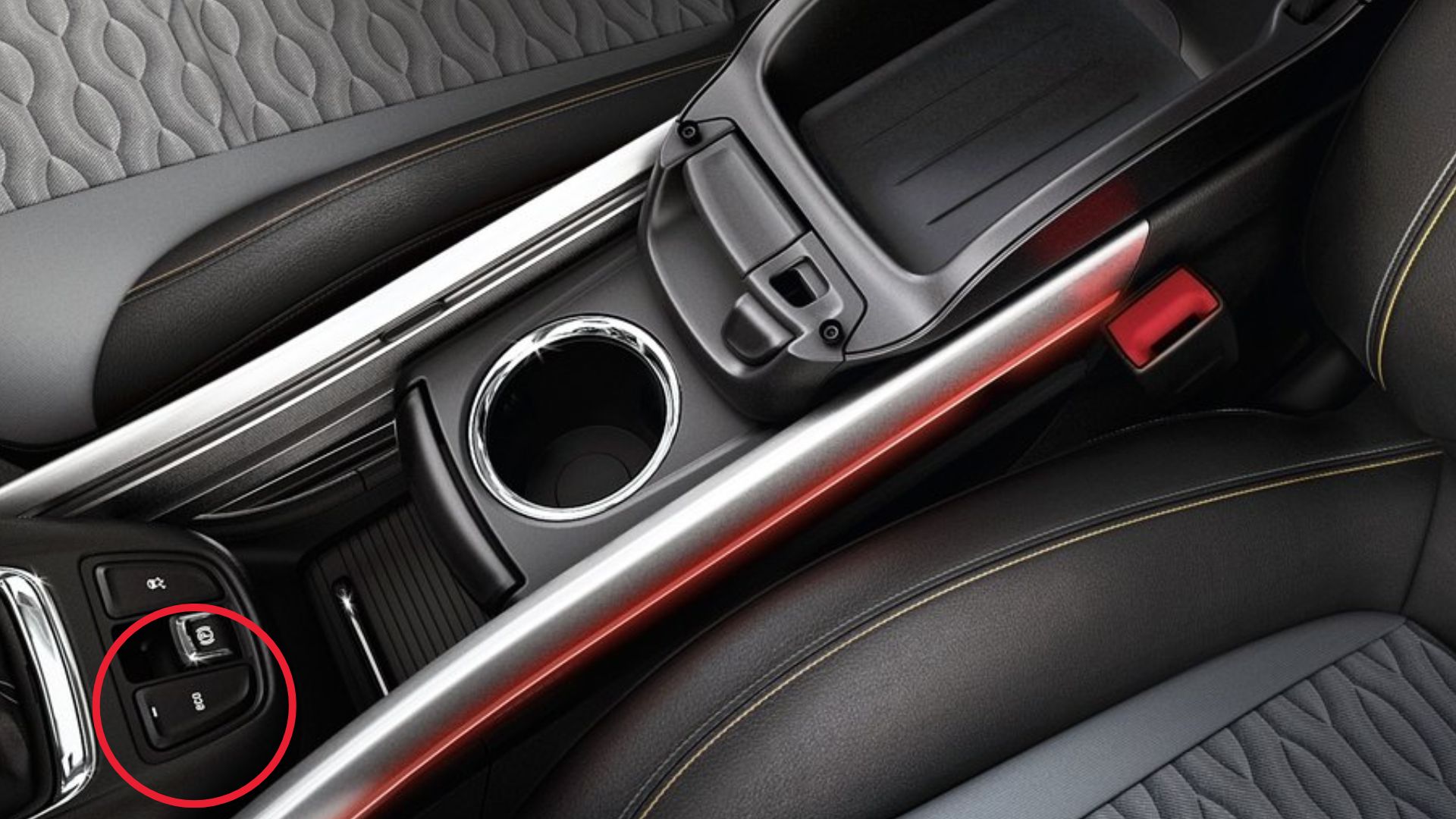
- Locate the Start/Stop system button on the dashboard.
- Press the button once.
- The Start/Stop system warning light will turn off.
- The system is now deactivated.
Method 2: Automatic Deactivation
- Unbuckle the driver’s seat belt.
- Open the driver’s door.
- The Start/Stop system will switch off automatically.
Reactivating the Start/Stop System
- The system is automatically reactivated the next time the ignition is switched on.
- You can also reactivate it manually by pressing the Start/Stop button again.
If the Engine Won’t Stop at a Standstill
If you have left Start/Stop enabled but the engine keeps idling at every junction, work through the likely reasons rather than assuming a fault:
- The 12 V battery is low — a run of short trips leaves it too depleted for the system to arm; a longer drive or a proper charge often restores it.
- The engine is not yet warm — on a cold start the system waits until the coolant reaches temperature.
- Climate demand is high — strong heating or air conditioning, or a heavily misted screen, keeps the engine running to hold the cabin temperature.
- The driver’s seat belt is unbuckled or a door is open — on this model that condition deliberately holds the engine on.
- Very cold or very hot ambient temperatures can suspend the stop entirely to protect the battery and comfort.
- The car is not fully stopped, or the brake pedal is not held firmly enough to trigger the cut.
- A weak or ageing battery that no longer holds charge will stop the system arming even after a long drive — a battery test is worthwhile.
After the Reset
Switching the system off applies to the current drive only. Deactivating it does not store any fault codes or make any permanent change to the car, and the engine will simply idle normally at every stop for the rest of the journey. The Start/Stop system always returns to its normal, enabled state the next time you start the vehicle, so if you want it off again you press the button after each start. Leaving it enabled costs nothing and quietly saves a little fuel in town.
Frequently Asked Questions
How do I turn off Start/Stop on an Opel Zafira Tourer?
Press the Start/Stop (ECO) button on the dashboard once. The warning light in the cluster goes out to confirm the system is deactivated for the rest of that drive. Before any engine-bay work you can also switch it off automatically by unbuckling the driver’s seat belt and opening the driver’s door.
Does the setting stay off permanently?
No. There is no permanent off switch on this Zafira Tourer. The system re-enables itself every time you switch the ignition on, so if you prefer to drive without it you need to press the button again after each start. This is normal behaviour and shared by most cars of this era.
Why doesn’t the engine stop at traffic lights?
Usually because one of the enabling conditions is not met. The most common causes are a 12 V battery that is not charged enough, an engine that has not yet warmed up, or the heating or air conditioning working hard to reach the set cabin temperature. Once those are satisfied the engine will begin stopping again on its own.
Is it bad to keep using Start/Stop?
No. The system is designed for constant use and the starter and battery are specified to cope with the extra cycles. It simply reduces idling time to save a little fuel and lower emissions. If you find the restart intrusive in heavy traffic you can switch it off, but there is no mechanical downside to leaving it on.
Should I disable it before working on the engine?
Yes. Always deactivate Start/Stop before opening the bonnet, either with the dash button or by opening the driver’s door with the seat belt unbuckled. This prevents the engine auto-restarting while your hands are near belts, the cooling fan or other moving parts, which is an important safety step.
Could a warning light mean the system has failed?
A steady A-in-arrow light usually just means the system is currently off or waiting for conditions. If a Start/Stop warning stays lit with an amber fault symbol, or the engine behaves oddly on restart, it is worth having the battery and charging system checked, as a tired battery is by far the most common cause.
If a Start/Stop or battery-related fault light stays on, you can look up the meaning of the trouble code on autodtcs.com.
Independent guide — not affiliated with Opel. Always follow your official service manual and safety precautions. Read our full disclaimer.