These instructions apply to the Kia Ceed Mk2 (JD) 2012-2018.
For other models, please choose your vehicle here.
The Kia Cee’d Mk2 (JD, 2012–2018) — the second-generation Ceed (officially spelt Cee’d with the apostrophe until the Mk3 facelift), built in Žilina (Slovakia) for European markets across hatchback, Sportswagon estate, ProCee’d 3-door coupe, and GT performance variants — uses a clean menu-driven reset that’s the platform-twin of the Hyundai i30 Mk2 GD reset. There’s no diagnostic tool needed and no pedal sequence — everything goes through two steering-wheel buttons and the cluster’s central LCD readout. The procedure is identical across every JD engine variant (1.0 T-GDi, 1.4 / 1.6 GDi petrol; 1.4 / 1.6 CRDi diesel; 1.6 T-GDi GT).
When to Reset the Service Indicator
- After completing an oil and filter change.
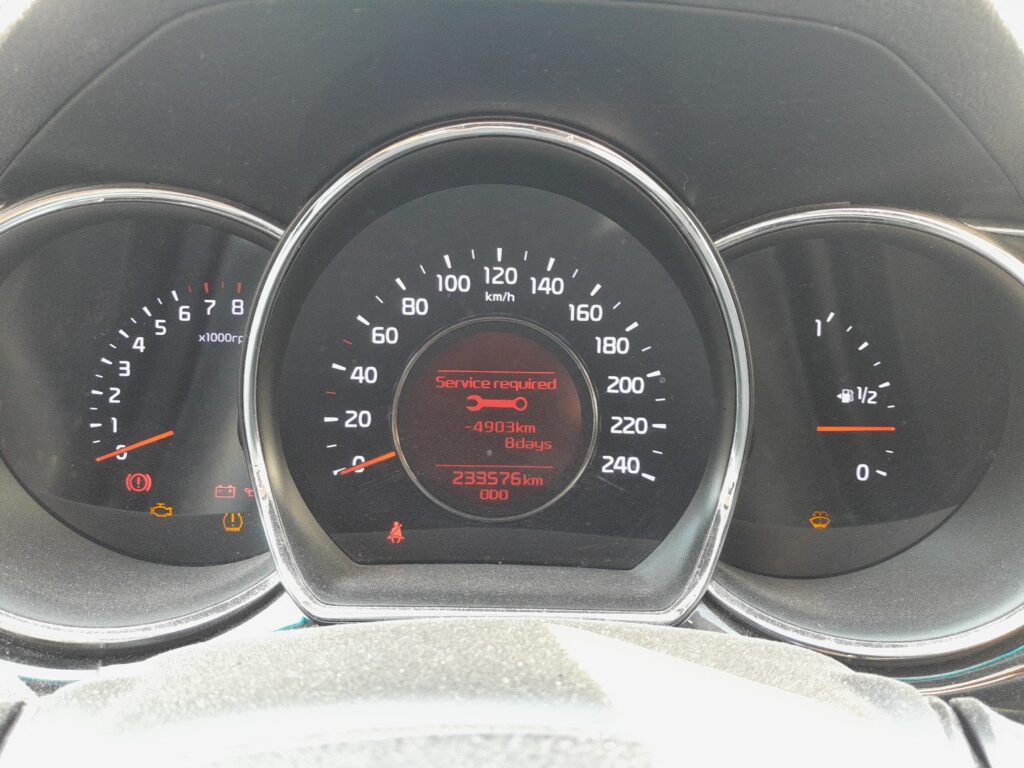
- If the spanner / wrench symbol with “Service required” or “SERVICE INTERVAL” appears on the cluster at startup.
- If you bought the Cee’d second-hand and the previous owner didn’t clear the indicator.
⚠️ On the JD Cee’d the service indicator tracks the oil-change distance counter. Other items (brake fluid every 2 years, coolant at the manufacturer’s interval, timing belt at 90,000 miles on the CRDi diesels) aren’t tracked by the cluster — those follow the printed service schedule.
Before You Start
- Park on a level surface with the engine off. Complete the actual oil and filter change before the reset.
- Identify the cluster control buttons:
- Button (1) — the menu-scroll button on the right-hand steering-wheel spoke. Used to cycle through cluster menu items.
- Button (2) — the OK / select button next to it. The long-press of this is what commits the reset.
- On lower trims without multifunction controls, the equivalent buttons are mounted on the cluster face. Same procedure, just different button positions.
Tools and Supplies
None for the reset itself. For the oil change: fresh Kia-spec oil — 5W-30 ACEA A5/B5 for the 1.4 / 1.6 GDi petrol engines, 5W-20 ACEA A5/B5 for the 1.0 T-GDi small turbo, 5W-30 ACEA C2/C3 for the 1.4 / 1.6 CRDi diesels (DPF-compatible); a new spin-on filter (different parts per engine family); a 17 mm sump-plug socket (petrol) or 21 mm (CRDi); torque about 35 Nm (petrol) or 50 Nm (CRDi).
Service Indicator Reset — Step-by-Step
- Turn the ignition ON with the engine off. Key position II on key-start trims; on Smart Key trims press START/STOP without a foot on the brake — pedal contact cranks the engine.
- Wait a moment for the cluster to fully wake.
- Press button (1) repeatedly to scroll through the cluster’s central menu.
- Continue until the display shows the remaining distance to next service (the line marked “Service interval” or “Service required”).
- Press and hold button (2) for at least 5 seconds.
- The display shows “RESET”.
- Release the button.
- Within 5 seconds, press and hold button (2) again, this time for 3 seconds.
- The service interval is now reset. The cluster shows the new full distance value.
- Switch the ignition off to exit.
Verify the Reset Worked
Switch the ignition off, wait 30 seconds, then cycle ignition back on. The spanner / service warning should be gone. Scroll back to the Service interval screen — the remaining-distance value should now show the full new interval (typically 10,000 miles / 15,000 km or 12 months for European-spec Cee’d JD petrol, or 12,500 miles / 20,000 km or 24 months for CRDi diesel variants; the Cee’d GT uses a slightly shorter interval).
Troubleshooting
- “RESET” doesn’t appear after the 5-second hold. The cluster must be showing the service-interval line (remaining distance to next service) when you start the hold — not the trip computer, MPG screen, or odometer. Cycle button (1) until you’re on the right screen first.
- The second hold doesn’t commit. The Kia procedure has a tight 5-second window between the first release and the second hold. If you wait too long, the cluster reverts and you need to restart from step 5. Practise the two-stage hold once on a non-due cluster (it won’t commit anything if there’s no service due) so you know the timing.
- Reset works but the warning comes back after a few miles. 12V battery condition. Like other Hyundai/Kia clusters of the era, the JD Cee’d cluster is sensitive to cold-crank voltage drop. Load-test and replace if older than 5 years.
- I drive a Cee’d GT (1.6 T-GDi performance variant) — same procedure? Yes. The Cee’d GT (and the ProCee’d GT, 2013–2017) shares the JD cluster and uses the same reset path. The GT’s shorter service interval (typically 9,000 miles for the higher-output engine) means the warning appears more frequently, but the reset is identical.
- ProCee’d 3-door — same procedure? Yes. The 3-door ProCee’d (JD body variant) shares the hatchback’s cluster and firmware.
- Cee’d Sportswagon estate — same procedure? Yes. The estate (JD wagon) shares the cluster. Procedure unchanged.
- 2015 facelift — does anything change? The 2015 facelift updated the front-end styling and centre-console infotainment but kept the cluster firmware identical. Procedure unchanged on both pre-facelift and facelift JD cars.
Frequently Asked Questions
What does the spanner symbol on the Kia Cee’d mean?
On the JD Cee’d the spanner / wrench icon is the oil-change reminder. It’s a mileage timer — when the distance since the last reset reaches the configured interval, the icon illuminates at startup. The icon does not indicate an engine fault — engine faults trigger the orange check-engine light (an engine-outline icon, different shape).
How often does the JD Cee’d service indicator come up?
Kia’s official European-market schedule for the JD Cee’d:
- 1.4 / 1.6 GDi petrol: 10,000 miles (15,000 km) or 12 months.
- 1.0 T-GDi (post-2015 facelift): 9,000 miles (15,000 km) or 12 months — slightly shorter for the small turbo engine.
- 1.4 / 1.6 CRDi diesel: 12,500 miles (20,000 km) or 24 months.
- 1.6 T-GDi GT: 9,000 miles (15,000 km) or 12 months — shorter for the higher-output performance engine.
UK severe-service / short-trip driving typically halves the petrol interval to 5,000 miles or 6 months.
Does the reset clear engine fault codes?
Is this the same as the oil or service light reset?
Yes. On the Ceed the service reminder is the scheduled-service (oil-change) countdown, so this one reset clears what owners also call the oil light or service light.
No. The reset zeros the service-distance counter only. Engine fault codes are stored in the engine ECU and need a scan tool. For DTC interpretation see autodtcs.com.
Is the procedure the same as on the Hyundai i30 Mk2?
Yes. The Hyundai i30 Mk2 (GD, 2012–2017) shares the JD Cee’d’s platform and uses an essentially identical cluster. Same menu structure, same button hold timing. The labels are virtually identical between brands.
What about the Mk3 Ceed (CD, 2018+)?
The third-generation Ceed (CD, 2018 onwards, the apostrophe was officially dropped) uses the newer Kia supervision cluster (or full 7-inch TFT on GT-Line / Premium trims) and a different menu hierarchy: User Settings → Service Interval → Reset (Hold OK). We’ll publish a dedicated CD Ceed guide.
And the Mk1 Cee’d (ED, 2007–2012)?
The Mk1 Cee’d ED uses an older cluster with a button-and-ignition-cycle sequence rather than the menu reset. Different procedure — see our forthcoming Mk1 guide.
Will resetting the indicator extend my Kia 7-year warranty?
No. Kia’s 7-year warranty depends on actual service work being performed with documentation in the service book, not on what the cluster reports. The cluster reset is purely a convenience reminder.
For DTC code interpretation on Kia / Hyundai vehicles see autodtcs.com.
Independent guide — not affiliated with Kia. Always follow your official service manual and safety precautions. Read our full disclaimer.