These instructions apply to the Hyundai Kona Mk1 (OS) 2017-2023.
For other models, please choose your vehicle here.
If the one-touch (auto up/down) function on your Hyundai Kona Mk1 (OS, 2017–2023) has stopped working — usually after a battery disconnection, a flat battery or replacing a window switch — the window simply needs re-initialising so it relearns its fully-closed position. It is a 20-second job per window with no tools. This guide shows how.
Why One-Touch Stops Working
Each window motor remembers its closed position so the auto and anti-trap (pinch protection) functions know when the glass is fully up. Cutting power clears that memory, so the window still moves while you hold the switch but won’t run on its own. Re-initialising restores it.
How to Re-initialise a Kona Window
Do this with the ignition on (engine can be off), one window at a time:
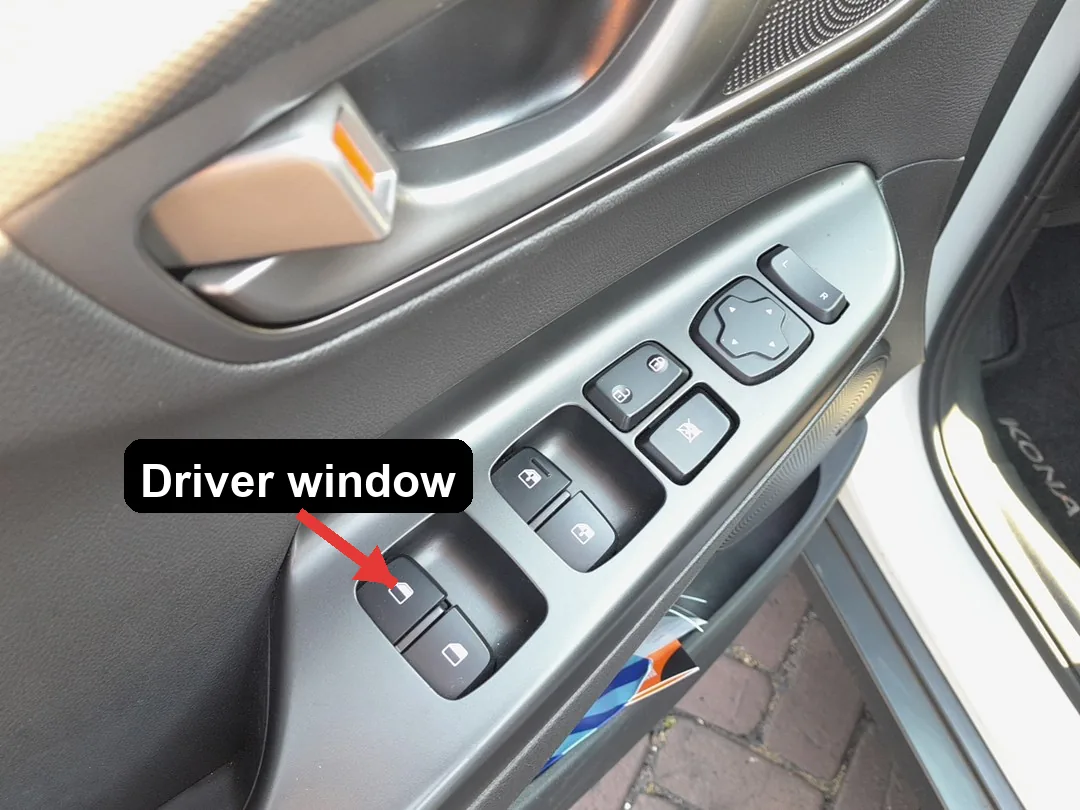
- Turn the ignition on.
- Pull and hold the window CLOSE switch until the window is fully closed.
- With the window fully closed, keep holding the switch up for about 1 more second.
- Release the switch.
- Test the one-touch function — a single tap up or down should now run the window automatically.
- Repeat for the passenger’s window using that door’s switch.
If It Still Won’t Auto-Close
- Repeat the procedure — the brief hold after the window reaches the top is what registers the limit.
- Make sure the glass reaches the very top — dirt or ice in the runner can stop it short and prevent the relearn.
- After a battery disconnection, also re-initialise the sunroof if fitted, which also loses its settings.
Frequently Asked Questions
Why did my Kona windows lose auto after I changed the battery?
Disconnecting power wipes the stored closed position, so auto and anti-trap switch off until you re-teach each window the routine above.
Do I have to do all the windows?
Only the ones that lost one-touch — but after a battery disconnection it is usually all of them. Each is initialised from its own switch.
The window goes up a bit then stops — why?
That is the anti-trap protection reacting because the motor hasn’t relearned its limit. Complete the hold-at-the-top routine and it clears.
Do I need any tools?
No — just the door switches and the ignition on. No diagnostic equipment is required.
To clear a service reminder after maintenance, see our Hyundai Kona service indicator reset guide. For warning lights, look up the code on autodtcs.com.
Independent guide — not affiliated with Hyundai. Always follow your official service manual and safety precautions. Read our full disclaimer.