These instructions apply to the Hyundai Kona Mk1 (OS) 2017-2023.
For other models, please choose your vehicle here.
On the Hyundai Kona (Mk1/OS, 2017–2023) the rear pad change hinges on one step most people miss: putting the electronic parking brake into service (maintenance) mode so the rear caliper motors retract before you compress a piston. Do it in the wrong order and the actuator, still holding the piston shut, gets damaged when you push back against it.
What service mode does and why you need it
EPB-equipped Kona OS variants have a small electric motor on each rear caliper that turns a spindle to clamp the disc for parking. With the car parked the spindle still loads the piston, so there’s no clearance to wind it back. Service mode commands both rear motors to wind fully open, retracts the pistons and suspends the auto-apply logic so the brake can’t re-clamp while the caliper is apart.
First, an honesty check on which Kona this applies to. Not every OS Kona has an EPB — lower trims use a conventional handbrake lever, and those need none of this; you just wind the piston back normally. This procedure is only for cars with the console EPB switch (typically higher trims and the Kona Electric). And there is no owner button sequence: Hyundai’s manual lists only normal apply and release, so service mode is entered through the OBD-II port with a scan tool that supports the Hyundai EPB function (iCarsoft CR Pro, Autel AP200, Topdon, XTool and similar).
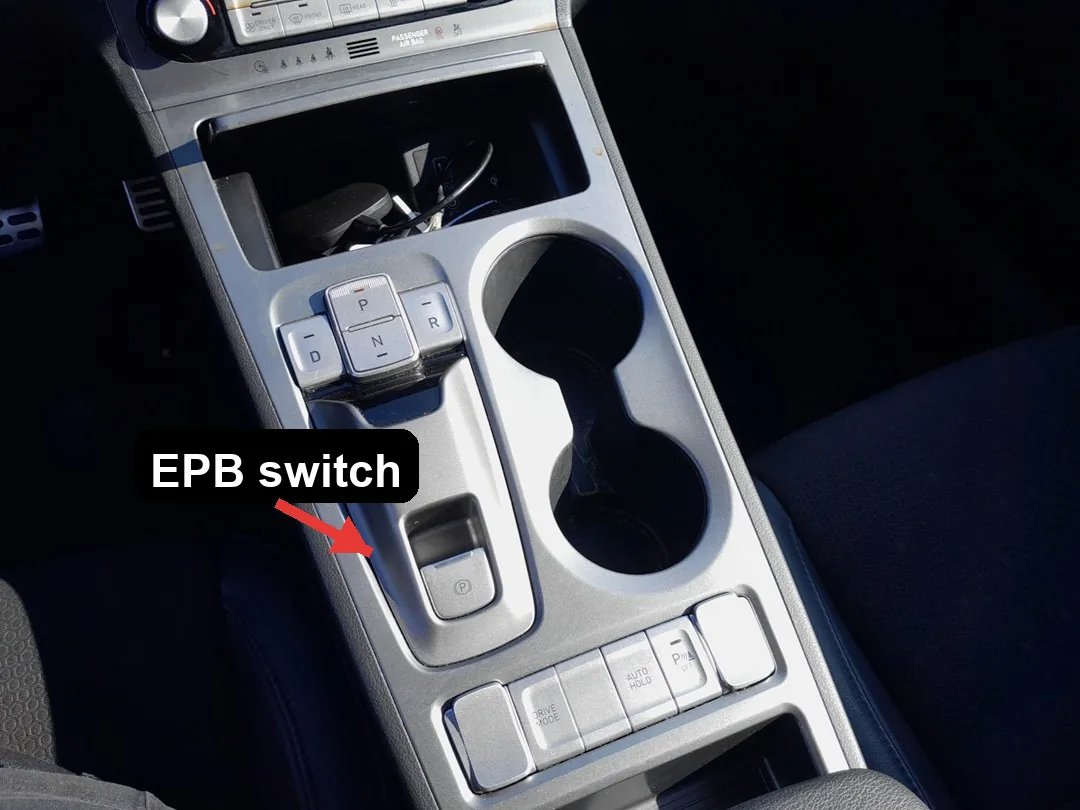
- Park on level ground, chock the front wheels and leave it in P (or, on the EV, in P with the car READY off).
- Turn the ignition / power ON without starting or going to READY drive, so the EPB module is awake.
- Connect the scan tool to the OBD-II port under the dash and open the EPB / chassis-brake menu.
- Select EPB – Service Mode – Enter. Both rear motors whir back and stop; the EPB warning lamp stays lit while the system is open.
- Remove the rear wheels, slide the caliper off and wind/press the pistons back. They retract with normal effort once the motors are clear.
Critical warning: never force the Kona’s rear pistons back by hand or with a clamp while the EPB is applied. The spindle has to be retracted electronically first. Forcing a loaded piston backwards strips the motor gears and can seize the caliper — an expensive failure on a small car, and entirely avoidable.
No scan tool? The documented fallback is to unbolt the EPB motor from the caliper (two small fasteners) and hand-wind the spindle clear with a hex key. Don’t just unplug the connector and lever the piston — that can latch a fault needing a dealer reset.
To exit: with the new pads in and the caliper torqued, select Service Mode – Exit on the tool so the motors re-clamp onto the thicker pads (some tools prompt an ignition cycle plus one EPB apply instead). Then bed in: pump the brake pedal firmly until it’s hard, cycle the EPB switch up and down to confirm grip and release, then drive gently and make several moderate 30–40 mph stops before braking hard.
Frequently Asked Questions
Does my Kona have an electronic parking brake? Only EPB-trim cars and the Kona Electric have the console switch; many petrol Kona OS use a lever handbrake. If yours has a lever, ignore service mode and wind the piston back as normal.
Is there a no-tool service mode on the Kona OS? Not as a factory owner sequence. Use an EPB-capable OBD tool, or remove the caliper motor to wind the spindle back manually.
Does the Kona Electric use the same procedure? Yes — the EV has the same MOC-style rear EPB. Power the car ON (not READY to drive), then enter service mode with the scan tool exactly as above.
The EPB light is on while I work — is that a fault? No, it stays lit during service mode on purpose. It should clear after you exit service mode and apply the brake once.
Do I need to bleed the brakes after a pad change? No. Pad-only work leaves the hydraulic system sealed, so just pump the pedal to take up clearance and bed the pads.
If a brake or EPB warning lamp stays on afterwards, decode the stored fault before driving — our sister site autodtcs.com explains what each OBD-II trouble code means.
Independent guide — not affiliated with Hyundai. Always follow your official service manual and safety precautions. Read our full disclaimer.