These instructions apply to the Hyundai i10 Mk3 (AC3) 2020-Present.
For other models, please choose your vehicle here.
When the spanner (service) symbol or a “Service Required” message appears in your Hyundai i10 Mk3 (AC3, 2020–present), the service interval has elapsed. It is a maintenance reminder counting down to the next scheduled service — not a fault with the engine. You clear it from the cluster’s User Settings menu in a few seconds — no tools or dealer visit needed, once the work itself has actually been done.
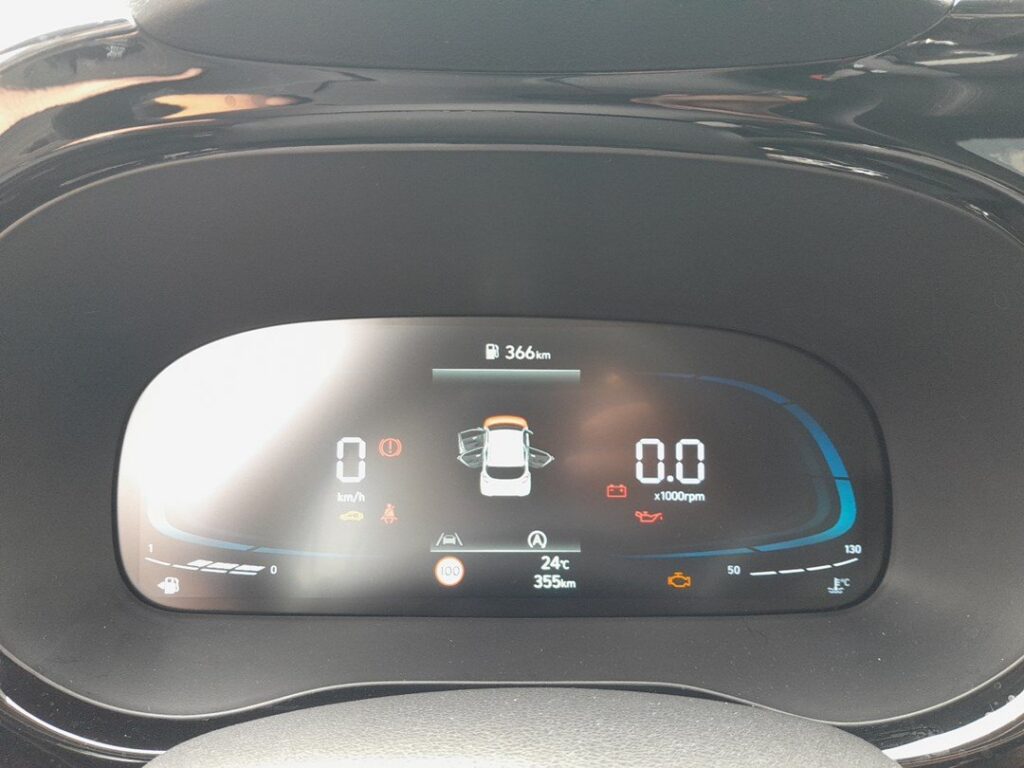
What the i10 Service Light Means
The Hyundai i10 tracks the gap to the next service and shows the spanner symbol, often with a “Service Required” message, when that interval is reached. The reminder is driven mainly by distance travelled and elapsed time since the last reset. Because it is a simple counter rather than a live measurement of oil condition, it keeps counting whether or not the oil has actually been changed — which is exactly why it has to be reset by hand after each service.
The spanner on its own is informational: the car still drives normally and nothing has failed. It is easy to tell it apart from a genuine warning. A service reminder is amber and clears once reset; a red warning light, or an amber light for a specific system (engine, oil pressure, brakes, airbags), points to a fault that a reset will not touch. If you are not sure which you are looking at, note the exact symbol before doing anything else.
Before You Start
Only reset once the service has actually been done; clearing it early just hides the reminder while the oil and filters keep ageing.
- Park on level ground and apply the handbrake.
- Turn the ignition on, but leave the engine off — you do not need it running to reach the menu.
- No tools are required; the whole job is done with the steering-wheel buttons.
- Give yourself a moment to read the cluster — the menu wording can vary slightly by trim and model year.
How to Reset the i10 Mk3 Service Indicator
- Turn the ignition on (engine doesn’t need to run).
- Press the ‘MENU’ button on the steering wheel repeatedly until ‘User Settings’ appears.
- Scroll to and select ‘Service Interval’ (it may sit under a Service/Convenience sub-menu).
- Select ‘Reset’ and confirm ‘Yes’.
- The interval resets to full and the spanner clears.
Some entry-trim i10s have a simpler trip cluster — if there’s no User Settings menu, hold the trip-reset button with the ignition on until the service display resets.
If the Reset Doesn’t Work
Nine times out of ten a reset that will not take is down to a small procedural slip rather than a fault. Work through these before assuming anything is wrong:
- Check the ignition position. The dash must be fully powered up (ignition on). If you started the engine, switch it off and try again with ignition on only.
- Make sure you selected the service item. It is easy to stop in the wrong sub-menu — step all the way through to Service Interval, then Reset, then Yes.
- Complete the confirmation. If you back out before choosing Yes, the counter is not saved and the reminder returns at the next start-up.
- Cycle the ignition and repeat. Turn everything off, wait a few seconds, switch the ignition back on and run through the steps once more.
If the Reminder Comes Back
- It reappears at start-up — the reset wasn’t confirmed; repeat and select Reset/Yes.
- A separate warning light is on — that’s a fault, not the service timer.
What to Expect After Resetting
Once the reset is accepted, the spanner disappears immediately and the counter jumps back to a full interval. Nothing else on the car changes — your trip meters, clock and radio presets are untouched, and no other system is affected. From that point the i10 simply starts counting down again towards the next service.
How Often to Reset It
Reset the indicator once after every scheduled service, immediately after the oil and filters have been changed. Servicing frequency depends on how the car is used and which engine it has, so follow the schedule in your owner’s handbook rather than a figure you half-remember. The dashboard reminder is a convenience prompt, not a substitute for that schedule — if in doubt about the correct interval for your car, check the handbook.
Frequently Asked Questions
Does the engine need to run to reset the i10 service light?
No — ignition on is enough. In fact it is best done with the engine off, so the dash is powered up without the car running.
Where is the Service Interval option?
In the cluster’s User Settings menu, reached with the steering-wheel MENU button. On some sub-menus it sits under a Service or Convenience heading.
Will resetting affect anything else?
No — it only restarts the service-interval countdown. Trip data, clock and audio settings are left alone.
The light stays on after resetting — why?
If it’s the spanner, the reset wasn’t confirmed. A different warning is a fault needing diagnosis.
My i10 has no User Settings menu — how do I reset it?
Entry trims use a simpler trip cluster. With the ignition on, hold the trip-reset button until the service display clears.
Is the spanner light serious — can I keep driving?
The service reminder itself is not a fault, so the car is fine to drive. Book the service soon, though, so the oil and filters are changed on schedule.
If a warning light appeared with the service message, look it up on autodtcs.com. After battery work, see our i10 Mk3 battery guide.
Independent guide — not affiliated with Hyundai. Always follow your official service manual and safety precautions. Read our full disclaimer.