These instructions apply to the Kia Ceed Mk3 (CD) 2018-Present.
For other models, please choose your vehicle here.
The Kia Ceed Mk3 (CD, 2018–present) uses a direct TPMS — a sensor in each wheel — that relearns automatically as you drive once the pressures are right. There’s no reset button or menu step. Here’s how to clear the light.
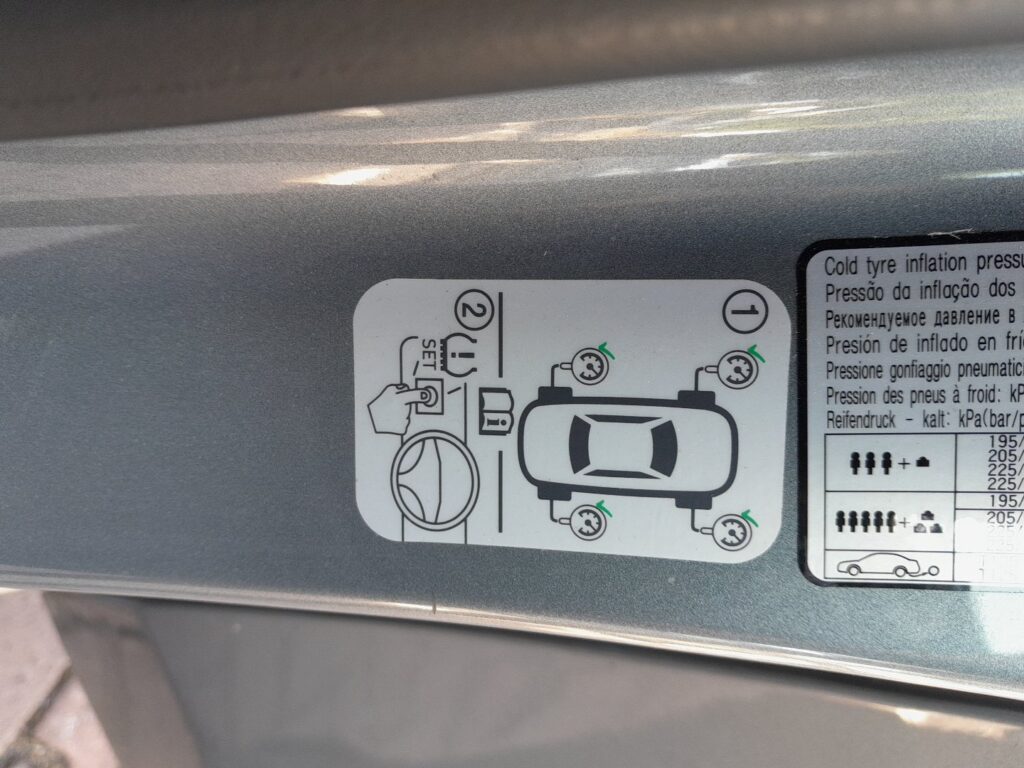
On the Ceed the amber tyre symbol is a warning, not a fault in itself. It usually appears because a tyre has genuinely dropped below its target — after cold weather, a slow leak, or a top-up that left one corner off — or simply because you’ve just adjusted the pressures. Because the system is direct, it can even tell you which wheel is low on the driver display. Correct the pressures and the warning clears itself; there is nothing to reset by hand.
How the Ceed’s TPMS Works
Each wheel reports its own pressure, so the dash can show exactly which corner is low. You correct the pressures and the warning clears itself after a short drive.
A direct sensor sits on each valve and radios its pressure to the car, which is why the Ceed can name the low corner rather than just warn you. The trade-off is that each sensor has a small internal battery that lasts several years, and a sensor must be matched to the car if a wheel is replaced — the only situations where a tyre-shop tool is involved. For a routine low-pressure warning, no tool is needed.
Getting Ready
- Check pressures cold — first thing, or a couple of hours after parking. Warm tyres read high and can leave a corner low once they cool.
- Use the figure on the driver’s door-pillar label for your tyre size and load.
- Set every tyre, and include a full-size or space-saver spare if yours carries its own sensor.
- Note which corner the display flags, so you know exactly where to add air.
- Have a decent gauge with you — forecourt airlines can be a few psi out.
How to Clear the Warning
- Set all four tyres to the correct pressure (cold) — the figure is on the driver’s door-pillar label.
- Don’t forget a space-saver spare if your car has a sensor in it.
- Drive normally for about 10–20 minutes. The system reads the corrected pressures and the warning goes out.
If the Light Stays On
- Re-check every tyre — one slightly low corner keeps the light on; the display should tell you which.
- Give it a few miles — the sensors report as you drive, so the light may take part of the trip to clear.
- Cold morning? Pressures fall about 1 psi per 5 °C drop, so a chilly night can re-trip the warning — top up and drive.
- Chased a slow puncture? If one corner keeps needing air, find the leak rather than reinflating each day.
- After a wheel change, a sensor that hasn’t been matched to the car can leave the warning on — that needs a tyre shop’s tool.
- A steady-flashing TPMS light (about a minute at start-up) means a sensor fault — a flat sensor battery, or a sensor not matched after a wheel change — and needs a tyre shop’s tool.
What Happens Next
With the pressures corrected, the warning clears on its own during the drive — you don’t need to stop or restart. If your Ceed shows individual pressures on the cluster, you’ll see each corner settle to its target as the tyres warm slightly. After that the light stays off until a tyre genuinely drops again, which is normal with seasonal temperature changes.
Frequently Asked Questions
How do I reset the tyre pressure light on a Kia Ceed?
Set the pressures correctly and drive 10–20 minutes — there’s no button; the direct system relearns on the move. Each sensor reports its own pressure, so once every corner is at the door-pillar figure the warning clears itself without any menu step.
Is there a reset button?
No — the Ceed’s direct TPMS clears itself once the pressures are right. Unlike some cars there is no “set” button or dashboard menu to confirm the pressures; you simply inflate to spec and drive, and the in-wheel sensors do the rest.
Why won’t the light go out after pumping the tyres up?
Either a tyre is still slightly off, or it needs a few miles to confirm. A persistent flash means a sensor fault. Re-check each corner cold against the door label — the display should show which one is low — then drive a little further to let the sensors report.
Do I need a tool?
Not for a normal reset — only if a sensor was replaced or swapped between wheels. In everyday use you just correct the pressures and drive. A tyre shop’s programming tool is needed to match a new sensor to the car or to relearn positions after wheels have been moved around.
The light flashes for a minute then stays solid — what does that mean?
A start-up flash of roughly a minute followed by a steady light points to a sensor problem rather than low pressure — commonly a sensor whose battery has run down after several years, or one that hasn’t been matched after a wheel change. Inflating the tyres won’t clear it; a tyre shop can test and re-register the sensors.
If a fault code is stored, look it up on autodtcs.com. To clear a service reminder, see our Ceed Mk3 service reset.
Independent guide — not affiliated with Kia. Always follow your official service manual and safety precautions. Read our full disclaimer.