These instructions apply to the Chrysler 300 Mk1 (LX) 2004-2011.
For other models, please choose your vehicle here.
If the radio screen in your first-generation Chrysler 300 (2004–2011) has frozen, gone black, or stopped responding to touch, the reboot you need depends on which head unit your car was built with. Only the optional MyGIG units (the RER and REN, fitted from the 2008 model year) have a colour touchscreen that can lock up. The base radios in early 300s — the cassette/CD REC and the RES — are knob-and-button units with a simple display and no touch layer, so there’s nothing to “freeze” in the way owners usually mean. This guide covers the touchscreen MyGIG reset that most 300 freezes call for.
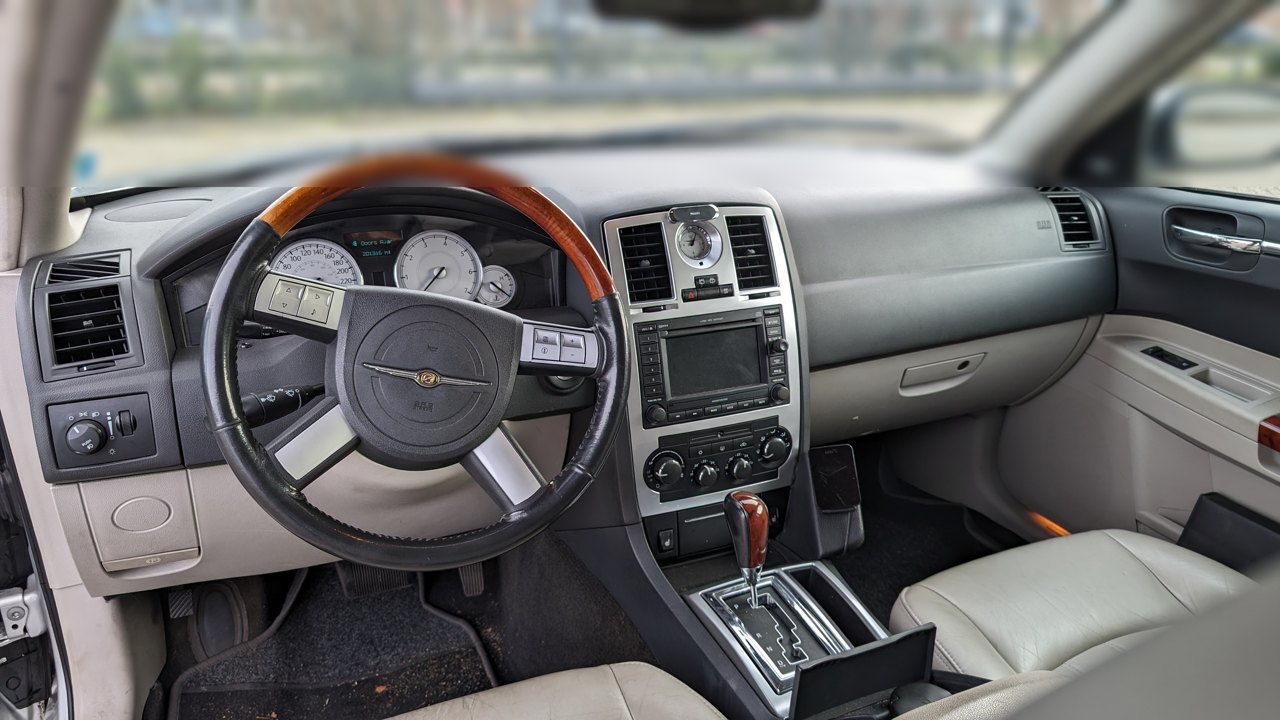
Which screen does your 300 have?
Run your finger across the centre-stack radio. If it’s a colour touchscreen that responds to taps, you have a MyGIG — the RER (navigation, hard-drive based) or the REN (no built-in nav). These were the freeze-prone units, largely because they store their software and media on an internal hard drive that degrades with age. If your radio is controlled only by buttons and a tuner knob with a small mono/two-line display (REC or RES), it isn’t a touchscreen and a soft-reset reboot doesn’t apply; a stuck display on those usually means a power/ground or unit fault rather than a software hang.
Soft reset: hold Volume + Tuner together (10–20 seconds)
This is the standard MyGIG reboot and clears most frozen screens:
- Turn the ignition to RUN (or ACC) so the radio is powered.
- Press and hold the Volume knob/button and the Tuner knob at the same time.
- Keep both held for 10–20 seconds. The screen will flash the Chrysler logo and go dark.
- Release when the display goes black, then wait. When the Chrysler logo returns and the menu loads, the unit has rebooted.
- Give it a minute to fully restart before pressing anything.
Is it safe? Yes — nothing is erased
The Volume + Tuner reboot just restarts the MyGIG software. It keeps your radio presets, paired Bluetooth phones, saved navigation destinations and audio settings — nothing personal is wiped. You can do it as often as the screen acts up. Only a deliberate full reset through the engineering menu, or a battery disconnect, changes settings, and even those mostly affect presets rather than your media.
If it stays frozen
- Full key-off soak: Switch the car off, open the driver’s door, and leave it for 30–60 seconds (or lock up and wait a few minutes) so the radio loses its keep-alive power, then restart. This clears locks a quick reboot can’t.
- Pull the radio fuse: Removing the radio fuse for a couple of minutes forces a cold boot. Check the owner’s manual for the correct fuse (the 300 has fuse boxes under the hood and in the cabin).
- Disconnect the battery: As a hard reset, disconnect the negative terminal for 5–10 minutes, then reconnect. This fully power-cycles the head unit’s hardware.
- Suspect the hard drive: If a MyGIG reboots in an endless loop, freezes on the logo, or only works with audio when certain features are disabled, the internal hard drive is the usual cause. A telltale test: if the radio plays AM/FM normally but navigation, media and saved music are dead or crashing, the drive is failing and the unit needs hard-drive service or replacement — a reset won’t cure that.
Engineering-menu reset (advanced)
MyGIG units have a hidden engineering/diagnostic mode used for deeper resets and touchscreen recalibration. On RER/REN units it’s reached by holding a combination of the Seek and Menu (or Radio/Media + Seek-Up + Nav) buttons until the warning screen appears, then accepting it. Only go in here if you know what you’re doing — it’s a service-level menu, not a normal settings page, and the wrong option can clear presets or trigger a recalibration. For most frozen screens the Volume + Tuner reboot is all you need.
Frequently Asked Questions
My 2005 300 radio has no touchscreen — how do I reset it? Base 300s use the REC or RES radio, which are button/knob units with no touch layer, so there’s no software screen to reboot. A stuck or blank display there is usually a power, ground or internal fault; try a fuse pull or battery disconnect, but it often points to a unit that needs servicing.
Which years of the 300 actually had the MyGIG touchscreen? The MyGIG (RER/REN) touchscreen became a factory option from the 2008 model year through the end of the first generation. Earlier 2004–2007 cars came with REC/RES non-touch radios from the factory.
Will the Volume + Tuner reset delete my presets or paired phone? No. That reboot preserves presets, Bluetooth pairings and saved destinations. Only an engineering-menu reset or a battery disconnect can clear presets.
My MyGIG keeps restarting over and over — is a reset enough? A reboot loop usually means the internal hard drive is failing. Reboots may give a temporary reprieve, but a looping or logo-stuck MyGIG generally needs hard-drive repair or a replacement unit.
Can I do these resets while driving? Park first. The fuse and battery steps obviously require the car stopped, and even the button reboot is best done parked so you’re not distracted while the screen cycles.
If a dashboard warning light or trouble code turned up around the same time as the radio glitch, you can decode it at autodtcs.com to see whether it’s connected or a separate fault.
Independent guide — not affiliated with Chrysler. Always follow your official service manual and safety precautions. Read our full disclaimer.