These instructions apply to the Cupra Formentor Mk1 (KM) 2020-present.
For other models, please choose your vehicle here.
The Cupra Formentor (2020–present) was the first model built as a Cupra in its own right rather than a hot-badged SEAT, and it rides on Volkswagen Group’s MQB Evo platform — so its key is the familiar VW-family angular smart fob, finished in Cupra’s dark satin plastic with the tribal logo on the back. There is essentially one fob design across the range: a proximity smart key with a hidden emergency blade. Higher trims add KESSY keyless entry and push-button start, but the physical key — and the coin cell inside it — is the same whether or not your car has keyless. When the range shrinks or the dash warns of a weak key, the fix is almost always a fresh battery, and it is a five-minute job on the driveway.
How to Tell the Fob Battery Is Dying
- Shrinking range. You have to be right next to the Formentor — or hold the fob against the door handle — before it will lock or unlock. That drop-off is the classic first sign.
- A key-battery warning in the cluster. The Formentor’s driver display shows a low-key-battery message when the cell voltage sags. One owner measured a nominally 3-volt cell that had fallen to around 2.96 V after less than a year — enough to trigger the warning.
- KESSY gets fussy. On keyless cars, the car may stop detecting the key in your pocket, so the handle-touch unlock and push-button start become intermittent before failing altogether.
- Cold-weather dropouts. A cell that is already weak struggles further in the cold, so the fob may work in the afternoon and refuse first thing in the morning.
A CR2032 in a Formentor key typically lasts two to four years. If yours is around that age and showing any of the above, fit a fresh cell before you start suspecting the car’s receiver or immobiliser.
The Battery You Need
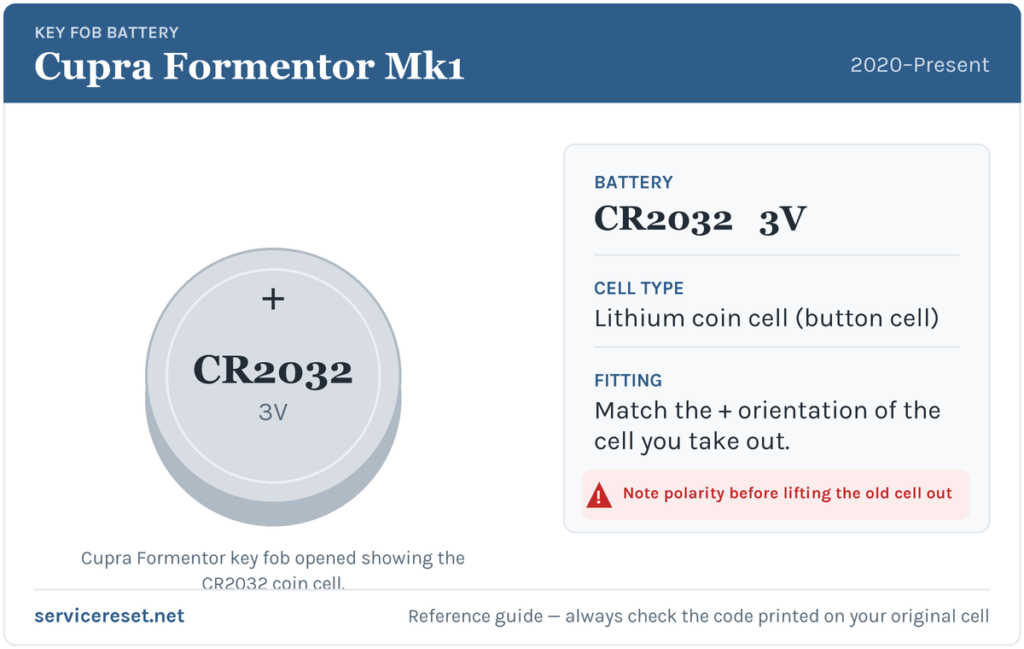
The Formentor smart key takes a single CR2032 — a 20 mm, 3-volt lithium coin cell, the most common fob battery there is and stocked in any supermarket or hardware shop. The owner’s manual doesn’t print the CR code, but it does describe a 20 mm button cell, which is exactly a CR2032, and owner replacements confirm it. Buy a good-quality branded cell — cheap ones sag under the brief current the transmitter draws and can give poor range even when “new”.
How to Change the Cupra Formentor Key Battery
- Release the emergency blade. Slide the small catch on the top of the fob and pull the metal key blade straight out. You’ll use it as the opening tool, and it keeps the case from flexing while you work.
- Find the prise slot on the logo side. With the blade removed, look at the edge of the case on the side that carries the Cupra logo — not the button side. There is a small slot where the two halves meet.
- Lever the cover off. Insert the tip of the emergency blade (or a small flat screwdriver) into that slot and gently lever the logo-side cover away. Cupra’s own advice is to pop it from the seam rather than digging at it with a fingernail, which risks snapping the retaining tabs.
- Note the orientation, then lift the cell out. Before you touch it, look at which face of the coin cell is showing. Ease the old CR2032 out from under its retaining clip.
- Fit the new cell the same way round. Drop the fresh CR2032 in matching the exact orientation of the one you removed, and press it fully under the clip so it sits flat against both contacts.
- Close it up. Line up the cover and squeeze the two halves together until they click all the way round, then slide the metal blade back in until it latches.
⚠️ Get the polarity right. The manual specifically warns to check the battery’s polarity when fitting it and to use only a cell of the same size, voltage and type — a wrong-way-round or wrong-spec cell can damage the key or leave it dead. Because the manual doesn’t print which face goes up, the safe rule is simple: copy the orientation of the cell you took out, and don’t force the cover shut if it won’t seat — that usually means the coin cell is proud or upside down.
Make Sure It Took
Stand back a few metres and lock, then unlock, the Formentor with the buttons — full range should return at once. On a KESSY car, walk up and try the handle-touch unlock and push-button start to confirm the proximity function is back. The low-key-battery message in the cluster usually clears the next time the car reads a healthy fob, occasionally after one drive rather than instantly.
If a Fresh Cell Doesn’t Fix It
- Re-check the seating and polarity. The single most common mistake is a cell that’s proud of its clip or fitted the wrong way up. It must sit flat against clean contacts.
- Wipe the terminals. A smear of finger grease or light corrosion on the contacts is enough to cause dropouts — clean them with a dry cloth.
- Re-synchronise the key. If the buttons were pressed repeatedly out of range while the battery was flat, the rolling code can drift out of step. The manual’s fix: with the blade removed, press a button on the key while it’s at the car, then open the driver’s door with the mechanical blade within about one minute — that re-pairs the remote.
- Still nothing? If the fob is completely unresponsive with a known-good cell, the transmitter itself may have failed — rare next to a simple flat or misfitted battery, but it does happen.
New Key or Spare — Why It’s a Dealer Job
Changing the coin cell keeps the fob’s existing coding, so nothing needs reprogramming after a battery swap. A new key is a different story: like the rest of the VW Group, the Formentor pairs each key to the car’s immobiliser electronically, and a blank smart fob has to be ordered against the VIN and coded in with diagnostic equipment. That makes adding a spare or replacing a lost key a job for a Cupra dealer or an auto-locksmith — so keep the battery in your spare key fresh too, and you’re never down to one working fob.
Frequently Asked Questions
What battery does a Cupra Formentor key fob take?
A single CR2032 3-volt lithium coin cell — the standard 20 mm button cell used across the VW Group smart keys.
How do I open the Formentor key without breaking it?
Pull out the emergency metal blade first, then lever the cover off from the slot on the Cupra-logo edge using the blade tip. Working from the seam, rather than prising at the buttons with a nail, avoids snapping the plastic tabs.
Which way up does the battery go?
The manual says only to check the polarity is correct — it doesn’t print which face is up. The reliable approach is to note the orientation of the old cell before you remove it and fit the new one exactly the same way.
Do I need to reprogram the key after changing the battery?
No. A battery swap leaves the coding untouched, so the fob works straight away. If the buttons had been pressed a lot while the cell was flat, you may just need to re-synchronise it by pressing a button at the car and opening a door with the blade within a minute.
How long should a Cupra Formentor key battery last?
Usually two to four years. Constant use of the remote — or leaving a KESSY key sitting close to the car so it keeps waking to talk to it — shortens that.
Can I still start the Formentor if the fob battery is dead?
Yes. Use the emergency blade hidden in the fob to unlock the driver’s door, and the keyless system is designed to still start the car with a flat key using the backup method in the manual — so a dead cell won’t strand you.
If the remote died suddenly right after the 12 V battery was disconnected — rather than fading gradually — the cause is more likely lost pairing than the coin cell, and the car may also log a related fault. You can look up what any stored code means on autodtcs.com.
Independent guide — not affiliated with Cupra. Always follow your official service manual and safety precautions. Read our full disclaimer.