These instructions apply to the Honda HR-V Mk2 (RU) 2015-2022.
For other models, please choose your vehicle here.
The Honda HR-V Mk2 (RU, 2015–2022) — Honda’s compact crossover, built in Celaya (Mexico) and Suzhou (China) for European markets, sold across pre-facelift (2015–2018) and facelift (2018–2022) variants in 1.5 i-VTEC petrol (L15Z6/L15Z7, 88 kW; later L15B4/L15BY, 96 kW), 1.6 i-DTEC diesel (N16A3, 88 kW, 2016–2018 only), 1.5 i-VTEC Turbo (L15BY, 134 kW, RS / Sport, 2019–2022), and 1.8 i-VTEC (R18Z series, 105 kW, non-EU markets) — uses Honda’s i-MID (Intelligent Multi-Information Display) menu-driven service reset. The procedure is the same Maintenance Minder system used across the wider Honda lineup of the era — Jazz Mk3, CR-V Mk4, Civic Mk9 — done either by holding a single SEL/RESET (trip-reset) button until the display flashes — the simplest method, used on many cars, especially base trims — or by navigating the i-MID menu with the steering-wheel display controls on higher trims. No diagnostic tool needed for the owner-accessible method.
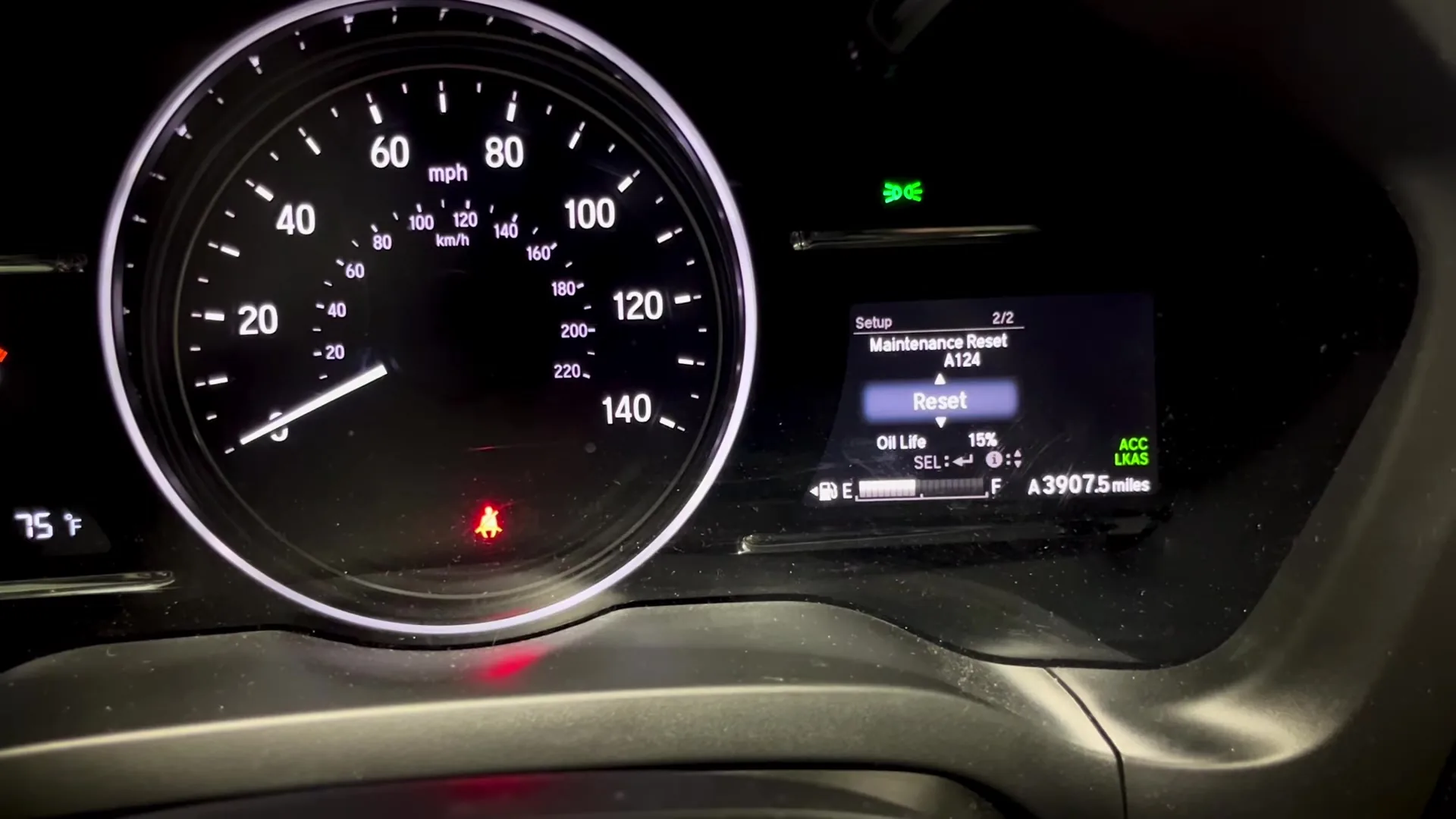
When to Reset the Service Indicator
- After completing an oil and filter change.
- After replacing items the Maintenance Minder tracks (transmission fluid on CVT cars, brake fluid, coolant — all separate sub-codes).
- If the spanner / wrench icon plus a service code (A, B, 1, 2, 3, 4, 5, 6) appears at startup.
⚠️ Honda’s Maintenance Minder uses a two-letter / number system: the main letter (A or B) tracks oil + filter (B adds an inspection), and the number(s) track additional items. Only reset the items you’ve actually serviced — clearing everything when you’ve only changed oil means the next reminder schedule will be wrong.
Before You Begin
- Park on a level surface with the engine off, then turn the ignition on without starting (engine off, instruments live).
- Complete the actual service work before the reset.
- Locate the steering-wheel INFO button — top-left of the right-hand steering wheel cluster (or upper-left depending on RHD/LHD).
- Locate the SEL/RESET button — adjacent to INFO, marked with the select / reset legend. On some RHD UK cars this is on the left-hand cluster.
- Make a note of which Maintenance Minder codes were displayed before you started — that determines which sub-items to reset.
What You’ll Need
None for the reset itself. For an oil-only Maintenance Minder “A” / “A1” service: fresh Honda-spec oil — 0W-20 ACEA C5 / Honda Type 2.0 0W-20 for the 1.5 i-VTEC petrol engines, 0W-30 ACEA C3 / DPF-compatible for the 1.6 i-DTEC diesel; a new spin-on filter (Honda 15400-PLM-A02 or equivalent for the L15 series); a 17 mm sump-plug socket; torque 40 Nm. The 1.5 i-VTEC L15Z petrol takes 3.5 L with filter, the 1.6 i-DTEC takes 5.7 L with filter.
Method 1 — SEL/RESET Button (Simplest: Hold Until It Flashes)
Many HR-Vs — especially base trims and US-market cars — reset the oil life with a single SEL/RESET (trip-reset) button and no menu navigation. It is the same button that cycles the trip meter; on most cars it sits low on the steering column / instrument panel, so you reach up under the dash to it.

- Turn the ignition ON (engine off or running — either works) and let the cluster wake.
- Make sure the display is showing the oil-life index (tap the SEL/RESET button to change screens if it isn’t).
- Press and hold the SEL/RESET button for about 10–15 seconds until the display starts to flash.
- Let go of the button, then press and hold it again — the oil life resets to 100% and the wrench / maintenance light clears.
If it doesn’t reset, release and hold once more — it sometimes needs a second attempt.
Method 2 — Steering-Wheel i-MID Menu (Higher Trims)
Trims with the full i-MID menu reset through the steering-wheel display controls. On some HR-Vs these are separate INFO and SEL/RESET buttons; on others the control is a single toggle on the lower-right spoke that you nudge up/down and pull toward you to select — the menu path is the same either way.

- Turn the ignition ON (engine off, instruments live).
- Press the INFO button repeatedly to scroll the i-MID screens until the main menu appears.
- Press the SEL/RESET button to enter the menu.
- Scroll with INFO to the Vehicle Setting (or “Vehicle settings”) menu item.
- Press SEL/RESET to enter Vehicle Setting.
- Scroll with INFO to Maintenance Info (also labelled “Maintenance info” on some markets).
- Press SEL/RESET to enter Maintenance Info.
- Scroll with INFO to the specific service item to reset — typically Engine oil & filter, Inspection, Transmission fluid, etc. Each Maintenance Minder code corresponds to one or more sub-items.
- Press and hold SEL/RESET for about 5 seconds to reset the selected item.
- The display will read “Reset completed” (or “Reset complete” on some markets) when the operation succeeds.
- Repeat steps 8–10 for any other Maintenance Minder sub-items that were displayed before you started.
- Switch the ignition off. Reset complete.
Method 3 — Honda HDS Diagnostic Tool
For a Honda dealer or workshop with the Honda Diagnostic System (HDS) tool — useful when you want to reset specific items after a different sequence of work, or when the i-MID menu is stuck.
- Connect the HDS tool to the OBD-II port (below the steering column, driver’s side).
- Power-on the vehicle (ignition ON, engine off).
- In HDS, select Gauge from the system menu.
- Select ADJUSTMENT.
- Select Service Reminder.
- Select RESET.
- Select the specific service schedule to be reset — same options as the i-MID method (oil & filter, inspection, transmission fluid, etc.).
- Confirm. Disconnect HDS and cycle the ignition.
Verify the Reset Worked
Switch the ignition off, wait 30 seconds, then cycle back on. The Maintenance Minder code(s) you reset should no longer be displayed at startup. Open Vehicle Setting → Maintenance Info on the i-MID and the items you reset should now show a fresh full interval. Typical RU HR-V intervals after a Maintenance Minder “A” reset:
- 1.5 i-VTEC petrol: 12,500 miles (20,000 km) or 12 months, whichever comes first.
- 1.6 i-DTEC diesel: 12,500 miles (20,000 km) or 24 months, whichever comes first.
- 1.5 i-VTEC Turbo (RS / Sport, 2019+): 9,000 miles (15,000 km) or 12 months — Honda shortens the interval for the turbocharged engine.
UK severe-service / short-trip driving requires halving the interval manually. Honda’s UK schedule treats most urban driving as severe.
If Something Goes Wrong
- “Reset completed” doesn’t appear after holding SEL/RESET. Hold for the full 5 seconds — releasing too early aborts the operation. Press-and-hold means continuous contact; pulses don’t count.
- The Maintenance Minder code returns at the next startup. A different sub-item is still due. Open Maintenance Info and reset every sub-item that the original code indicated. Honda’s owner-manual table maps “B1” to oil + filter + inspection + brake/clutch fluid, for example — three separate resets in the menu.
- The i-MID has no Vehicle Setting menu. The menu is hidden while the vehicle is moving. Ensure the vehicle is stationary with the parking brake / electric parking brake applied and the gear selector in P.
- Facelift 2018+ HR-V — anything different? The 2018 facelift updated the front end and added new infotainment options but kept the i-MID Maintenance Minder system unchanged. Procedure unchanged.
- 1.5 i-VTEC Turbo RS / Sport — extra steps? The Turbo’s tighter oil interval reflects in the Maintenance Minder schedule but the reset path is identical. The transmission-fluid Maintenance Minder code “3” appears more often on the CVT-equipped Turbo because Honda flagged early CVTs for accelerated fluid changes.
- Reset works but warning returns after a few miles. 12V battery condition. Load-test; replace if older than 5 years.
Frequently Asked Questions
What do the Maintenance Minder letters and numbers mean on the HR-V?
Honda’s Maintenance Minder system uses a letter (A or B) for the main service and digits (1, 2, 3, 4, 5, 6) for sub-items: A = oil + filter; B = oil + filter + inspection items; 1 = tyre rotation; 2 = air filter, cabin filter, drivebelt; 3 = transmission fluid; 4 = spark plugs, valve clearance; 5 = engine coolant; 6 = brake fluid. A display of “B14” means oil + filter + inspection + tyre rotation + spark plugs at the same service.
Do I need a diagnostic tool?
No. The owner-accessible i-MID method (Method 1 above) handles every Maintenance Minder reset. Honda HDS (Method 2) is the workshop alternative — useful only if you don’t have access to the steering-wheel controls or if the i-MID menu is locked out for some reason.
Does the reset clear engine fault codes?
No. The reset zeros the Maintenance Minder counters only. Engine fault codes need a scan tool. For DTC interpretation see autodtcs.com.
Is the procedure the same as the Jazz Mk3 and CR-V Mk4?
Yes. The HR-V RU, Honda Jazz Mk3 (2015–2020), CR-V Mk4 (2012–2018), and Civic Mk9 (2012–2017) all use the same i-MID Maintenance Minder system with the same INFO + SEL/RESET button sequence. Menu paths and labels are essentially identical.
What about the HR-V Mk3 (RV, 2021+)?
The Mk3 HR-V (RV, 2021-onwards) switched to Honda’s newer Connect infotainment system with a fully integrated touchscreen, and the reset path moved into the touchscreen menus rather than the cluster i-MID. We’ll publish a dedicated RV guide.
For DTC code interpretation on Honda vehicles see autodtcs.com.
Independent guide — not affiliated with Honda. Always follow your official service manual and safety precautions. Read our full disclaimer.