These instructions apply to the Hyundai i20 Mk2 (GB) 2014-2020.
For other models, please choose your vehicle here.
After the battery is disconnected or a fuse is pulled, the one-touch (auto-up) function on the Hyundai i20 Mk2 (GB, 2014–2020) driver’s window stops working and the anti-pinch protection is disabled. Re-initialising the window teaches the control its fully-closed position again — a quick job with just the window switch.
When you need this
Re-initialise whenever the auto-up/auto-down stops working — typically after the 12 V battery is disconnected or goes flat, or the power-window fuse is removed. This procedure is the same on European and other-market (e.g. Indian Elite i20) cars.
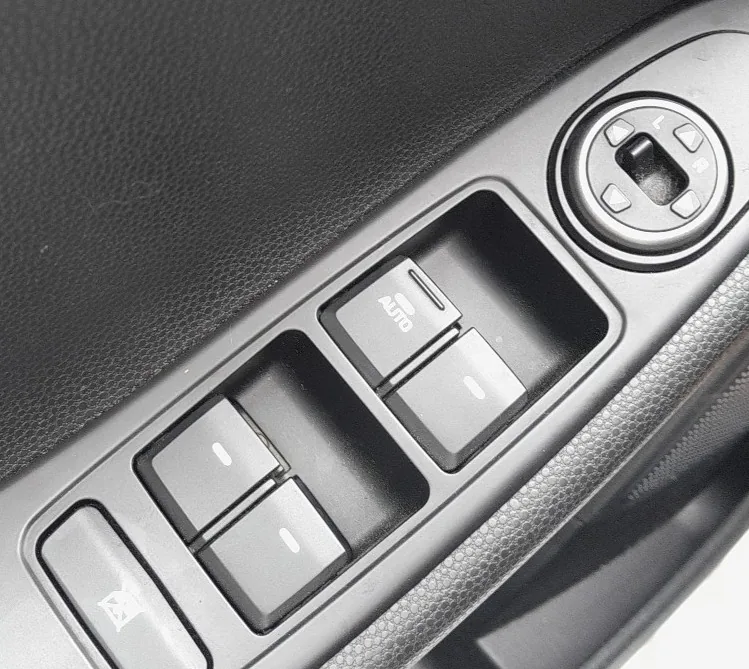
- Turn the ignition to ON (you do not need to start the engine).
- Close the driver’s window fully, then keep pulling the window switch up for at least one second after the glass is closed.
- Release the switch. The closed position is now learned.
- Test it: pull the switch fully up to the second detent and release — the glass should close on its own; press fully down and release — it should open on its own.
- Check the anti-pinch by letting the window rise against light hand pressure; it should stop and drop back about 2.5 cm.
Frequently asked questions
Why does my i20 window only go up while I hold the switch?
The auto-up feature is disabled until the switch relearns the closed position. This is normal after a battery disconnect — follow the steps above to restore it.
The window goes up on its own but won’t stop for my hand — is that safe?
No. Do not rely on auto-up until initialisation is complete, because the anti-pinch only works once the closed position is learned. Re-run the procedure and test gently.
Do only the front windows have this?
The driver’s window has the full auto-up/down with anti-pinch; the front passenger window has auto operation on higher trims. Rear windows are manual-hold and need no initialisation.
If a window fault persists after initialising — or a related warning appears — check any stored body-control code on autodtcs.com.
Independent guide — not affiliated with Hyundai. Always follow your official service manual and safety precautions. Read our full disclaimer.