Service ResetService Reset
  • Home
  • Guides
  • Tools
    • Tire Pressure Calculator
    • Check DTC Codes
    • Request a Guide
    • Wheel Offset Calculator
    • Tire Size Comparison
    • Tire Pressure Converter
    • Torque Converter
    • Coolant & Antifreeze Mix
  • Blog
  • About
  • FAQ
  • Contact Us
  • Home
  • Guides
  • Tools
    • Tire Pressure Calculator
    • Check DTC Codes
    • Request a Guide
    • Wheel Offset Calculator
    • Tire Size Comparison
    • Tire Pressure Converter
    • Torque Converter
    • Coolant & Antifreeze Mix
  • Blog
  • About
  • FAQ
  • Contact Us
Home/Hyundai/i40/Mk1 (VF) 2011-2019/Find the OBD2 Diagnostic Port

Find the OBD2 Diagnostic Port

Reviewed by the Service Reset editor · Updated September 4, 2026 · How we verify

These instructions apply to the Hyundai i40 Mk1 (VF) 2011-2019.
For other models, please choose your vehicle here.

Every Hyundai i40 (VF, 2011–2019) has a standard OBD-II diagnostic port — the 16-pin socket a scan tool or Bluetooth adapter plugs into to read fault codes and live data. On the i40 it sits low under the driver’s side of the dashboard.
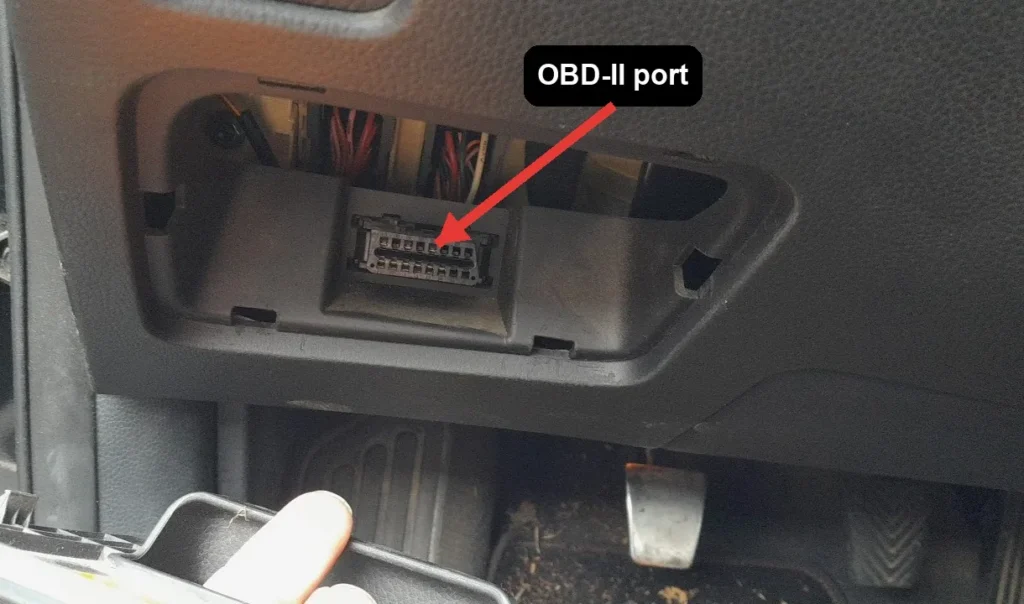
OBD-II diagnostic port under the dashboard of the Hyundai i40
The 16-pin OBD-II port sits under the driver’s-side dash, near the bonnet release.

Where the i40 OBD-II Port Is

  1. Sit in the driver’s seat and look under the dashboard, to the left of the steering column, above the pedals.
  2. The 16-pin connector is near the bonnet-release lever, often behind a small trim cover or panel.
  3. If covered, gently pull the trim flap open by hand — no tools are needed.
  4. Plug your adapter or scanner in; the connector is keyed and only fits one way.

Before You Plug In

  • Turn the ignition to ON (engine off) for most code reading, unless your tool asks for the engine running.
  • Never connect or disconnect the tool while the engine is cranking.
  • A generic OBD-II adapter with an app such as Torque or Car Scanner reads engine codes on the i40.

Frequently Asked Questions

Where is the OBD port on a Hyundai i40?

Under the dashboard on the driver’s side, to the left of the steering column and above the pedals, close to the bonnet-release lever. It faces downward and may sit behind a small trim cover.

Do I need to remove any trim?

No. At most there is a small flap you can open by hand. The socket is designed to be reached without tools.

Will any OBD-II adapter work on the i40?

Yes. The port and its core pins are standardised, so a generic Bluetooth or Wi-Fi adapter paired with a phone app will read engine codes and live data.

Once you have read a fault code from the port, our sister site autodtcs.com looks up OBD-II diagnostic codes and explains the likely causes.

Independent guide — not affiliated with Hyundai. Always follow your official service manual and safety precautions. Read our full disclaimer.

Related Articles
  • Release the Electric Parking Brake (EPB)
  • Replace the Wiper Blades
  • Find the Fuse Boxes
  • Jump-Start a Flat Battery
  • Replace the Engine Air Filter
  • Replace the Cabin (Pollen) Filter

On This Page: [hide]

Where the i40 OBD-II Port Is

Before You Plug In

Frequently Asked Questions

Where is the OBD port on a Hyundai i40?

Do I need to remove any trim?

Will any OBD-II adapter work on the i40?

Service Reset

Independent step-by-step car reset & maintenance guides – not affiliated with any manufacturer. All trademarks belong to their respective owners.

© 2026 ServiceReset.net. All rights reserved.

POPULAR BRANDS
Toyota · Volkswagen · BMW · Ford · Audi · Mercedes · Nissan · Kia
EXPLORE
  • Guides
  • Blog
  • About
  • Contact
TOOLS
  • Dashboard Warning Lights
  • Tire Pressure Calculator
  • Tools
  • FAQ
  • Request a Guide
LEGAL
  • Privacy Policy
  • Terms of Use
  • Disclaimer
  • YouTube
  • Pinterest