These instructions apply to the Hyundai ix35 Mk1 (LM) 2010-2015.
For other models, please choose your vehicle here.
Disconnecting the 12V battery cuts all power to the car so you can safely carry out accessory work, put the vehicle into storage, or clear a stubborn electrical fault. On the ix35 the battery sits in the engine compartment, and the job takes only a few minutes if you follow the correct order.
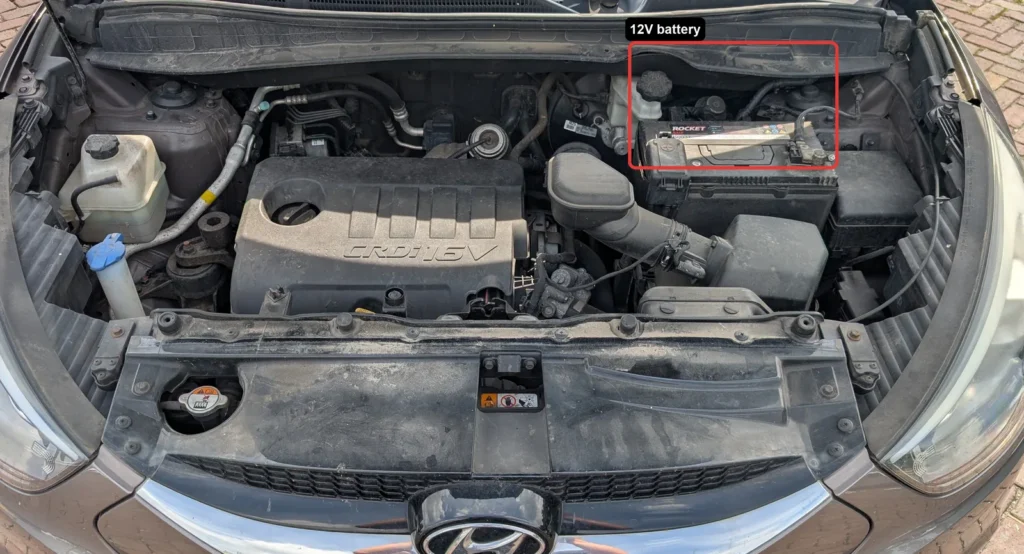
- Turn the ignition to the OFF position and remove the key, then switch off all electrical consumers (lights, heating, radio and any chargers).
- Check whether the audio system has a security code and note it down, along with your radio preset stations and other settings, as these are lost when the battery is disconnected.
- Disconnect the NEGATIVE (minus) terminal first, then move the clamp aside so it cannot touch the post.
- Disconnect the POSITIVE (plus) terminal.
- If you will work near pyrotechnic components such as airbags or seat-belt pretensioners, wait at least 3 minutes after disconnecting before you start work.
- To reconnect, reverse the order: fit the POSITIVE terminal first, then the NEGATIVE terminal last, and tighten both clamps securely.
Good to know
Wear eye protection and keep sparks and open flames well away from the battery, as the gases it gives off are explosive. On this generation of ix35, reconnecting the same battery needs no dealer coding, but you will need the radio security code (if one is set) to re-enable the audio system, so find it before you disconnect.
Once power is restored, reset the date and time and re-enter your radio presets and user preferences, entering the security code if prompted. The trip computer, the electronic climate control, the electric windows and, if fitted, the sunroof may all need re-initialising. The windows and sunroof are separate quick procedures.
FAQ
Which terminal do I disconnect first?
Always disconnect the negative (minus) terminal first and reconnect it last. When refitting, connect the positive terminal first, then the negative. This order reduces the risk of a short circuit while you work.
Where is the battery on the ix35?
The 12V battery is located in the engine compartment, with both terminals accessible once the bonnet is open.
What settings do I lose when I disconnect the battery?
You will lose the clock, your radio presets and audio security code, and the trip computer memory. The electronic climate control and the electric windows and sunroof may also need re-initialising afterwards.
Do I need to wait after disconnecting?
Only if you will be working near airbags or seat-belt pretensioners. In that case, wait at least 3 minutes after disconnecting the battery before starting work.
Independent guide — not affiliated with Hyundai. Always follow your official service manual and safety precautions. Read our full disclaimer.