These instructions apply to the Hyundai ix35 Mk1 (LM) 2010-2015.
For other models, please choose your vehicle here.
When the remote’s range drops off or the lock and unlock buttons stop responding, the coin cell inside the key is usually flat. Both ix35 key styles use a CR2032 coin cell, and swapping it takes a couple of minutes with a small screwdriver. Changing the battery does not unpair the remote, so it keeps working afterwards.
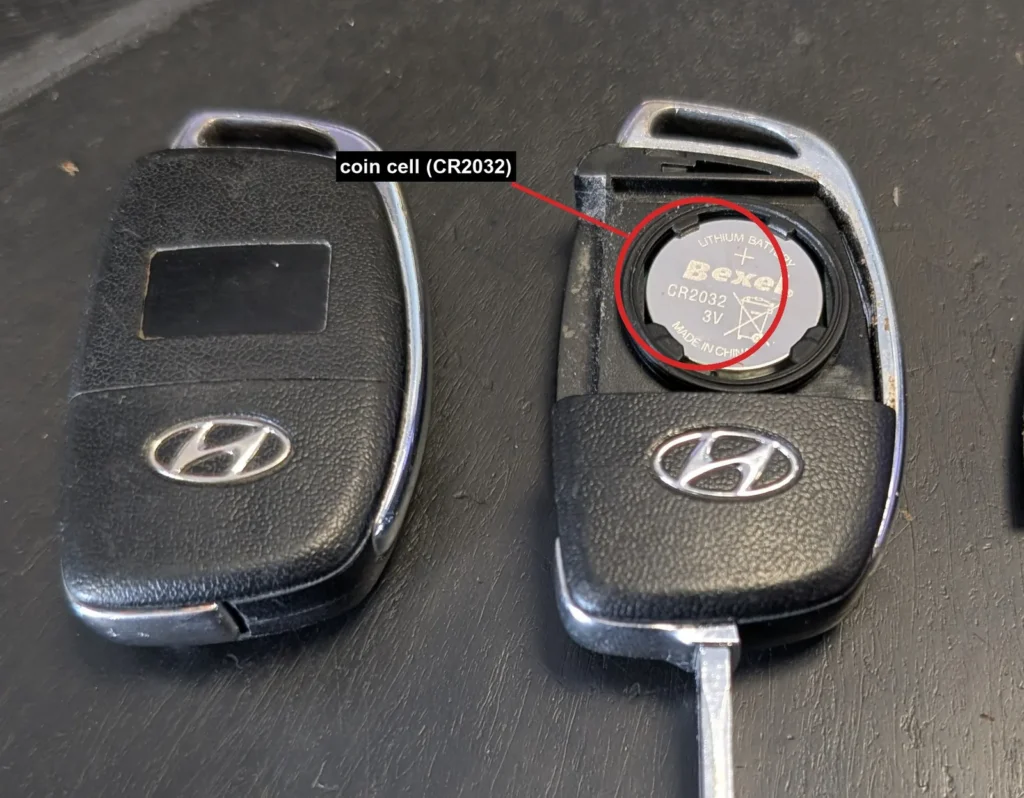
- Pull the mechanical key blade out of the fob.
- Prise the key cover apart at the seam with a small flat screwdriver, taking care not to damage the case or touch the circuit board.
- Lift out the old CR2032 coin cell and note which way up it sat.
- Fit the new CR2032 with the positive (+) side facing downwards.
- Press the cover back together until it clips shut, then push the mechanical key blade back into the fob.
Good to know
The ix35 also came with a fixed remote-and-key cover style that has no fold-out blade. It takes the same CR2032, but in that key the cell fits with the positive (+) side facing upwards. Because the orientation differs between the two keys, always check which way the old cell was sitting before you fit the new one.
Note that a battery change is not the same as programming a remote. Pairing a brand-new remote needs a Hyundai dealer with a diagnostic tool, and a lost or broken key can only be ordered from a dealer. Simply replacing the battery does not require any reprogramming.
FAQ
What battery does the ix35 key take?
A CR2032 coin cell, for both the flip key and the fixed-cover key.
Which way up does the coin cell go?
It depends on the key. In the flip key the positive (+) side faces downwards; in the fixed-cover key it faces upwards. Check how the old cell was seated before fitting the new one.
Do I need to reprogramme the remote after changing the battery?
No. A battery swap does not unpair the remote, so it works straight away with no reprogramming.
The remote still does not work after a new battery. What now?
Check the cell is the right way up and clean the contacts, as a smear of grease or a slightly loose cell will stop it working. If the remote is genuinely faulty or brand new, it needs dealer programming with a diagnostic tool.
Independent guide — not affiliated with Hyundai. Always follow your official service manual and safety precautions. Read our full disclaimer.