These instructions apply to the Mercedes C-Class Mk5 (W206) 2021-Present.
For other models, please choose your vehicle here.
When the wrench/spanner and an “A” or “B” service message appears on your Mercedes-Benz C-Class W206 (2021–present), the ASSYST PLUS maintenance counter has run down. This is a scheduled maintenance reminder rather than a fault warning — the car is telling you the next service is due, not that something has broken. You reset it from the instrument-cluster menu using the steering-wheel touch controls, with no workshop tool needed. Do the service first, then clear the counter using the sequence below.
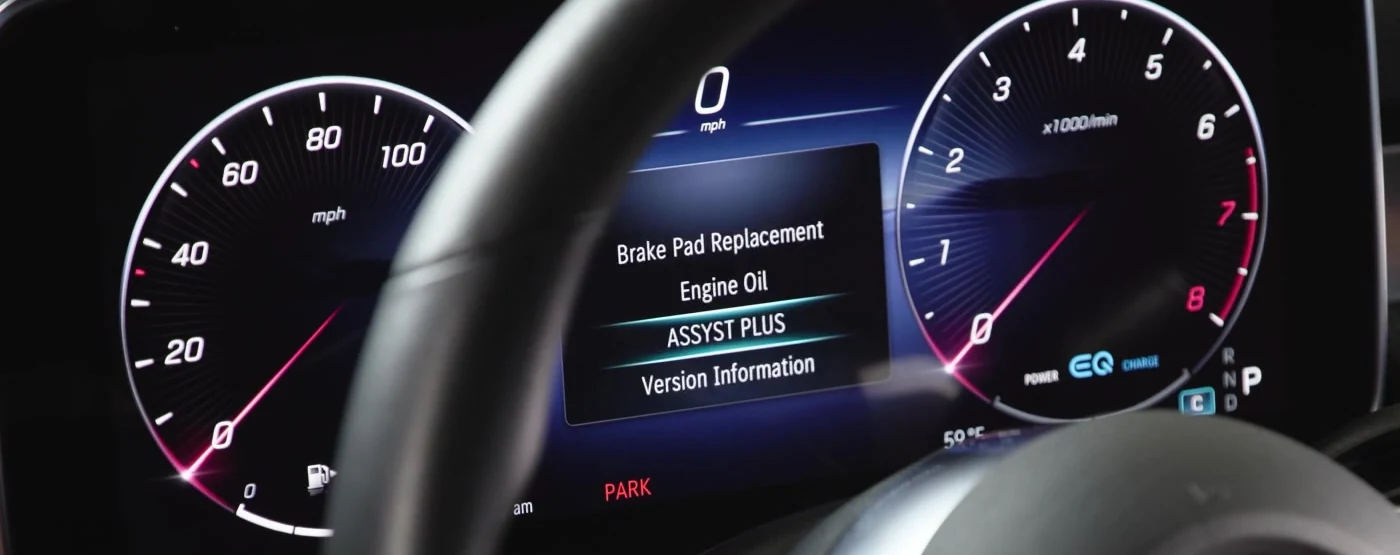
What ASSYST PLUS Is
ASSYST PLUS is the C-Class’s flexible service system. Rather than counting down a fixed mileage alone, it factors in distance, time and how the car is driven to estimate when maintenance is due, then displays the wrench symbol with a countdown as the date approaches. When the interval is reached it shows the wrench together with an “A” or “B” label, indicating which type of service is required. Because the system estimates rather than measures the oil directly, it relies on being reset at the end of each service so the next interval is calculated from the correct starting point.
The wrench is a maintenance prompt, not a fault light. Red and amber warnings for the engine, brakes, tyre pressure or electrical system are separate and will not clear by resetting ASSYST PLUS — those need to be investigated on their own.
Before You Start
Only reset ASSYST PLUS once the service work — oil, filter and anything else due — has actually been completed. Set the car up so the hidden service menu will arm cleanly:
- Park on level ground with the car stationary.
- Close the bonnet, boot and all doors — an open panel stops the menu from opening.
- Have the key with you and be ready to switch the ignition between positions 1 and 2 during the sequence.
- No tools are required; the whole reset is done from the steering-wheel touch controls.
Reset After the Service Only
ASSYST PLUS counts down by distance, time and driving conditions. Reset it only once the oil and filter (and anything else due) are done, or the next interval will be wrong.
How to Reset the W206 Service Indicator
- Close the bonnet, boot and all doors.
- Turn the ignition to position 1 and wake the cluster.
- On the left steering-wheel touchpad, open the menu and select the ‘CLASSIC’ display, then scroll to ‘Total distance’ (the odometer).
- Press and hold the OK button for ~5 seconds; within 1.5 seconds, press and hold OK again for ~3 seconds.
- The hidden menu appears (VEHICLE DATA / DYNAMOMETER TEST / ASSYST PLUS). Turn the ignition to position 2.
- Select ‘ASSYST PLUS’ → ‘FULL SERVICE’, then confirm the reset (‘Confirm’/‘Reset’).

Step 6 — the final “Cannot be undone” prompt: highlight Confirm to reset the service counter. ASSYST PLUS is irreversible, so only confirm once the service is actually done.

If the Reset Doesn’t Work
The double OK-hold that opens the hidden menu is the part people most often miss. If the menu will not appear or the reset will not confirm, check the following:
- The two OK-holds must follow each other quickly — the second hold has to begin within about 1.5 seconds of releasing the first. Practise the rhythm and try again.
- Every door plus the bonnet and boot must be fully closed; the menu will not arm otherwise.
- Make sure you scrolled to Total distance (the odometer) in the CLASSIC display before holding OK — other screens won’t open the menu.
- Don’t start the engine during the sequence. If it all goes wrong, switch the ignition off, wait a few seconds, and begin again from position 1.
If It Doesn’t Reset
- The timing is tight — the double OK-hold must be within 1.5 seconds; try again.
- A door/bonnet is open — the menu won’t arm; close everything and retry.
What to Expect After Resetting
When the reset confirms, the wrench symbol and the A/B service message clear, and the ASSYST PLUS remaining-distance and remaining-days figures return to a full interval. The system then starts estimating the next service from that point. The reset affects only the maintenance counter — your odometer, trip meters and vehicle settings are untouched.
How Often to Reset It
Reset ASSYST PLUS once after each completed service and at no other time. Because the system is condition-flexible, the gap before the next reminder varies with your mileage, the time elapsed and how the car is driven, so let the wrench message itself tell you when the next service is due and follow the maintenance plan in your owner’s handbook for the specifics. Short journeys and hard use tend to bring the reminder up sooner.
Frequently Asked Questions
How do I reset the service light on a Mercedes C-Class W206?
Via the cluster: CLASSIC menu → Total distance, double-hold OK to open the hidden menu, then ASSYST PLUS → FULL SERVICE → confirm.
Do I need a Star/diagnostic tool?
No — ASSYST PLUS resets from the dashboard. A tool is only needed for the separate oil-life/battery registration tasks.
What do A and B service mean?
Mercedes alternates a smaller ‘A’ and larger ‘B’ service. ASSYST PLUS picks the right one; reset after whichever you’ve done.
The message came back — why?
The reset wasn’t confirmed, or a separate fault is present. Repeat and confirm to the end.
Why won’t the hidden menu open?
Almost always the timing of the double OK-hold or an open door/bonnet/boot. Close everything, make sure you’re on Total distance, and get the second hold in within about 1.5 seconds.
Does resetting confirm the service was done?
No — the counter only reflects the last reset, not the actual work. Always carry out the service first and then clear ASSYST PLUS.
If a warning light appeared with the service message, look it up on autodtcs.com. After battery work, see our W206 battery guide.
Independent guide — not affiliated with Mercedes. Always follow your official service manual and safety precautions. Read our full disclaimer.