These instructions apply to the Mitsubishi ASX Mk1 (GA) 2010-2023.
For other models, please choose your vehicle here.
The Mitsubishi ASX (GA, 2010–2023) — also sold as the Outlander Sport and the RVR abroad — kept essentially the same cluster firmware and service-reset path across every facelift (2010, 2013, 2017, 2019). The reset uses the multi-information meter switch (button 1) in a multi-step press-and-hold sequence — no diagnostic tool required.
Before you start
- Complete the oil and filter change first, with the car on a level surface and the engine off.
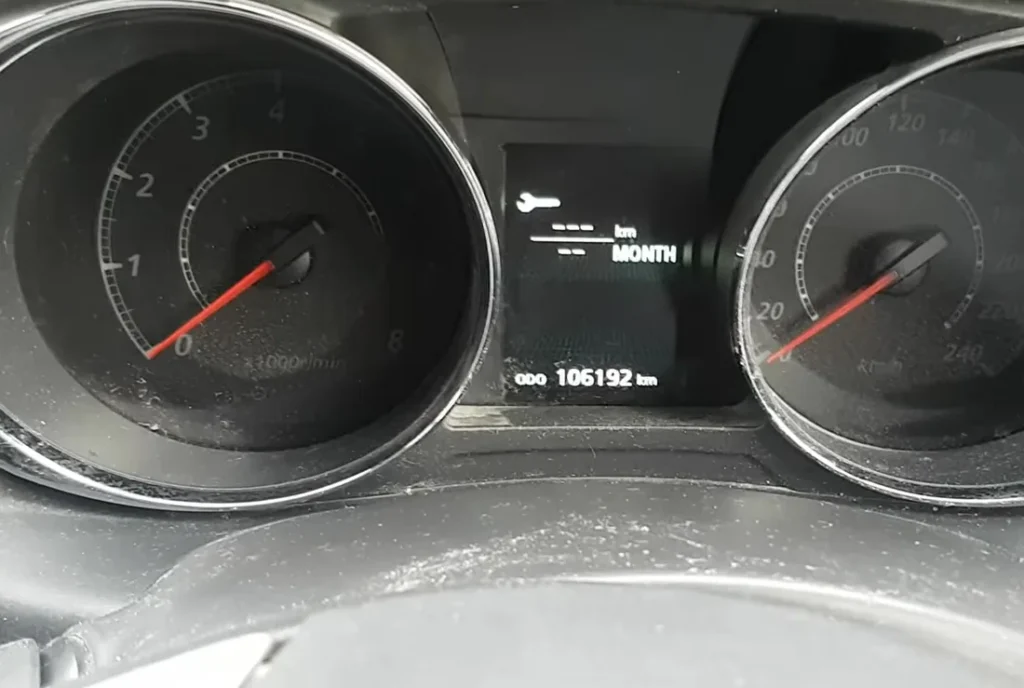
- Find the multi-information meter switch — the small black trip-recorder button at the bottom-right of the speedometer face, the one you use to cycle trip A / trip B / odometer / instant MPG / range / service display.
- The sequence needs the button held at three separate moments (display → flash → CLEAR → new interval), so take the holds slowly and don’t rush.
Note: on the GA-generation ASX the service indicator only tracks the oil-change distance counter. Brake fluid (every 2 years), coolant and CVT fluid aren’t tracked by the cluster — those follow the printed schedule in the owner’s handbook.
How to Reset the Service Light on the Mitsubishi ASX
- Turn the ignition OFF. The cluster goes dark.
- Press multi-information meter switch repeatedly until the service display appears (the screen showing service distance remaining or the spanner-marked service line).
- Press and hold multi-information meter switch.
- Wait 2 seconds. The service indicator on the cluster starts flashing.
- Release the button.
- While the service indicator LED is still flashing (you have a few seconds before it stops), press multi-information meter switch again — just a short press this time.
- The service light illuminates solid and “CLEAR” appears on the cluster display.
- Press and hold multi-information meter switch once more.
- Keep holding. The new service interval appears on the display (typically “9000 mi” or “15000 km”).
- Release the button.
- The service interval is now reset.
- Turn the ignition on briefly to confirm the spanner warning is gone, then off again.
Verify the Reset Worked
Turn the ignition off, wait 30 seconds, then on (engine off is fine). The spanner / service warning that was appearing at startup should be gone. Cycle multi-information meter switch through to the service display — the remaining-distance value should now show the full new interval.
Common Snags
- The service indicator doesn’t start flashing after the first 2-second hold. The most common cause: the service display wasn’t the active screen when you started the hold. Make sure the cluster is showing the actual service line (not trip A, trip B, odometer, MPG, or range) before holding. Cycle through with short presses first to find the service display.
- I released the button after flashing started, but pressing it again doesn’t trigger “CLEAR”. The flash window is only about 5-7 seconds. If you wait too long after release, the cluster reverts to normal display. You need to press the button again while the LED is still flashing. If the flash has stopped, repeat from step 2.
- “CLEAR” appears but the second long-press doesn’t show the new interval. Hold longer — the ASX needs around 3 seconds on this final hold, not 2. The new interval value should appear within that time.
- Reset works but the spanner returns after a few miles. 12V battery condition. The ASX cluster is sensitive to voltage drop during cold cranking, particularly on diesel variants which have higher cranking-current draw. Load-test the battery; replace if older than 5 years.
- I drive a 1.6 HDi-engined ASX (post-2014, Peugeot/Citroën-sourced DV6C engine) — same procedure? Yes. The HDi diesel was added via Mitsubishi’s partnership with Peugeot, but the Mitsubishi ASX cluster and the button-driven reset are unchanged. The diesel engine doesn’t affect the reset path.
- 2017 facelift / 2019 facelift — does anything change? Mitsubishi updated the front-end styling at both facelifts but kept the instrument cluster firmware essentially unchanged across the entire GA generation. The procedure works on every ASX from 2010 to 2023.
- 4WD All-Wheel-Drive variant — same procedure? Yes. The 4WD selector adds entries to the trip-computer menu but doesn’t change the service-reset path. Same procedure.
Frequently Asked Questions
What does the spanner symbol on the Mitsubishi ASX mean?
On the ASX the spanner / wrench icon is the oil-change reminder. It illuminates when the cluster’s service-distance counter reaches the configured threshold. It does not indicate an engine fault. Engine faults trigger the orange check-engine light (a separate engine-outline icon).
How often does the ASX service indicator come up?
Mitsubishi’s official European-market schedule for the GA ASX:
- 1.6 MIVEC petrol (4A92): 9,000 miles (15,000 km) or 12 months.
- 2.0 MIVEC petrol (4B11): 9,000 miles (15,000 km) or 12 months.
- 1.6 DI-D diesel: 12,500 miles (20,000 km) or 24 months.
- 1.8 DI-D diesel: 12,500 miles (20,000 km) or 24 months.
- 2.2 DI-D diesel (early variants): 12,500 miles (20,000 km) or 24 months.
UK severe-service / short-trip driving typically halves the petrol interval. The cluster doesn’t auto-adjust.
What about the Outlander Sport (US/Canada name)?
The Outlander Sport is the same car as the ASX, with the same Mitsubishi instrument cluster and the same reset procedure. The button positions and labels are identical. Use this guide regardless of the badge.
And the Mitsubishi RVR (Canada/Japan name)?
Same again. The RVR is identical to the ASX/Outlander Sport from the cluster’s perspective. Use this guide.
What about the all-new 2023+ ASX (Renault Captur-based)?
The 2023+ ASX is a completely different car — based on the Renault Captur platform under the Renault-Nissan-Mitsubishi alliance. The new ASX uses Renault’s cluster firmware and the reset path is in Settings → Vehicle → Service. We’ll publish a dedicated 2023+ ASX guide. This article only covers the original GA ASX (2010–2023).
Will this work on the Mitsubishi Outlander (Mk3, GG)?
Similar but not identical. The Outlander Mk3 (GG, 2012–2021) uses a related but slightly different cluster with a touch-driven menu on higher trims. We’ll publish a dedicated Outlander Mk3 guide.
Is this the same as the ASX oil reset?
Yes — the ASX has a single maintenance counter tied to the oil-change interval, so the reset shown here is what owners also search for as the oil reset.
For DTC code interpretation on Mitsubishi vehicles see autodtcs.com.
Independent guide — not affiliated with Mitsubishi. Always follow your official service manual and safety precautions. Read our full disclaimer.