These instructions apply to the Mitsubishi ASX Mk1 (GA) 2010-2023.
For other models, please choose your vehicle here.
When the tyre-pressure warning light comes on in your Mitsubishi ASX Mk1 (GA, 2010–2023), it usually just means the system needs to relearn your current pressures after a check, top-up or wheel change. You reset it from the instrument-cluster menu with the INFO button, then a short drive. This guide shows how.
When to Reset
- After checking or adjusting the tyre pressures (including seasonal changes).
- After changing one or more wheels or tyres.
- After disconnecting or renewing the battery.
Set Your Pressures First
The reset stores whatever pressures are in the tyres at that moment, so they must be correct first. Park on level ground and set all four (cold) to the figures on the placard in the driver’s door aperture, using the laden column for a full load. Never reset with a tyre already low.
How to Reset the ASX TPMS
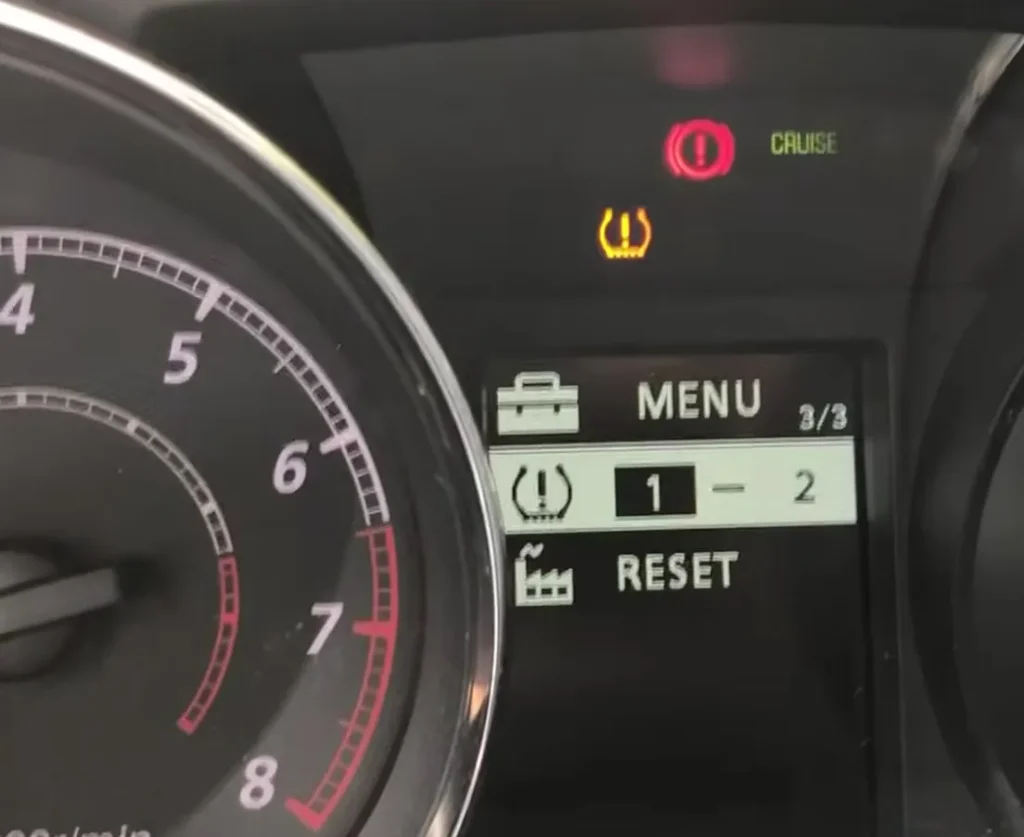
- Make sure all four tyres are at the correct cold pressure.
- Turn the ignition on.
- Press the “INFO” button repeatedly to scroll the cluster menu until “RESET” appears.
- Press and hold the INFO button for about 3 seconds — an audible signal sounds.
- Drive the vehicle until the warning light goes out. The new pressures are stored.
Light Won’t Go Out? Work Through This
- A tyre is genuinely low: the system is doing its job — find and fix the leak, re-inflate, then reset.
- Not driven far enough: the system reads the sensors while the wheels turn, so the light only clears after a short drive — keep going.
- Light flashes then stays on (not a low tyre): a flashing TPMS light points to a sensor fault, often a flat sensor battery. A code may be stored that you can look up on autodtcs.com.
Frequently Asked Questions
Where is the TPMS reset on an ASX?
In the cluster menu: press INFO repeatedly until RESET appears, then hold INFO for 3 seconds and drive until the light goes out.
Do I have to drive after resetting?
Yes — the system reads the sensors while the wheels turn, so the light only clears after a short drive.
Why does the light come back a few days later?
Either a tyre is slowly losing air, or it was a little low when you reset. Re-check all four cold pressures and reset again.
Do I need to reset after just topping up the air?
Yes — any pressure change shifts the reference, so reset after any adjustment.
After tyre or seasonal-wheel work it is worth confirming the service reminder is clear — see our Mitsubishi ASX service indicator reset guide.
Independent guide — not affiliated with Mitsubishi. Always follow your official service manual and safety precautions. Read our full disclaimer.