These instructions apply to the Nissan Micra Mk5 (K14) 2017-Present.
For other models, please choose your vehicle here.
When the spanner symbol or a service message appears on your Nissan Micra Mk5 (K14, 2017–present), the car’s oil-service counter has run down to zero. This is a routine maintenance reminder, not a fault: it simply means the distance or time the car was set to run between services has elapsed, and the counter is asking to be renewed. Once the oil and filter have been changed, you clear it yourself from the instrument-cluster Settings → Maintenance menu using the steering-wheel buttons — no garage visit and no diagnostic tool required. Here’s the full sequence; do the service first.
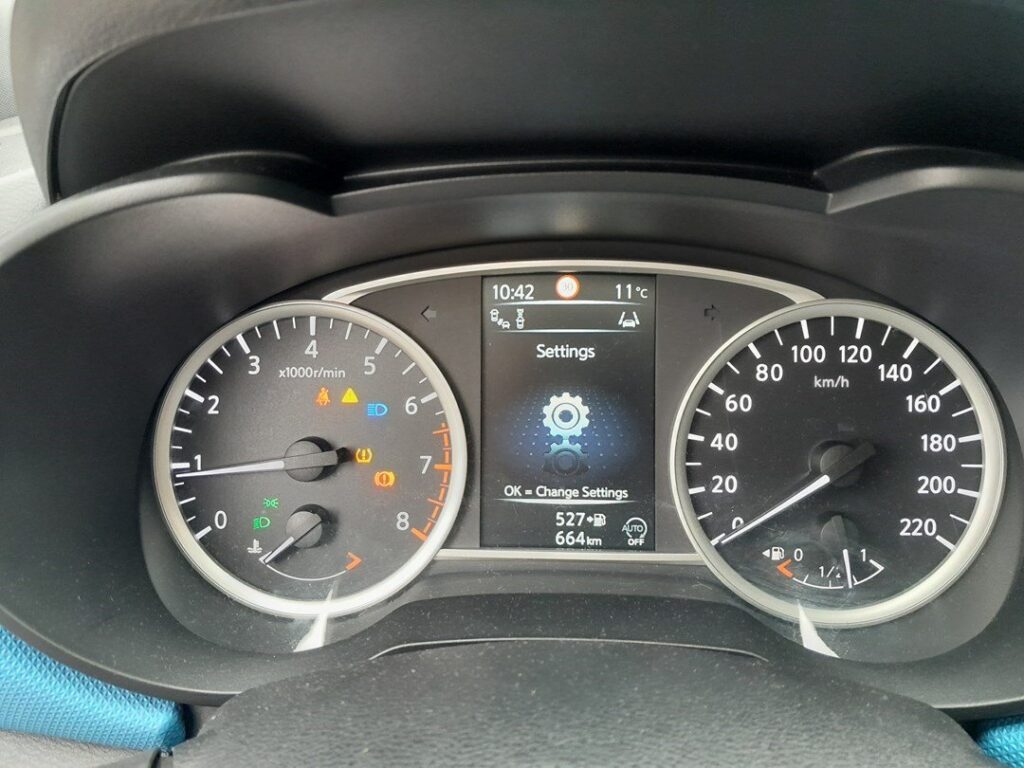
What the Service Light Means on the Micra Mk5
The spanner (wrench) symbol and any accompanying ‘Service’ message are driven by the maintenance counter in the instrument cluster. The counter tracks distance driven and elapsed time since the last reset, and it lights the reminder when either limit is reached. It has nothing to do with oil pressure, engine temperature or a mechanical problem — those have their own dedicated red or amber warning lights. Think of the spanner purely as a calendar-and-odometer alarm that says “a service is due,” and nothing more.
Because the counter measures only distance and time since it was last cleared, it does not know whether fresh oil is actually in the engine. That is why the reset is a manual, deliberate step: the car trusts you to have carried out the service before you zero the timer. For the exact service interval that applies to your Micra, follow the schedule in your owner’s handbook rather than assuming a figure — intervals vary by market, engine and driving conditions.
First, a Few Checks
Only reset the indicator after the oil and filter have actually been renewed. Clearing the reminder on an engine that still has old oil hides the very prompt that protects it. Before you begin:
- Park on level ground with the handbrake firmly applied and the transmission in neutral (manual) or P (automatic).
- You need the ignition on but the engine off — press the start button without touching the brake, or turn the key to the second position.
- No tools are needed; the whole job is done with the steering-wheel buttons and the cluster display.
- Make sure no other warning message is being displayed, so you can clearly read the maintenance menu.
Reset After the Oil Change Only
The counter only measures distance and time since the last reset — clear it once fresh oil and a new filter are in.
How to Reset the Micra Mk5 Service Indicator
- Turn the ignition on but do not start the engine.
- Press the scroll button on the steering wheel until ‘Settings’ shows; press ‘OK’.
- Scroll to ‘Maintenance’, then select ‘Service’.
- Select ‘Reset’ — the procedure is complete when ‘—’ appears on the display.
- Scroll back to the standard display and turn the ignition off.
If It Doesn’t Reset
The Micra’s menu reset is reliable, but a few simple things stop it from taking. Work through these before assuming anything is wrong:
- You stopped short of ‘Reset’ — step right through Settings → Maintenance → Service → Reset until ‘—’ shows. If you back out early, the counter is never cleared.
- The engine was running — the menu should be navigated with the ignition on and the engine off; start the car only after ‘—’ appears.
- The display timed out — if you pause too long, the cluster reverts to the main screen. Cycle the ignition off and on and run through the menu again without long gaps.
- A separate warning is on — that is a fault, not the service timer, and it will not clear from this menu.
Once the Reset Is Done
As soon as the display shows ‘—’ and you return to the normal screen, the spanner reminder should be gone. Start the engine and confirm the message does not return at the next ignition cycle. The maintenance counter now begins counting down again from a full interval, so the reminder will stay off until the next service is due.
Reset Frequency
Reset the indicator once after every scheduled oil-and-filter service — that is the only time it should be cleared. The distance or time between services is set by Nissan’s maintenance schedule and varies with engine, market and how the car is used, so check your owner’s handbook for the figure that applies to your Micra rather than guessing. Do not clear the reminder simply because it is inconvenient; it exists to keep the engine on its correct service rhythm.
Frequently Asked Questions
Where is the service reset on the Micra Mk5?
In the cluster menu: Settings → Maintenance → Service → Reset, using the steering-wheel buttons.
Do I need a diagnostic tool?
No — it’s done from the dashboard with the ignition on.
Does the engine need to run?
No — ignition on, engine off.
The message came back — why?
The reset didn’t reach ‘—’. Repeat and confirm to the end.
Does resetting the light mean the car has been serviced?
No. Resetting only zeroes the counter; it is not proof of a service. Always change the oil and filter first, then clear the reminder.
What’s the difference between the spanner and a red warning light?
The spanner is a maintenance reminder based on distance and time. A red or amber warning light signals a fault and should be investigated on its own.
If a warning light appeared with the service message, look it up on autodtcs.com. After battery work, see our Micra Mk5 battery guide.
Independent guide — not affiliated with Nissan. Always follow your official service manual and safety precautions. Read our full disclaimer.