These instructions apply to the Renault Clio Mk5 (XJA) 2019-Present.
For other models, please choose your vehicle here.
When the spanner or a “Service due” message appears on your Renault Clio Mk5 (XJA, 2019–present), the oil-service counter has run down. This is a routine maintenance reminder, not a fault — the car has simply counted down the distance and time since its last reset and is telling you the oil service is due. Renault lets you clear it yourself from the instrument-cluster menu, driven by the buttons on the wiper stalk, so there’s no garage trip needed. Here’s the exact sequence once the oil and filter are done.
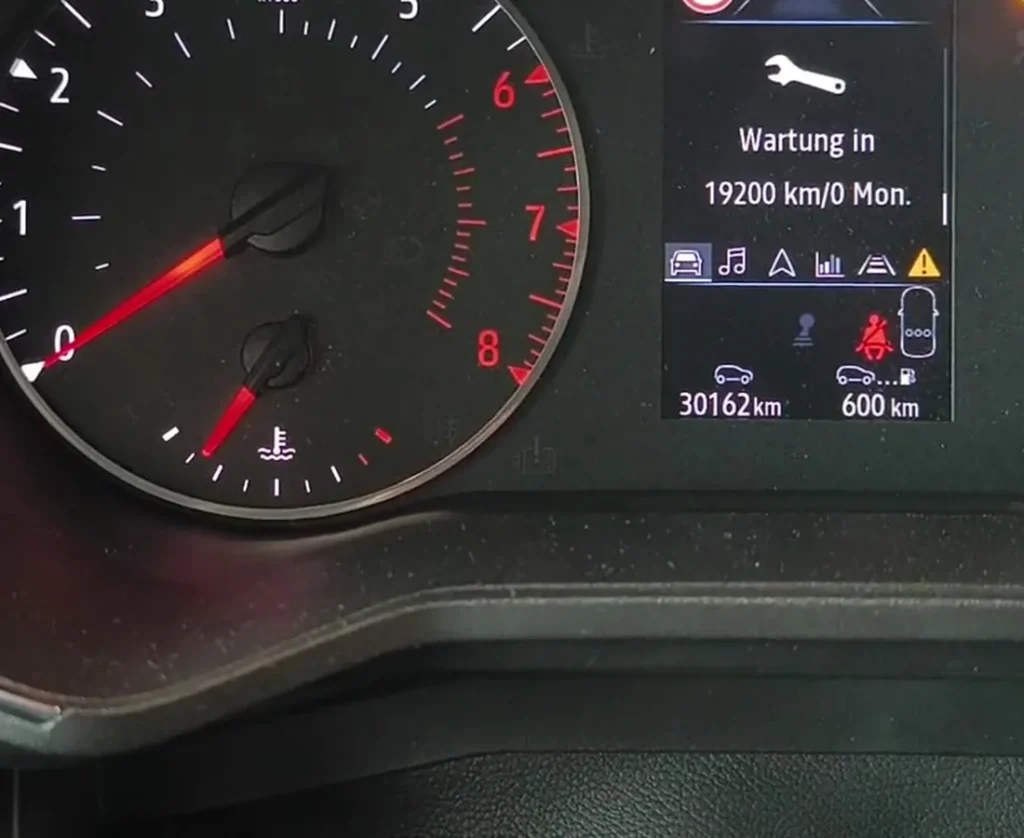
What the Service Reminder Means
The Clio’s oil-service reminder is a straightforward interval counter. It measures the distance you cover and the time that passes since the last reset, and when it reaches its limit it shows the spanner and a “Service due” message. It has no sensor watching the oil itself, so it cannot tell whether the service has been done — it only knows when it was last reset. That is why the reset is a manual step at the end of an oil change, and why clearing it early just hides a reminder while the oil keeps ageing.
The spanner is an amber, informational symbol. It is separate from the fault warnings — an amber or red engine or oil-pressure light, for instance — which point to an actual problem and will not clear by resetting the service counter.
Before You Start
Reset the counter only after fresh oil and a new filter have been fitted. Set the car up first:
- Park on level ground with the handbrake applied.
- Switch the ignition on but do not start the engine — the reset expects ignition on, engine off.
- Locate the trip/menu buttons on the end of the wiper stalk, which drive the cluster menu.
- No tools are needed for the reset itself.
Reset After the Oil Change Only
The counter only measures distance and time since the last reset; it doesn’t sense the oil. Clear it only once fresh oil and a new filter are fitted, so the next interval is timed from the right point.
How to Reset the Clio Mk5 Oil Service
- Turn the ignition on but do not start the engine.
- Press the scroll button (1) on the wiper stalk repeatedly until you reach the ‘Vehicle’ menu.
- Confirm by pressing button (2) or (3).
- Select ‘Mileage before oil service’.
- Press and hold the ‘OK’ button for 10 seconds — the display then shows the full distance to the next service.
- Turn the ignition off. Done.
The buttons are on the end of the wiper stalk (Renault’s trip/menu controls). On EASY LINK touchscreen cars the same reset can also live under the vehicle/service menu on the screen.
If the Reset Doesn’t Work
Nearly every failed Clio reset comes down to the 10-second hold not completing. Work through these before assuming a problem:
- Keep the OK button pressed for the full 10 seconds — the reset only writes once the display flips to the full distance. Releasing early cancels it.
- Make sure the ignition is on with the engine off; a running engine puts the menu in the wrong state.
- Check you are on ‘Mileage before oil service’ and not a neighbouring readout before holding OK.
- If it still won’t take, switch the ignition off, wait a few seconds, switch back on and repeat the whole sequence.
If It Doesn’t Reset
- Released OK too soon — the 10-second hold is what writes the reset; try again and hold longer.
- Engine was running — the reset wants ignition on, engine off.
- A different warning is on — an amber engine/oil light is a fault, not the service timer, and won’t clear this way.
What to Expect After Resetting
As soon as the hold completes, the display shows the full distance to the next service, the spanner clears and the “Service due” message no longer appears at start-up. The counter then begins counting down again from that full value. The reset changes only the oil-service countdown — your odometer, trip meters and other settings are untouched.
How Often to Reset It
Reset the counter once after each oil service, and only then. The exact distance or time before the spanner reappears depends on the engine and how the car is configured, so treat the reminder as the cue for your next oil service and follow the interval given in your owner’s handbook. High-mileage or hard-driven cars will naturally reach the reminder sooner.
Frequently Asked Questions
Where is the service reset on the Clio Mk5?
In the cluster menu via the wiper-stalk buttons: Vehicle → Mileage before oil service → hold OK 10 s.
Do I need a diagnostic tool?
No — it’s done entirely from the stalk buttons with the ignition on.
Does the engine need to run?
No — ignition on, engine off, is the correct position.
The spanner came back — why?
The 10-second hold didn’t complete the reset. Repeat it and keep OK pressed until the full distance shows.
Can I reset it from the EASY LINK touchscreen instead?
On cars with the EASY LINK screen the same reset can also live under the vehicle/service menu on the display. The wiper-stalk method works across the range.
Does resetting mean the oil has been changed?
No — the counter only tracks distance and time since the last reset, not the oil itself. Always change the oil and filter first, then clear the reminder.
If a warning light appeared with the service message, look it up on autodtcs.com. After battery work, see our Clio Mk5 battery guide.
Independent guide — not affiliated with Renault. Always follow your official service manual and safety precautions. Read our full disclaimer.