These instructions apply to the Skoda Octavia Mk3 (5E) 2013-2020.
For other models, please choose your vehicle here.
The Škoda Octavia Mk3 (5E, 2013–2020) — the third-generation Octavia hatchback / Combi (estate) / Scout (raised Combi), built in Mladá Boleslav (Czech Republic) on Volkswagen’s MQB platform, sold across pre-facelift (2013–2017) and facelift (2017–2020) variants with a wide engine range covering 1.0 TSI (CHZD/DKRA/DKRF, 85 kW), 1.2 TSI (CJZ-series/CYV-series, 63–81 kW), 1.4 TSI (CHPA/CXSA/CZCA, 90/110 kW including the e-HEV 4×4), 1.5 TSI EVO (DAD-series, 110 kW), 1.6 TDI (CLH-series/DCX-series/DGT-series, 66–85 kW diesel), 1.8 TSI (CJSA, 132 kW), 2.0 TSI (CHHA/CHHB, 162–169 kW RS), and 2.0 TDI (CRV-series/DFG-series, 110–135 kW including RS-TDI) — uses the standard VAG cluster trip-button service reset. Two service items (oil change and inspection) are tracked independently, each reset via the same procedure. No diagnostic tool needed for the owner method.
When to Reset the Service Indicator
- After completing an oil and filter change (clears the OIL counter).
- After a scheduled inspection service (clears the INSP counter).
- If “OIL” or “INSP” appears at startup with a time-to-service countdown.
⚠️ Like all VAG cars, the Octavia 5E tracks two separate service items independently. Each resets on its own. Clearing oil when only inspection was done (or vice versa) leaves the next genuine service due indication wrong.
Before You Begin
- Park on a level surface with the engine off.
- Complete the actual service work before the reset.
- Keyless entry (KESSY) cars only: close all doors, the boot/tailgate, and the bonnet before starting the reset. KESSY will refuse to enter the service menu with any aperture open. Cars with conventional remote keys aren’t affected.
- Identify your cluster type:
- Standard cluster (S / SE): central monochrome MFD between the dials. Uses the right-hand cluster menu button.
- Maxi-DOT cluster (SE L / Elegance / Style): larger colour MFD. Same button layout; same procedure.
- Virtual Cockpit (Style Plus, RS 245, late facelift): fully digital cluster. Same button + brief variant noted below.
- Locate the right cluster button — the menu / OK button on the right side of the dial cluster (sometimes a thumbwheel on the steering wheel can be used instead on multifunction-wheel cars, but the cluster button is the universal path).
What You’ll Need
None for the reset itself. For an oil change, fresh VW Group-spec oil — 0W-20 ACEA C5 / VW 508 00 / 509 00 for the 1.0 / 1.5 TSI EVO petrol engines (Long-life regime); 5W-30 ACEA C3 / VW 504 00 / 507 00 for the older 1.2 / 1.4 / 1.8 / 2.0 TSI petrol and all the 1.6 / 2.0 TDI diesel (Long-life regime); 5W-40 ACEA A3/B4 / VW 502 00 / 505 00 for the 2.0 TSI RS (Fixed regime). A new cartridge filter (cap-style housing on top of the engine on most TSI variants); sump-plug torque 30 Nm. Capacity: 1.0 TSI takes 4.0 L; 1.2 TSI takes 3.6 L; 1.4 TSI takes 4.0 L; 1.6 TDI takes 4.3 L; 2.0 TDI takes 4.3 L; 2.0 TSI RS takes 4.6 L. The Long-life “WIV” regime requires the right oil spec — using a lesser oil reverts the car to the Fixed schedule.
Oil Service Reset
- (KESSY only) Close all doors, the boot/tailgate, and the bonnet.
- Turn the ignition OFF.
- Press and hold the right cluster menu button.
- Continue holding the button and turn the ignition ON.
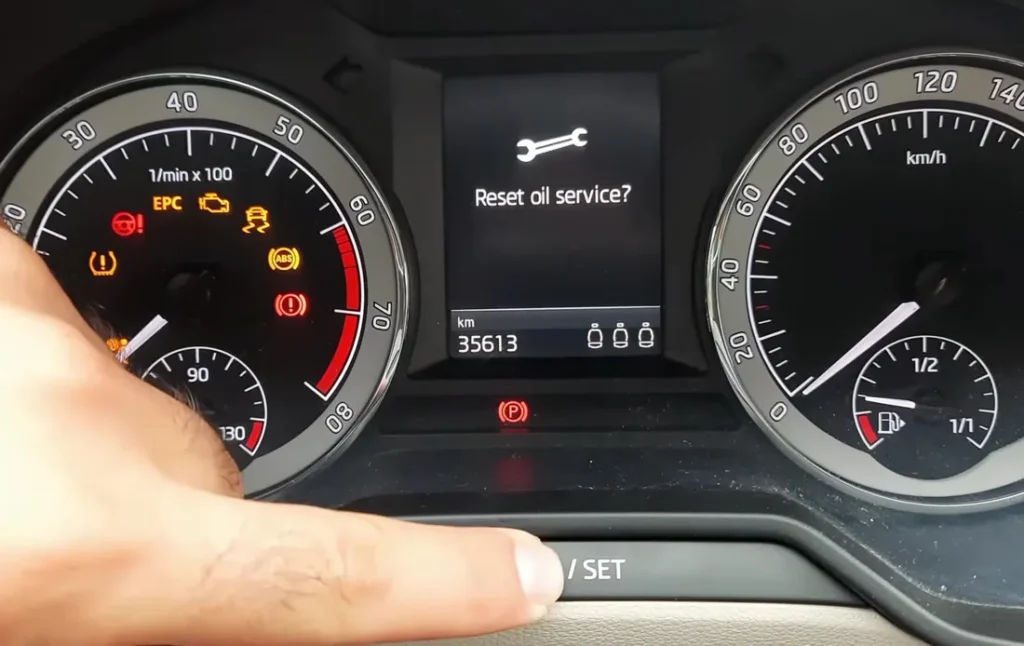
- The cluster will display “Reset oil change service?” or “DELETE OIL CHANGE” (depending on language / firmware).
- Release the button.
- Press the button again briefly to confirm. The system is now reset.
- Switch the ignition off. Oil service reset complete.
Inspection Service Reset
- (KESSY only) Close all doors, boot/tailgate, and bonnet.
- Turn the ignition OFF.
- Press and hold the right cluster menu button.
- Continue holding and turn the ignition ON.
- The cluster will display “Delete inspection?” or “DELETE INSPECTION”.
- Release the button.
- Press the button again briefly to confirm. The system is now reset.
- Switch the ignition off. Inspection service reset complete.
Verify the Reset Worked
Switch the ignition off, wait 30 seconds, then cycle back on. The OIL or INSP message that was appearing at startup should be gone. Open the cluster’s service-info menu (Setup → Service or “Service interval” on Maxi-DOT / Virtual Cockpit) and confirm the next service distance shows a fresh full interval. Typical Octavia Mk3 intervals after a reset on cars set to the Long-life (WIV — Wartungsintervallverlängerung) service regime:
- 1.0 / 1.5 TSI EVO petrol: up to 18,750 miles (30,000 km) or 24 months — calculated by car.
- 1.2 / 1.4 / 1.8 TSI petrol: up to 18,750 miles (30,000 km) or 24 months.
- 1.6 / 2.0 TDI diesel: up to 18,750 miles (30,000 km) or 24 months.
- 2.0 TSI RS (and RS-TDI): 9,000 miles (15,000 km) or 12 months — fixed, not Long-life.
On the Fixed service regime (selected at first service by the dealer): 9,000 miles (15,000 km) or 12 months across the board. UK severe-service driving — predominantly short trips, dusty conditions, towing — should run the Fixed schedule rather than Long-life regardless of factory configuration.
If Something Goes Wrong
- “Reset oil change service?” doesn’t appear. The button must already be held when the ignition turns on, not pressed after. Start completely off, press and hold the right cluster button, then turn the key / press START. Also on KESSY cars: ensure all apertures (doors, boot, bonnet) are closed before starting.
- I see the Inspection prompt when I wanted the Oil prompt (or vice versa). Some firmware variants prioritise the most overdue item first. Release without confirming, cycle the ignition off, and retry. If the wrong prompt keeps appearing, you can confirm to reset that item then re-do the procedure for the other item.
- I reset OIL but INSP is still due (or vice versa). They’re independent. Run the procedure twice — once for each item.
- The reset appears to work but the warning returns at the next start. 12V battery condition — VAG clusters are particularly sensitive. Load-test; replace if older than 5 years on Start-Stop AGM cars. On Long-life “WIV” cars, the cluster may also recalculate the interval based on driving — a short interval after reset means the algorithm read your last few weeks of trips as severe-use.
- The interval shown after reset is much shorter than I expected. The car is on Long-life WIV and is reading your driving pattern as severe (short trips, frequent cold starts, etc.). To force the Fixed regime, a Škoda dealer / workshop needs to switch it via VCDS / VAS.
- 2017 facelift Octavia — anything different? The 2017 facelift updated the front end (split-headlight controversy) and revised the infotainment, but kept the cluster architecture and reset path unchanged. Procedure unchanged.
- Octavia RS / vRS — anything different? The RS uses the same cluster + same right-button reset. The 2.0 TSI RS / RS-TDI run the Fixed 12-month / 9,000-mile interval rather than Long-life.
- Octavia Scout (raised Combi) — same procedure? Yes. The Scout body style doesn’t change cluster electronics.
- I have Virtual Cockpit on a Style Plus / late facelift — same procedure? Yes, the cluster button path is the same. The “Reset oil change service?” prompt simply renders on the digital screen rather than the smaller LCD.
Frequently Asked Questions
What does the OIL or INSP warning on the Mk3 Octavia mean?
OIL is the engine-oil change reminder; INSP is the scheduled-inspection reminder. They’re separate counters. Neither indicates a fault — they’re maintenance reminders. Engine faults are shown via the separate yellow CEL / amber engine-check icon.
Do I need a diagnostic tool?
No. The cluster-button reset (described above) handles both oil and inspection. VCDS / VAS / Carista (Method 1 from the Polo Mk6 guide pattern) is a workshop alternative useful for switching between Long-life and Fixed regimes — but for the actual reset, the cluster button is enough.
Does the reset clear engine fault codes?
Is this the same as the oil service reset?
Yes. On the Octavia the dashboard “Service” reminder covers the scheduled service (oil-change) interval, so the reset here is what owners also search for as the oil service reset.
No. The reset zeros the OIL or INSP counter only. Engine fault codes need a scan tool. For DTC interpretation see autodtcs.com.
What’s the difference between Long-life and Fixed?
VAG Long-life (WIV) lets the car calculate when service is due based on driving style, fuel/oil quality, ambient temperature, and trip pattern — typically up to 18,750 miles or 24 months as the maximum but often shorter in real use. Fixed regime is 9,000 miles / 12 months regardless. Long-life requires VW 504 00 / 507 00 (or 508 00 / 509 00) oil; using lesser specs voids Long-life and the car will signal “OIL” at 9,000 miles regardless.
Is the procedure the same as the VW Polo Mk6?
Similar but not identical. The VW Polo Mk6 uses two buttons (left + right cluster buttons in sequence). The Octavia 5E uses just the right cluster button for both prompts — single-button procedure. The conceptual layout (ignition-off → hold → ignition-on → release → press to confirm) is identical because it’s the same MQB-platform cluster firmware family.
Is the procedure the same as the Golf Mk7?
Yes — the Octavia 5E and VW Golf Mk7 (2012–2020) share the MQB platform and the same cluster firmware family. Reset path is essentially identical.
How often does the Octavia service indicator come up?
Depends on the service regime configured (see above). Most UK Octavia Mk3s are factory-set to Long-life — petrol/diesel non-RS reach up to 18,750 miles or 24 months, RS runs 9,000 miles / 12 months. Real-world Long-life UK cars often signal “OIL” at 10,000–14,000 miles.
What about the Octavia Mk4 (NX, 2020-onwards)?
The Mk4 Octavia (NX, 2020–) uses the newer MQB-Evo platform and a redesigned digital cluster. The reset moves into the infotainment Settings menu with a different navigation path. We’ll publish a dedicated NX guide.
For DTC code interpretation on Škoda vehicles see autodtcs.com.
Independent guide — not affiliated with Skoda. Always follow your official service manual and safety precautions. Read our full disclaimer.