These instructions apply to the Suzuki Ignis Mk3 (ATK) 2016-Present.
For other models, please choose your vehicle here.
If the one-touch (auto up/down) function on your Suzuki Ignis Mk3 (ATK, 2016–present) has stopped working — usually after the 12 V battery has been disconnected or gone flat — the driver’s window needs re-initialising so it relearns its fully-closed position. It takes about ten seconds with the ignition on and no tools at all.
Why One-Touch Stops Working
Each window motor remembers its fully-open and fully-closed positions so the auto and anti-trap (pinch protection) functions work. Cutting power clears that memory — the window still moves while you hold the switch, but won’t run on its own until re-taught.
How to Re-initialise the Ignis Windows
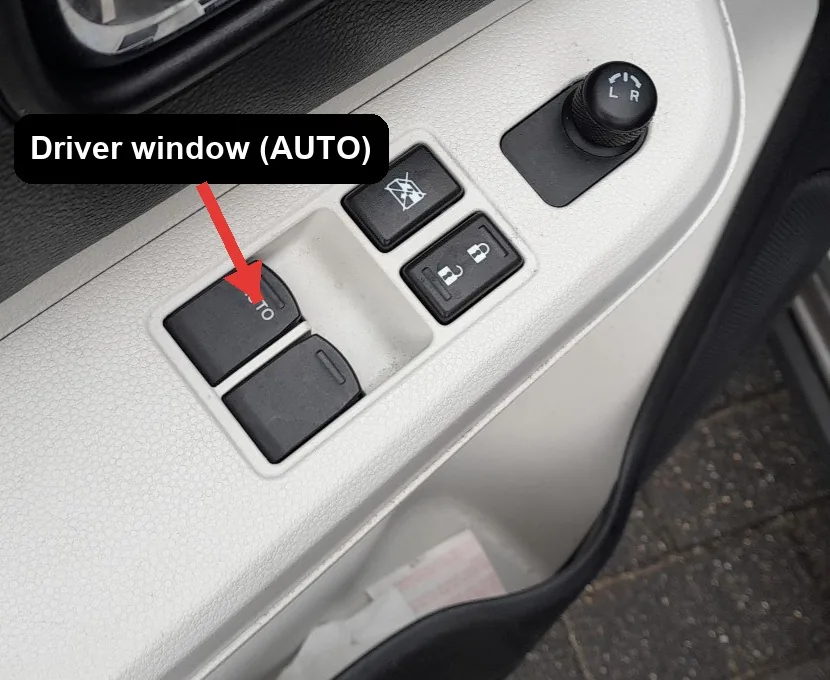
- Turn the ignition ON.
- Hold the driver’s window switch DOWN until the window is fully open.
- Hold the same switch UP until the window is fully closed, then keep holding for about 2 more seconds.
- Release, then check the one-touch AUTO up/down works. Repeat for any other window that has an AUTO function.
If It Still Won’t Auto-Close
- Repeat the procedure — the 15-second hold and the 2-second hold at full close must be observed.
- Make sure the glass reaches the very top and bottom — dirt or ice in the runner can stop it short.
Frequently Asked Questions
Why did the auto-up stop after I disconnected the battery?
Disconnecting or flattening the 12 V battery clears the window motor’s learned end position, which disables the pinch-protection and with it the one-touch auto-up. Re-initialising (open fully, then hold closed for two seconds) teaches the position back and restores the auto function.
Do I need to pull any fuses?
No. The Ignis re-initialisation is done entirely with the window switch and the ignition on — there is no fuse-pulling step. Just open the window fully, then hold it closed for about two seconds.
Do I have to do both windows?
Yes if both lost one-touch — after a battery disconnection that’s usually the case. Each is initialised from its own switch.
The window goes up a bit then stops — why?
That is the anti-trap protection reacting because the limits aren’t learned. Complete the routine and it clears.
To clear a service reminder after maintenance, see our Suzuki Ignis service indicator reset guide. For warning lights, look up the code on autodtcs.com.
Independent guide — not affiliated with Suzuki. Always follow your official service manual and safety precautions. Read our full disclaimer.