These instructions apply to the Suzuki Swift Mk3 (AZG/AZH) 2010-2017.
For other models, please choose your vehicle here.
If the colour touchscreen in your Suzuki Swift (Mk3/FZ-NZ, 2010–2017) has frozen — the radio stuck, the map locked, or taps doing nothing — a forced reboot of the head unit almost always clears it in seconds, and on this generation you don’t lose any of your settings. The catch is that not every Swift in this range actually has a touchscreen, so the first thing to confirm is which audio unit your car is fitted with.
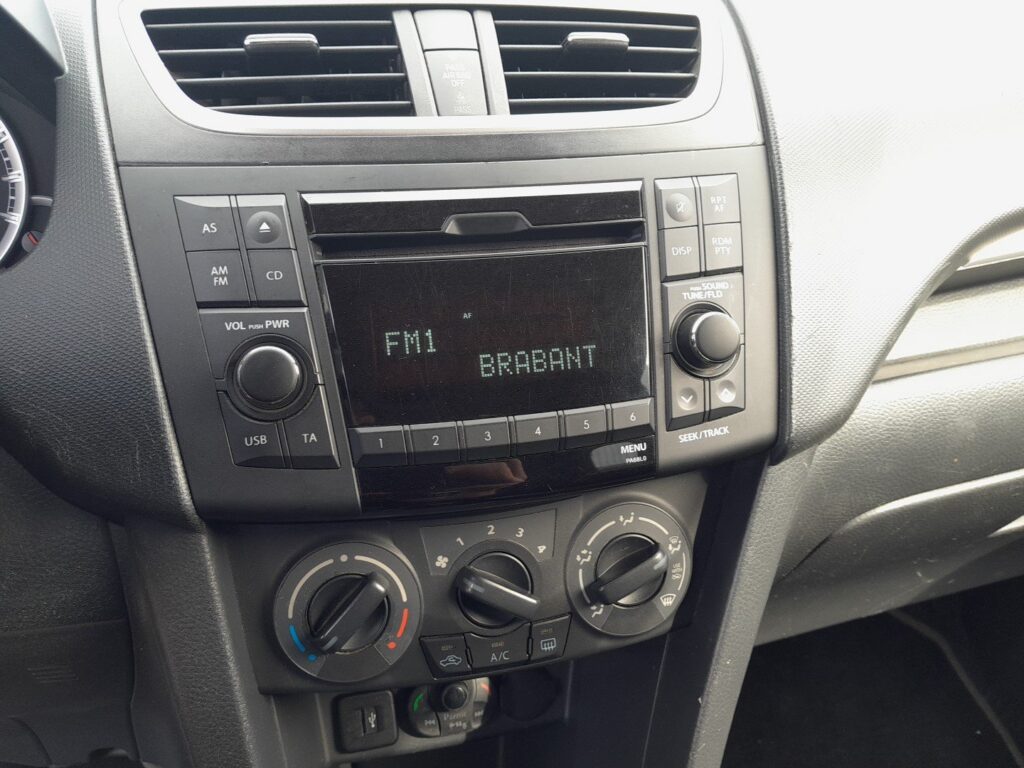
Which System Your Swift Has
The Mk3 Swift was sold in several trims and only the higher ones got a screen. The base SZ2 came with a simple radio/CD head unit, four speakers and a USB socket — no touchscreen at all. The SZ3 could be optioned with navigation, while the SZ4 and the special-edition SZ-L got the 6.1-inch colour touchscreen sat-nav as standard. That touchscreen is the Bosch-built unit Suzuki later branded SLDA, and it is the one that can freeze. If your car has only push-buttons and a small monochrome display, there is nothing to “reboot” in the touchscreen sense — pulling the ignition or the radio fuse is the only reset that applies.
Soft Reset (Reboot the Touchscreen)
- Switch the ignition to ACC/ON so the screen is powered — do this parked, not while driving.
- Press and hold the Power/Volume knob (the round dial you press to mute and turn to adjust volume) for about 10 to 15 seconds.
- Keep holding until the screen goes black and the Suzuki logo reappears.
- Release. The unit finishes booting in roughly half a minute and the home screen returns.
Safe — No Data Lost
This reboot is completely safe. Your radio presets, paired Bluetooth phones, and any saved navigation destinations all survive — holding the knob simply power-cycles the head unit, exactly like restarting a phone. You can do it as often as the screen plays up.
If It Stays Frozen
- Hold the knob longer — up to a full 20 seconds — if the first attempt didn’t bring up the logo.
- Switch off, lock the car, and leave it for 5–10 minutes. Once the car sleeps, the unit powers down fully, which clears a deeper hang that a quick reboot won’t.
- Pull the audio fuse for 30 seconds. If the screen is so locked that the knob does nothing, removing the head-unit fuse (or briefly disconnecting the battery) forces a cold restart. Note that the radio may ask for a security code afterwards.
- Unpair and re-pair your phone if the freeze only happens on Bluetooth calls or streaming — a corrupt pairing is a common trigger on this unit.
Factory Reset (Erases Data)
Only needed if the touchscreen is repeatedly unstable. With the screen responsive, go to Settings → Reset to factory settings and confirm. This wipes presets, pairings, and saved destinations and returns the unit to how it left the factory, so always try the soft reset first. On the basic SZ2 radio there is no such menu — clearing it means pulling the fuse and re-entering the radio code.
Frequently Asked Questions
My base Swift has no touchscreen — how do I reset it?
The SZ2 has a basic radio/CD unit with no software to freeze. If it misbehaves, switch the ignition off and on, or pull the audio fuse for 30 seconds; you may then need to re-enter the radio security code.
Will rebooting delete my saved sat-nav destinations or presets?
No. Holding the Power/Volume knob only restarts the unit. Presets, Bluetooth pairings, and saved destinations are kept — only the factory-reset menu erases them.
Which Swift trims actually have the touchscreen?
The 6.1-inch colour touchscreen sat-nav was standard on the SZ4 and SZ-L and an option on the SZ3. The entry-level SZ2 has only a radio/CD head unit.
Why does my Swift’s screen freeze on Bluetooth?
A corrupt phone pairing is the usual cause on this Bosch unit. Reboot the screen, then delete the phone from the list and pair it again fresh.
Will the radio ask for a code after I pull the fuse?
It can. The Mk3 head unit may request the four-digit security code stored in your owner’s wallet or service book once power is restored. Keep it handy before disconnecting anything.
If a warning light or stored fault appears alongside the freeze, read the code first on autodtcs.com.
Independent guide — not affiliated with Suzuki. Always follow your official service manual and safety precautions. Read our full disclaimer.