These instructions apply to the Toyota iQ Mk1 (J10) 2009-2015.
For other models, please choose your vehicle here.
A weak remote on the Toyota iQ (J10, 2009–2015) — where you have to stand close to lock or unlock — usually just needs a fresh coin cell. It’s a two-minute job with a small screwdriver, and no re-programming is needed afterwards.
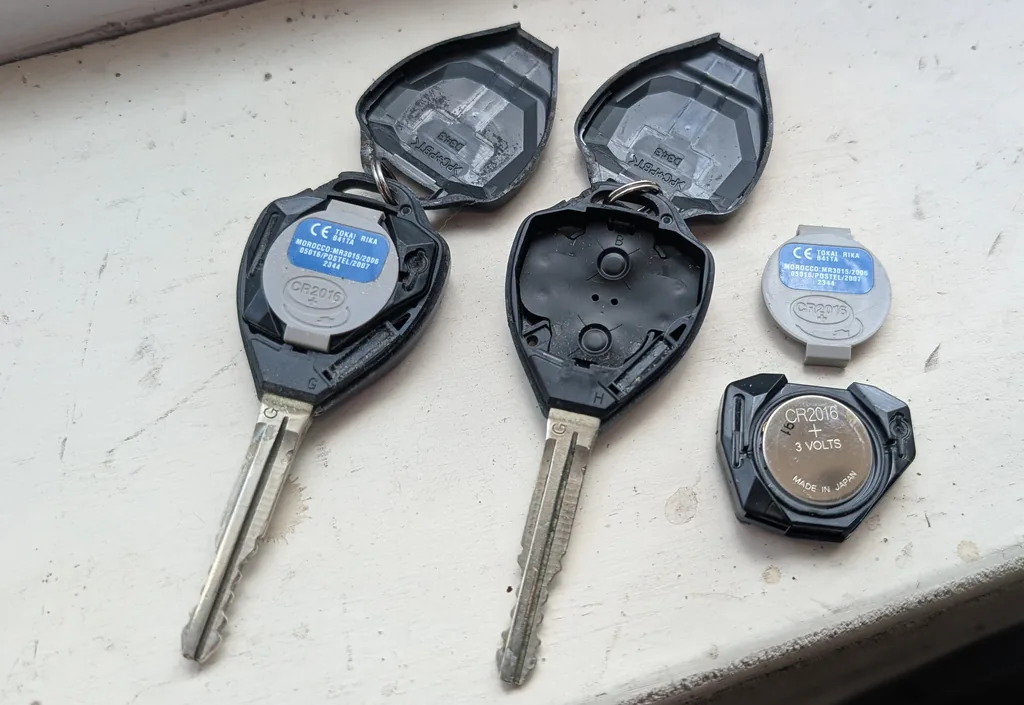
Which Battery
The bladed remote key (with a twist ignition) takes a CR2016 3 V lithium cell. The keyless smart key (push-button start) takes a CR1632. Both fit positive (+) side up.
How to Replace It — Bladed Remote
- Insert a small flat screwdriver into the case seam and gently prise the two halves apart.
- Lift out the transmitter section and remove the old CR2016 from its holder.
- Fit the new cell positive (+) up, the same way the old one sat.
- Clip the case back together and check the remote locks and unlocks the car.
Smart Key (Push-Button Start)
If your iQ has keyless entry and a start button, press the release catch and slide out the mechanical key, then insert a screwdriver to unclip the cover and swap the CR1632 the same way — positive up. Take care not to touch the terminals.
Does It Need Programming?
No — a battery swap doesn’t affect pairing, so the remote keeps working immediately. A lost or additional key has to be cut and programmed to the car, either through the on-board registration procedure with an existing working key or by a Toyota dealer.
Frequently Asked Questions
What battery does the Toyota iQ key take?
The bladed remote uses a CR2016; the keyless smart key uses a CR1632. Both are 3 V lithium coin cells fitted positive-side up.
My remote still won’t work with a fresh cell.
Re-open it, check the cell is the right way up and the contacts are clean. If it’s still dead the transmitter may have failed and need replacing and programming.
For fault codes, look them up on autodtcs.com.
Independent guide — not affiliated with Toyota. Always follow your official service manual and safety precautions. Read our full disclaimer.