These instructions apply to the Toyota RAV4 Mk5 (XA50) 2019-Present.
For other models, please choose your vehicle here.
If the touchscreen in your Toyota RAV4 (Mk5/XA50, 2019–Present) has frozen — locked on the map, ignoring touch, or stuck after a long drive — a forced reboot of the head unit clears it without losing any settings. This is the same trick Toyota technicians use, and you can do it from the driver’s seat.
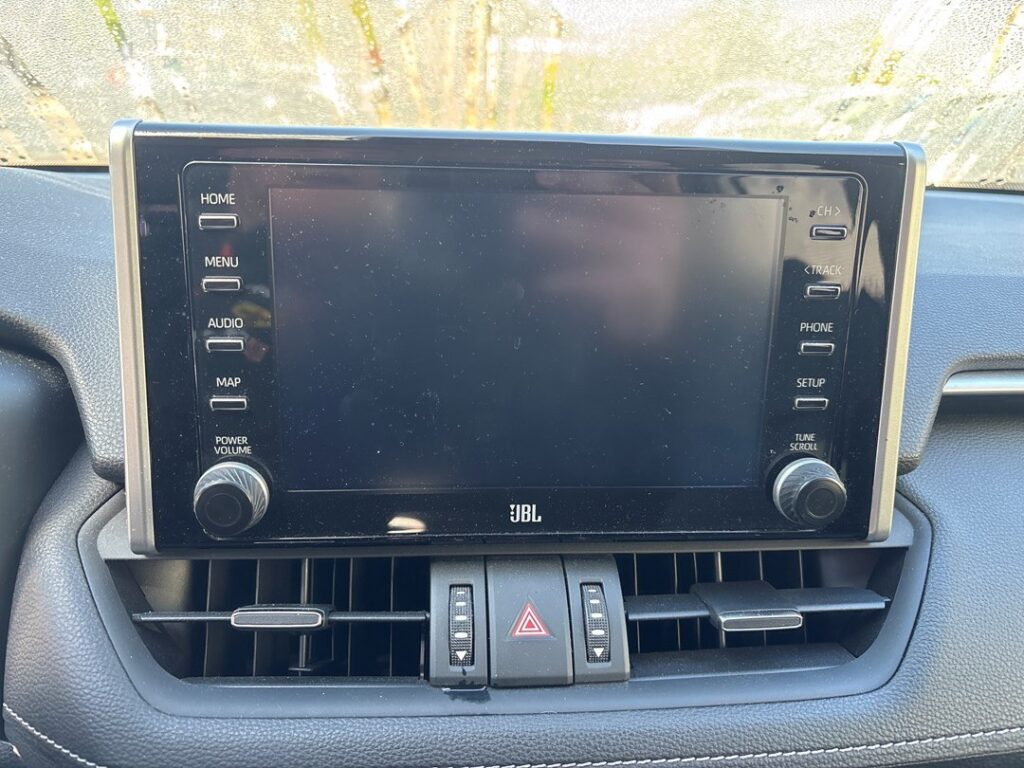
Which System Your RAV4 Has
The XA50 RAV4 uses Toyota Touch 2 with Go in Europe (sold as Entune 3.0 in the US) on the 7-inch or 8-inch unit, with a rotary PWR-VOL knob beside the screen. Later facelift cars (roughly 2022 onward) moved to the newer Toyota Smart Connect system. The earlier Touch 2 / Entune 3.0 unit is known to freeze or lag after extended use, which is exactly what the reboot is for.
Soft Reset (Reboot the Screen)
- Set the ignition to ON — or press the Start button twice without pressing the brake so the car is on but not running. Stay parked.
- Press and hold the PWR-VOL knob beside the screen for about 12 to 15 seconds.
- Keep holding until the display goes black and the Toyota logo reappears.
- Release. The system reboots and returns to the home screen in about half a minute.
If the knob alone doesn’t do it, some RAV4 units reboot when you hold the Audio and Volume-Down buttons together for around 12 seconds.
Safe — No Data Lost
The reboot keeps everything — radio presets, paired phones, navigation favourites and settings all survive. The long press only power-cycles the unit, just like restarting a phone, so you can repeat it any time the screen hangs.
If It Stays Frozen
- Hold the PWR-VOL knob the full 15 seconds, or try the Audio + Volume-Down combination.
- Switch off, lock the car, and walk away for 5 minutes. Letting it sleep cuts power to the unit and clears a deeper lock-up.
- Apply a software/map update. Toyota issued updates for the RAV4’s freezing behaviour; a dealer can flash the latest version, which is the most reliable long-term cure.
- Reset Bluetooth — delete the phone from the car and the car from the phone, then re-pair — if the hang follows a phone connection.
Factory Reset (Erases Data)
For a unit that keeps freezing, a factory reset clears corrupt data. On Touch 2 with Go / Entune 3.0 the path is Settings → System → Reset (Factory Data Reset), or Setup → General → Delete personal data. It may ask you to confirm twice. This wipes presets, pairings, favourites and logins, so try the reboot and an update first.
Frequently Asked Questions
How long do I hold the knob on a RAV4?
About 12 to 15 seconds — longer than on some Toyotas. Hold until the screen goes black and the Toyota logo appears, then let go.
Will the reset erase my saved stations and phone?
A reboot keeps them. Only the factory reset in the Settings menu erases presets, pairings and favourites.
My screen freezes after long drives — is that normal?
It’s a known trait of the Touch 2 / Entune 3.0 unit in the Mk5 RAV4. A reboot clears each event; a dealer software update reduces how often it happens.
What’s the Audio + Volume-Down trick?
On some RAV4 head units, holding the Audio button and the Volume-Down button together for about 12 seconds forces a full reboot — useful if the PWR-VOL knob hold doesn’t respond.
My 2022 RAV4 has a different menu — why?
Facelift cars use the newer Smart Connect system, so the factory-reset path reads Settings → General → Factory reset. The knob reboot still works the same way.
If a fault code accompanies the freeze, identify it first on autodtcs.com.
Independent guide — not affiliated with Toyota. Always follow your official service manual and safety precautions. Read our full disclaimer.