These instructions apply to the Toyota RAV4 Mk4 (XA40) 2013-2018.
For other models, please choose your vehicle here.
The Toyota RAV4 XA40 (A4, 2013–2018) — the fourth-generation RAV4, sold across petrol (2.0 / 2.5 ZR-FAE / FE), diesel (2.0 / 2.2 D-CAT D-4D), and hybrid (2.5 5S-A25A) variants and built in Tahara (Japan) and Saint-Petersburg (Russia) for European markets — uses one of two reset paths depending on whether your RAV4 has the multifunction steering-wheel controls with the central Maintenance System menu, or the simpler trip-recorder method on basic Active trim. Both are owner-accessible without any diagnostic tool.
When to Reset the Service Indicator
- After completing an oil and filter change.
- If the spanner / wrench icon with “Maintenance” or “Service” message appears at startup.
- If you bought the RAV4 second-hand and the previous owner didn’t clear the indicator.
⚠️ On the XA40 RAV4 the service indicator refers to oil change (consistent with Toyota’s policy across the XA40 generation). Other items (brake fluid every 2 years, coolant every 10 years on Toyota Super Long Life Coolant, CVT fluid where fitted) aren’t tracked by the cluster — those follow the printed service schedule.
Getting Ready
- Park on a level surface with the engine off. Complete the actual oil and filter change before the reset.
- Identify your RAV4’s trim by looking at the steering wheel:
- Multifunction steering wheel with up/down rocker and OK button on the right spoke = Type 1 (most Icon / Excel / Hybrid trims).
- Steering wheel without multifunction controls (basic Active trim, very early 2013 cars) = Type 2.
- For Type 2 (no multifunction wheel), locate the DISP button on the cluster or wiper stalk — this is the button used to cycle the trip-computer display.
Tools Required
None for the reset itself. For the oil change: fresh Toyota-spec oil — 0W-20 ACEA C2 / Toyota Genuine 0W-20 for the 2.0 / 2.5 petrol engines (ZR series), 5W-30 ACEA C2 / C3 for the D-4D diesel; a new spin-on filter (cartridge type — different parts per engine); a 14 mm sump-plug socket (petrol) or 17 mm (D-4D); a torque wrench rated to about 30 Nm (petrol) or 40 Nm (D-4D).
Type 1 — Multifunction Steering Wheel (Most XA40 Trims)
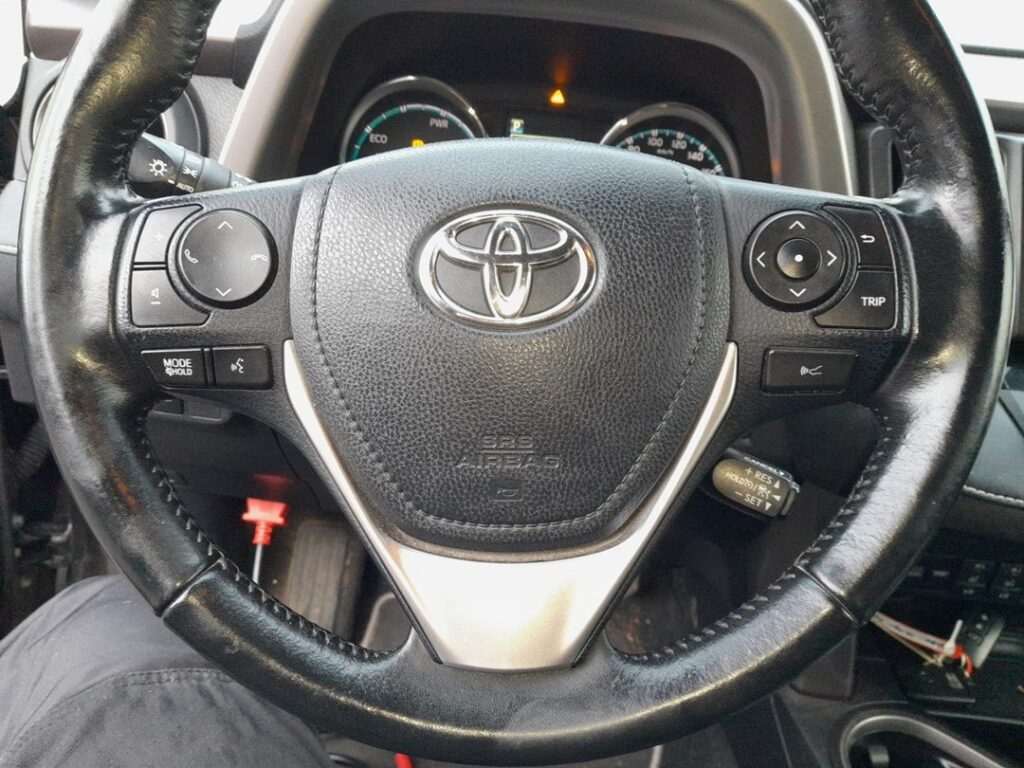
- Turn the ignition ON with the engine off. On Smart Key trims press START/STOP twice without a foot on the brake (first press → ACC, second press → IGNITION ON without cranking).
- Wait for the cluster and the multi-information display (MID) between the two main dials to fully wake.
- Using the steering-wheel up/down rocker, scroll through the MID menu.
- Continue scrolling until “Maintenance System” is highlighted.
- Press OK to confirm and enter the Maintenance System menu.
- Follow the on-screen instructions. The MID prompts you through the reset — typically selecting the service item to reset (Engine oil) and confirming with OK.
- When the reset commits, the MID shows the message “Resetting maintenance data”.
- The procedure is complete. Switch the ignition off to exit.
Type 2 — Basic Trim Without Multifunction Wheel
If your RAV4 has a steering wheel without the up/down rocker, use the DISP-button method. This is the same trip-recorder + ignition sequence used on the smaller Yaris / Auris cars of the same era.
- Turn the ignition ON.
- Press the DISP button (on the cluster or wiper stalk) to cycle the trip-computer display.
- Stop on TRIP A.
- Turn the ignition OFF.
- Press and hold the DISP button.
- While still holding, turn the ignition ON.
- Keep holding. A countdown begins.
- Wait until the display shows “000000”.
- Release the button. The reset is complete.
- Switch the ignition off.
Verify the Reset Worked
Switch the ignition off, wait 30 seconds, then cycle ignition back on. The spanner / maintenance warning at startup should be gone. On Type 1, scroll back through the MID to Maintenance System — the next-service-distance value should now show the full new interval. Typical XA40 intervals: 10,000 miles (15,000 km) or 12 months on petrol and D-4D diesel variants, 10,000 miles or 12 months on the Hybrid (with 5S-A25A engine).
When It Won’t Cooperate
- (Type 1) Maintenance System isn’t an option in the MID menu. Cycle through every menu entry — on some trims it’s grouped under “Vehicle Info” rather than as a top-level item. Also check that the cluster’s main menu is on the standard view (not in Settings or Trip details — there’s no Maintenance System inside those sub-menus). If still not visible, the cluster firmware may be a pre-mid-2014 build that placed it differently — try Type 2 as a fallback.
- (Type 1) OK button doesn’t confirm. The XA40 multifunction OK button has a slightly long press requirement — about 1 second. A quick tap might just refresh the screen. Hold for a full second.
- (Type 2) Display doesn’t reach 000000. The button was released too soon. The countdown takes 5-8 seconds — keep the button held throughout. If you release at 4 seconds, the reset doesn’t commit and you’ll need to start over.
- Reset works but the spanner returns on the next start. Cluster EEPROM didn’t commit. Almost always a marginal 12V battery — load-test. The XA40’s hybrid variant has a separate auxiliary battery; that’s the one to test, not the high-voltage battery.
- RAV4 Hybrid — does the procedure differ? No. The XA40 Hybrid (5S-A25A engine, 2015 onwards for European markets) uses the same MID and the same Maintenance System reset path as petrol/diesel variants. The hybrid system’s separate “ready” state doesn’t affect the reset — you can do it with the car in Ready mode or with ignition only on.
- 2015 facelift — does anything change? The 2015 facelift updated the front-end styling and added the Touch 2 with Go infotainment but kept the cluster firmware unchanged. Procedure unchanged.
- I have a Toyota Touch 2 touchscreen — is there a faster path? Yes, on touchscreen-equipped XA40 trims you can also access Maintenance through: Touchscreen → Car → Maintenance → Reset. This is an alternative to the Type 1 cluster-MID path. Both reach the same maintenance counter.
Frequently Asked Questions
What does the spanner symbol on the Toyota RAV4 mean?
On the XA40 RAV4 the spanner / wrench icon is the oil-change reminder. It’s a mileage timer set by the cluster. It does not indicate an engine fault. Engine faults trigger the orange check-engine light (an engine-outline icon, a different shape entirely).
How often does the XA40 RAV4 service indicator come up?
Toyota’s official European-market schedule for the XA40:
- 2.0 ZR-FAE petrol: 10,000 miles (15,000 km) or 12 months.
- 2.5 ZR-FE / A25A-FXS petrol: 10,000 miles (15,000 km) or 12 months.
- 2.0 D-4D diesel: 10,000 miles (15,000 km) or 12 months.
- 2.2 D-4D diesel: 12,500 miles (20,000 km) or 24 months.
- 2.5 Hybrid (5S-A25A): 10,000 miles (15,000 km) or 12 months.
UK severe-service / short-trip driving typically halves the petrol interval. The cluster doesn’t auto-adjust.
Does the reset clear engine fault codes?
No. The reset zeros the maintenance counter only. Engine codes (P0xxx etc.) need a scan tool. For DTC interpretation see autodtcs.com.
What about the XA50 RAV4 (2019+)?
The fifth-generation RAV4 (XA50, 2019 onwards, all-hybrid in Europe) uses the new Toyota cluster and the touchscreen-driven reset path: Toyota Touch → Car → Service → Maintenance Reset. Different procedure — we’ll publish a dedicated XA50 guide.
And the XA30 RAV4 (2005–2013)?
The XA30 uses an older cluster with a simpler trip-button-only sequence (similar to the contemporary Auris E15). Different procedure — see our forthcoming XA30 guide.
Is the RAV4 reset the same as the Toyota Auris E18?
Very similar. The Toyota Auris E18 (2012–2018) shares many cluster components with the XA40 RAV4 and uses essentially the same Type 1 Maintenance System menu path. The same procedure works on both with minor cosmetic differences.
4WD RAV4 with the Dynamic Torque Control AWD — same procedure?
Yes. The 4WD drivetrain adds entries to the MID for the AWD lock and the torque-split display but doesn’t change the maintenance-reset path.
For DTC code interpretation on Toyota vehicles see autodtcs.com.
Independent guide — not affiliated with Toyota. Always follow your official service manual and safety precautions. Read our full disclaimer.