These instructions apply to the Toyota Verso Mk1 (AR20) 2009-2018.
For other models, please choose your vehicle here.
After an oil change, the Toyota Verso (AR20, 2009–2018) keeps showing its maintenance/oil-service reminder until you reset it. It is a job you can do from the driver’s seat with the trip meter button — no diagnostic tool needed — and the exact steps depend on whether your Verso has a twist-key ignition or a Start/Stop button.
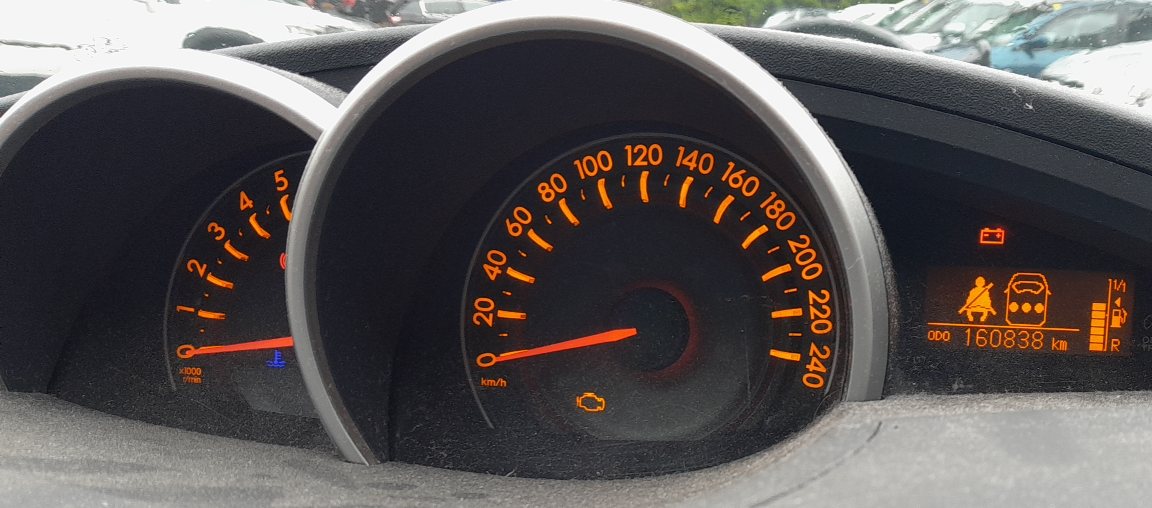
What the reminder covers
On the Verso the service indicator refers to the engine-oil interval only. Reset it every time the oil is changed, whether or not the reminder was already showing, so the count starts again from the correct point.
Reset — cars with a twist key (no keyless/Start-Stop)
- Turn the ignition on and press the trip meter button so the odometer shows the trip/total display.
- Turn the engine off.
- Press and hold the trip meter button.
- While holding it, turn the ignition key to position ‘2’ (ignition on, engine not running).
- Keep holding until the display counts down and shows 000000.
- Release the button — the reminder is reset.
Reset — cars with keyless / Start-Stop
Do not press the brake or clutch during this procedure, or the engine will start.
- Press the Start/Stop button twice (without the brake) to switch the ignition on.
- Press the trip meter button so the information shows on the odometer.
- Press the Start/Stop button once to switch the ignition off.
- Press and hold the trip meter button, then press the Start/Stop button twice to switch the ignition back on.
- Keep holding until the display reaches 000000, then release.
- Press the Start/Stop button once to switch off. The system is reset.
Frequently asked questions
Which button resets the Toyota Verso service light?
The trip meter button next to the instruments — the same one that switches the trip display. Hold it while turning the ignition on until the display shows 000000.
Does resetting the light change the oil?
No. The reminder is only a counter. Change the oil and filter first, then reset so the next interval is measured correctly.
Do I hold the brake during the keyless reset?
No — pressing the Start/Stop button without the brake only switches the ignition on. Holding the brake would start the engine and interrupt the procedure.
My Verso is a diesel — anything different?
The trip-button reset is the same. Diesel DPF and oil-dilution monitoring is separate and self-manages; the maintenance reminder still resets as above.
Doing the oil change usually means disconnecting the battery too — see our Verso battery guide. If a warning light stays on, read the code — find it on our sister site autodtcs.com.
Independent guide — not affiliated with Toyota. Always follow your official service manual and safety precautions. Read our full disclaimer.