These instructions apply to the Toyota Yaris Mk3 (XP130/P13) 2011-2020.
For other models, please choose your vehicle here.
The Toyota Yaris (Mk3/XP130, 2011–2020) hides a genuine combination-meter test mode in its instrument cluster — an owner-accessible self-check that needs no scan tool, no garage and no dashboard menu digging. It is the same routine Toyota technicians use to confirm the gauges, the warning lamps and the LCD odometer panel are all working, and you trigger it with nothing more than the trip-reset stalk and the ignition switch.
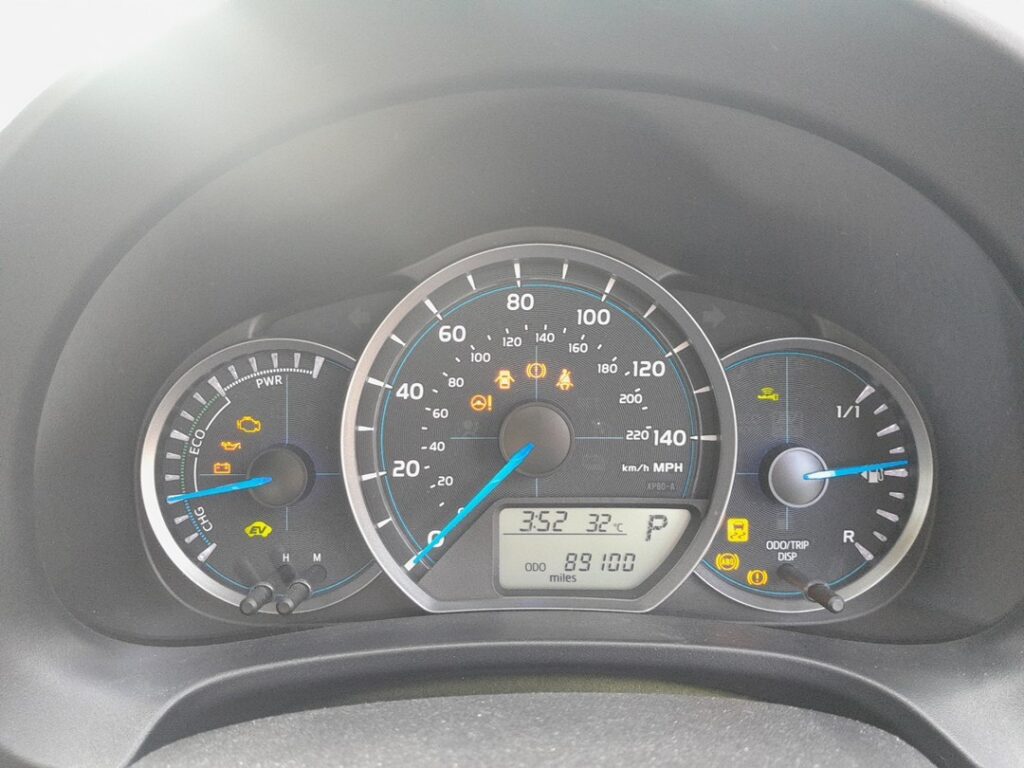
What the hidden meter test mode does
Toyota calls this the combination-meter “operation check”. When you enter it, the cluster sweeps both needles — the speedometer and the tachometer (or speedometer and fuel/temperature pointers on lower trims) — from their resting stop up to full scale and back down. At the same time every segment in the LCD area lights up (odometer digits, trip display, gear indicator, dot-matrix block) and the warning lamps flash on so you can spot any dead bulb or LED. It is a fast, visual way to prove the meter hardware is healthy before you start chasing a “dead gauge” or a suspected speedometer fault.
The Mk3 Yaris uses a key barrel on most variants, so the entry relies on physically turning the key. A handful of late high-spec cars use Smart Entry with a START button — those follow the push-button variant noted below.
How to enter the test mode
- Sit in the car with the ignition fully OFF and the engine not running. Make sure the display is currently showing the odometer (not a trip reading).
- Press and hold the trip-reset stalk — the slim button beside the speedometer that you normally tap to switch ODO/TRIP A/TRIP B.
- While still holding it, turn the ignition key to ON (the position just before START, where all the warning lights normally illuminate). On Smart-Entry cars, press the ENGINE START STOP button twice without touching the brake pedal to reach IGNITION ON.
- Keep the trip button held for a couple of seconds after the cluster powers up, then release it.
The cluster now runs its self-test. You will see the needle(s) drive smoothly to maximum and return, the LCD flood every segment, and the warning icons cycle. If a needle sticks part-way, a segment stays blank or an indicator never lights, that pointer, panel area or lamp is the suspect part.
How to exit
Turn the ignition back to OFF (or press ENGINE START STOP once on Smart-Entry cars). The next time you switch to ON normally the cluster behaves as usual — the test mode is not sticky and leaves no settings changed. Nothing is reset and no service interval is altered by running it.
Frequently Asked Questions
Does this work on the petrol and the Yaris Hybrid Mk3? Yes. The Hybrid uses the same XP130 cluster family; on the Hybrid the tachometer position is occupied by the ECO/POWER hybrid system indicator, which also runs through its full arc during the test.
Will the test mode clear a warning light or a fault code? No. It only exercises the display hardware. To read or clear stored trouble codes you still need an OBD-II scan tool on the port under the dash.
The needles sweep but one warning lamp never lights — is that bad? It usually means a single LED or bulb has failed in the cluster. The gauge itself is fine; only that indicator needs attention.
I have a key, not a START button — do I still hold the trip switch the same way? Yes. Hold the trip-reset stalk first, then turn the key from OFF to ON. The order matters: button down before the ignition comes up.
Could running this damage the meter? No. It is a factory diagnostic the cluster is designed to perform, and it does nothing to the engine or hybrid system because the car is only in ignition-ON, not started.
If the self-test reveals a genuine cluster warning rather than a dead segment, decode the underlying trouble code first at autodtcs.com before booking any work.
Independent guide — not affiliated with Toyota. Always follow your official service manual and safety precautions. Read our full disclaimer.