These instructions apply to the Toyota Yaris Mk3 (XP130/P13) 2011-2020.
For other models, please choose your vehicle here.
The Toyota Yaris (Mk3/XP130, 2011–2020) spanned a long run and a 2014 and 2017 facelift, offered both with Smart Entry & push-button start on higher grades and with a conventional bladed turn-key on entry models. The right fix for a dead fob depends on which system your XP130 has. Here is the full procedure for both.
Push-Button Yaris: Start It With a Dead Fob
On a Smart Entry XP130 the fob authorises the car by radio. A flat coin cell drops that link — the dash shows a key warning — but the car can still read the chip inside the fob up close.
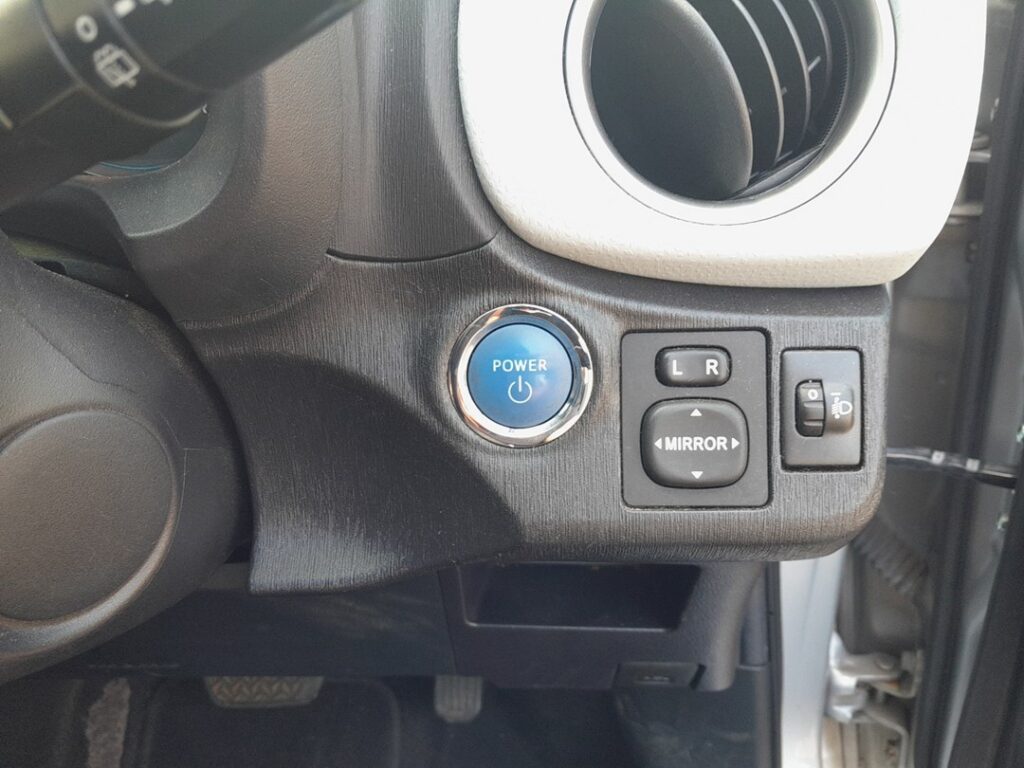
- Get in first (mechanical-key steps below) and sit in the driver’s seat with the door shut.
- Press the brake pedal fully and hold it.
- Hold the fob flat against the START/STOP button, badge face to the button, until you hear a beep.
- With the brake still down, press START. The Yaris cranks and starts (or, on the hybrid, powers up to READY).
If nothing happens, reposition the fob square over the button, or flip it and try the other face — the read coil behind the button only reaches a centimetre or two.
Unlock With the Hidden Mechanical Key
A dead fob won’t open the doors by radio, so use the blade inside the Smart Key.
- Slide the catch on the fob and pull the mechanical key out.
- At the driver’s door, the lock cylinder sits behind a small cover on the handle. Lever the cover off with the blade tip to reveal the keyhole.
- Insert and turn to unlock. The alarm may sound until you start the car.
Entry-grade XP130s with the bladed turn-key are simpler: the same key unlocks the door and turns the ignition barrel on the column, so a flat fob battery only disables remote locking — the car starts as it always does.
Why Touching the Fob to the Button Works
An induction antenna behind the start button powers and reads the passive transponder built into the key — a chip with no battery, woken by the antenna’s field. The dead coin cell only kills the longer-range radio for hands-free unlocking; the close-range immobiliser handshake still completes. That is the official fallback Toyota fits to every Smart Key Yaris.
Replace the Coin Cell
The XP130 smart key lasts roughly two to three years on a coin cell.
- Pull the mechanical key out to expose the case seam.
- Twist a coin or small flat screwdriver in the slot to part the two halves.
- Check the old cell first: XP130 fobs commonly take a CR2032, but some Yaris remotes of this era use a CR2025 or CR1632 — all 3V lithium, and the print on the old battery is the only reliable guide. Fit the new one positive (+) side the same way up.
- Handle the cell by its rim, then click the case shut.
Stand by the car and press lock once; the buttons should respond again.
Frequently Asked Questions
How do I tell if my Yaris has Smart Entry or a plain key? A Smart Entry car has a chunky fob and a START/STOP button on the dash. A turn-key car has an ignition barrel on the column — there the dead fob only affects remote locking.
Which battery does my Yaris fob take? It varies with the fob version across the 2011–2020 run. Open the fob and read the number printed on the old coin cell rather than guessing.
The fob beeps at the button but it still won’t start. Press the brake fully and push START promptly after the beep. No beep at all? Try the other face of the fob hard against the button.
Where is the door keyhole? Behind a small cap at the rear of the driver’s door handle; only that door has a barrel.
Could a weak 12V battery cause the warning? Yes — if a fresh coin cell doesn’t restore keyless entry, test the main 12V battery.
If a warning light stayed lit after you drove off, you can decode the exact fault on our sister site autodtcs.com to see whether it relates to the smart-key system.
Independent guide — not affiliated with Toyota. Always follow your official service manual and safety precautions. Read our full disclaimer.