These instructions apply to the Volkswagen Up Mk1 (AA) 2011-2023.
For other models, please choose your vehicle here.
Every Volkswagen up! fitted with the small Composition radio hides a factory service menu. It shows the head-unit firmware version, live radio-signal and antenna readings, and module status — the same data a technician sees. The identical unit is fitted to the Skoda Citigo and SEAT Mii, so these steps work on all three. The screenshots here are from a Polish-language car, but the SETUP-and-scroll-to-bottom route and the menu layout are identical on English, German or Dutch up!, Citigo and Mii units — only the wording changes with the car’s set language.
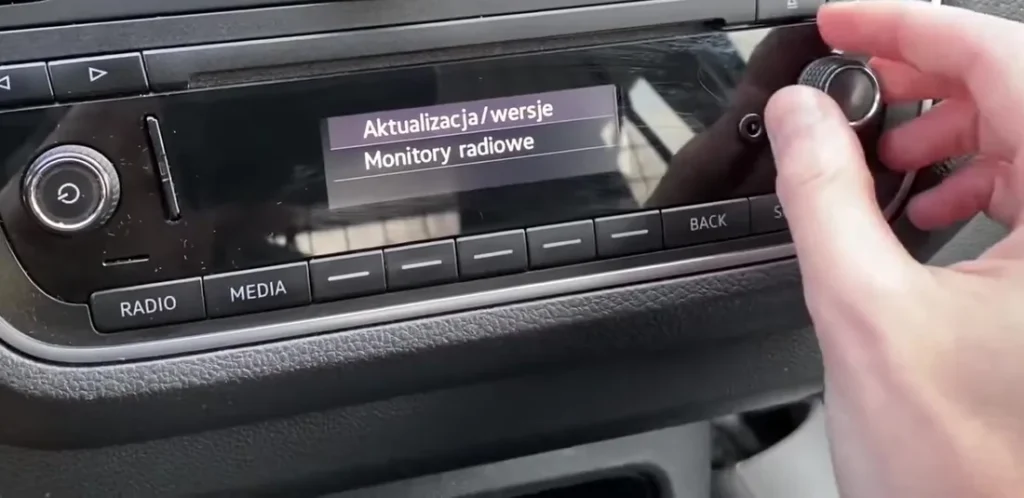
What this hidden menu shows
The menu is split into two entries that sit below the normal Radio, Media and Screen options:
- Aktualizacja/wersje (Updates/versions) — the head-unit part number and its software (SW) build, so you can check the firmware version.
- Monitory radiowe (Radio monitors) — live FM frequency, station name, which antenna is active (ANT: A or B) and the received field strength (FS), useful when chasing poor reception.
- Module / component-protection status — a table (Urzadzenie / Zakres) showing whether the radio is matched to the car, listing modules such as MU and ENGECU as OK or Nie OK (Not OK).
- USB / SD card status — whether an inserted USB stick or SD card is being read.

How to open it
- Switch the ignition on, or press the left power knob, so the radio is fully awake (not in standby).
- Press the SETUP button at the bottom-right of the radio to open the settings list.
- Turn the right-hand control knob to scroll to the very bottom of the list, past Radio, Media and Screen (Ekran).
- Two extra lines appear: Aktualizacja/wersje and Monitory radiowe. Turn the knob to highlight one, then push the knob to open it.
- Read the screen. Press BACK to step out, or turn the ignition off and on to leave the menu fully.
If it will not open
- Make sure the radio is fully on, not in standby, before pressing SETUP.
- If the two extra lines are not listed at the bottom, press and hold SETUP for several seconds until the list refreshes and they appear.
- The wording follows the car’s set language; on Polish cars the entries read Aktualizacja/wersje and Monitory radiowe (Updates/versions and Radio monitors).
- You are only reading values here, but do not confirm any coding, login or reset prompt you do not understand.
FAQ
Is this menu safe to open?
Yes. It only displays information — firmware, radio signal and module status. Look around freely; just do not enter or confirm any coding or login prompt you do not understand.
What does “Nie OK” mean next to MU or ENGECU?
It is Polish for “Not OK” on the module-status (component-protection) check. On a used radio moved between cars it often reads Nie OK until the unit is coded to that car; it does not stop the radio playing.
Does this work on the Skoda Citigo and SEAT Mii?
Yes. All three share the same Composition head unit, so the SETUP-menu route is identical — only the on-screen wording changes with the car’s language.
How do I check my radio’s firmware version?
Open Aktualizacja/wersje (Updates/versions). It lists the head-unit part number and the software (SW) build — the long string ending in something like SKPQm_P6340L.
Can I improve radio reception from here?
Not directly, but Monitory radiowe shows which antenna is active (ANT: A or B) and the field strength, which helps you tell a genuinely weak signal from an antenna or amplifier fault.
If a warning light appears alongside a radio or electrical fault, you can look up the stored trouble code on autodtcs.com to see what the car has logged.
Independent guide — not affiliated with Volkswagen. Always follow your official service manual and safety precautions. Read our full disclaimer.