These instructions apply to the Toyota Verso Mk1 (AR20) 2009-2018.
For other models, please choose your vehicle here.
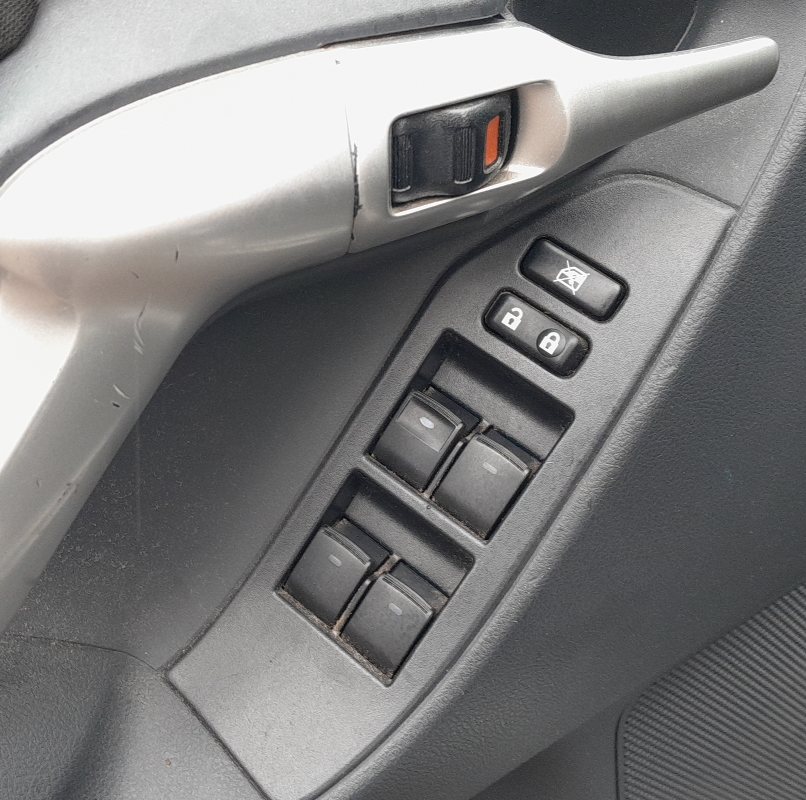
If the automatic (one-touch) up or down on your Toyota Verso (AR20, 2009–2018) has stopped working — or a window bounces back down as it reaches the top — the power-window motor needs re-initialising. This is normal after the 12 V battery has been disconnected or gone flat, and it takes under a minute with no tools.
Why it happens
Each window motor has a pulse sensor that remembers the fully-open and fully-closed positions. When power is cut — a battery change, a disconnect or a blown fuse — that memory is lost. Until you re-initialise, the AUTO one-touch, the jam-protection (anti-trap) and the remote window functions do not work, and the anti-trap can make the glass bounce back down near the top.
How to re-initialise a window
- Start the car (or turn the ignition on) and close all the doors.
- Using the switch on the door, press and hold it DOWN and open the window fully; keep holding for a couple of seconds at the bottom, then release.
- Lift and hold the switch UP and close the window fully; keep holding for a couple of seconds after it is shut, then release.
- Test it: one tap up and one tap down should now run the window automatically, and it should no longer bounce back.
Repeat for each window
Each window is learned on its own switch. Repeat the down-then-up hold routine at the passenger and rear doors until every one-touch window works again from the master switch.
If it still won’t learn
The usual cause of failure is releasing the switch too soon — hold it for a full couple of seconds at both the bottom and the top. If a single window still refuses, check its fuse and that the glass slides freely by hand; a sticking channel can stop the motor completing the learn.
Frequently asked questions
Why does my Toyota Verso window go back down when it nearly closes?
The anti-trap reference was lost (usually after a battery disconnect), so the window auto-reverses near the top. Re-initialise it with the hold-open, hold-closed routine and it will close normally.
Why did AUTO stop working after a battery change?
Disconnecting the battery wipes the window’s stored positions. The switches still work manually, but one-touch and jam protection return only after re-initialising.
Do I have to do every window?
Only the ones affected — but it is quickest to run the routine on all four while you are at it, starting with the driver’s door.
Lost one-touch almost always traces back to a battery disconnect — see the safe procedure in our Toyota Verso battery guide.
Independent guide — not affiliated with Toyota. Always follow your official service manual and safety precautions. Read our full disclaimer.