These instructions apply to the Mazda CX-5 Mk3 (KM) 2025-Present.
For other models, please choose your vehicle here.
The third-generation (KM) Mazda CX-5 uses a direct tyre-pressure monitoring system with an ID-coded sensor in each wheel. It relearns automatically, so there is no reset button and no menu SET function — you set the pressures, wait, then drive to let the sensors re-register.
Before you start
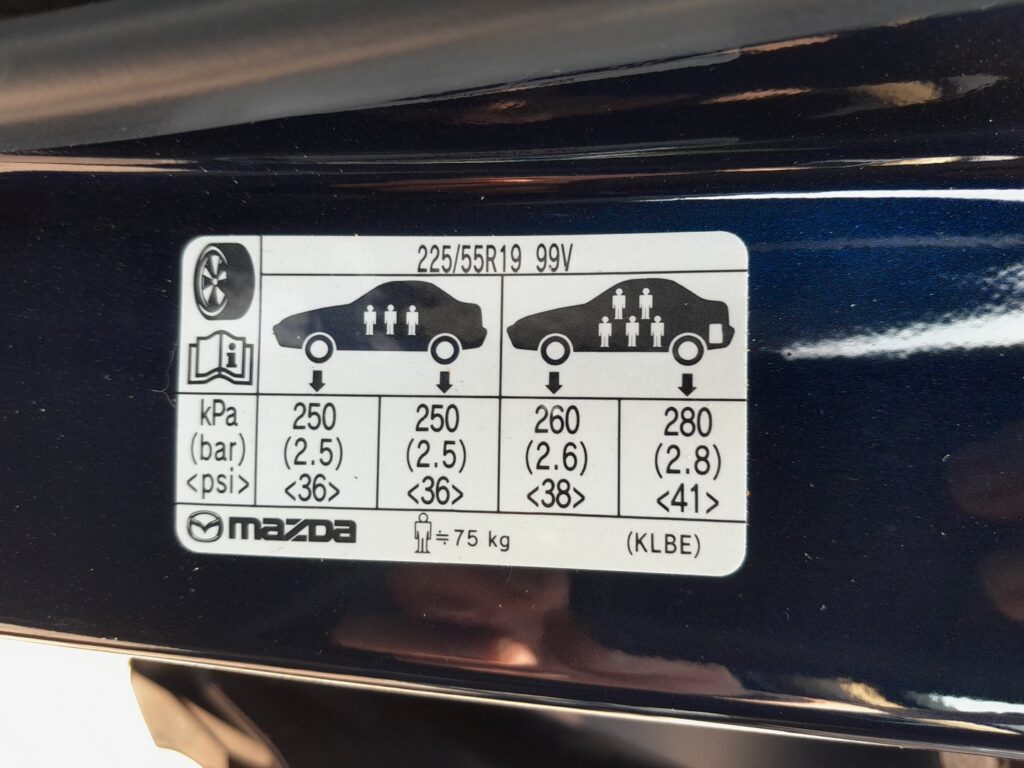
- Have an accurate gauge and the placard pressures from the driver’s door label to hand.
- Brand-new sensors cannot self-register — they must be coded by a dealer or specialist first.
- Allow a clear run of road where you can hold a steady speed for a few minutes.
- Adjust every tyre, including any that were rotated or swapped, to the placard pressure shown on the driver’s door pillar.
- Switch the ignition on but leave the vehicle parked and stationary for more than about 19 minutes so the system settles.
- After that wait, drive the car at 25 km/h (16 mph) or more.
- Keep driving above that speed for at least about 3 minutes so each wheel’s sensor ID is registered.
- Confirm the tyre-pressure warning light is off and stays off once the relearn completes.
FAQ
The TPMS light is flashing after I changed a tyre — what does that mean?
A flashing (rather than steady) light usually means you started driving before the roughly 19-minute wait finished, so the sensors could not register. Stop, park for the full wait period, then drive again above 25 km/h for at least three minutes.
Where is the TPMS reset button on the KM CX-5?
There isn’t one. This generation relearns sensor IDs automatically, so there is no reset button and no SET item in the menu. The “reset” is simply the wait-then-drive procedure above.
I fitted brand-new sensors and the light won’t clear. What now?
Factory-fresh sensors carry IDs the car has never seen, and they cannot be auto-learned by driving. A dealer or tyre specialist needs to register the new sensor IDs to the vehicle before the system will read them.
Independent guide — not affiliated with Mazda. Always follow your official service manual and safety precautions. Read our full disclaimer.