These instructions apply to the Toyota iQ Mk1 (J10) 2009-2015.
For other models, please choose your vehicle here.
The Toyota iQ (J10, 2009–2015) keeps a 12 V battery in the engine bay to run the ECU, audio and body electronics. Disconnecting it for a battery swap or electrical work is simple, but a few systems need re-initialising once power returns. Always work negative-first.
Before You Start
- Switch the ignition off and take the key out.
- Have the audio security code ready if your iQ’s radio uses one — it can lock after a disconnect.
- Wait a couple of minutes before disconnecting so the airbag capacitors discharge.
Battery Location
The 12 V battery sits on the right-hand side of the engine bay under a red positive-terminal cover, held by a clamp bracket.
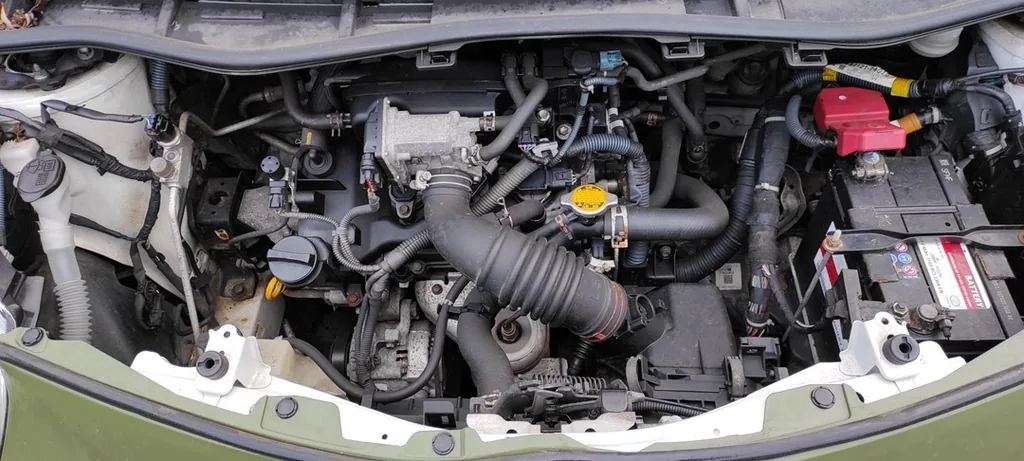
How to Disconnect and Reconnect
- With the ignition off, open the bonnet and lift the red cover off the positive terminal.
- Loosen and remove the negative (–) terminal first, then the positive (+).
- Do your work, or lift the battery out after undoing the hold-down clamp.
- Refit the battery, connect the positive (+) first, then the negative (–) last, and tighten both clamps.
- Refit the red terminal cover.
After Reconnecting
- Clock and radio presets — reset; enter the audio code if prompted.
- Power windows — re-initialise the one-touch AUTO on each window.
- Stop & Start (if fitted) — it won’t operate straight away; with the car parked and closed up, leave it about 4 hours, then start, stop and restart the engine to reinitialise it.
- Take a short drive and check the warning lights go out.
Frequently Asked Questions
Where is the battery on a Toyota iQ?
In the engine bay on the right-hand side, under a red positive-terminal cover. It is a conventional 12 V lead-acid battery — not in the boot or under a seat.
Will I lose my radio code?
If the head unit is code-protected it may ask for the code after reconnection. Enter the four-digit code from your owner’s pack; a Toyota dealer can retrieve it with proof of ownership if it’s lost.
Why has my Stop & Start stopped working after the battery change?
The system re-learns after power is restored. Park the car, close the doors and bonnet, leave it about four hours, then start, stop and restart the engine. It then operates normally once its conditions are met.
If a warning light stays on afterwards, look the code up on autodtcs.com.
Independent guide — not affiliated with Toyota. Always follow your official service manual and safety precautions. Read our full disclaimer.