These instructions apply to the Toyota iQ Mk1 (J10) 2009-2015.
For other models, please choose your vehicle here.
If the automatic on your Toyota iQ (J10, 2009–2015) won’t come out of P (Park) — typically with a flat 12 V battery or a brake-light fault — the SHIFT LOCK button beside the selector manually frees the lever so the car can be rolled or towed. Manual iQs don’t have this.
Before You Start
- Apply the parking brake or chock the wheels first — releasing Park lets the car roll.
- Do this on level ground.
Where the Override Is
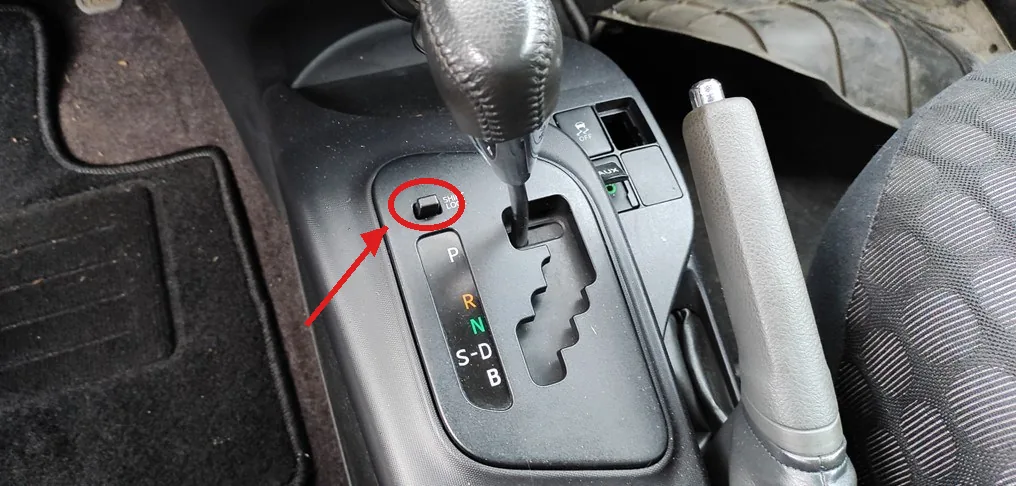
It’s the small SHIFT LOCK button under a plastic cap just left of the gear selector.
How to Release the Selector
- Apply the parking brake and turn the ignition ON — do not start the engine.
- Prise off the small plastic cap over the SHIFT LOCK button.
- Press and hold the SHIFT LOCK button down.
- With it held, move the selector out of P into N, then release the button.
- Refit the cap.
A selector that sticks in Park points to a cause — often a flat battery or a failed brake-light switch — so have it checked once the car is moved.
Frequently Asked Questions
Why won’t my iQ come out of Park?
The shift lock only frees when the car senses the ignition on and (normally) the brake pedal pressed. A flat 12 V battery or a brake-light switch/fuse fault cuts that signal, so the lever stays locked until you use the SHIFT LOCK override.
Is this on the manual iQ?
No — a manual iQ has no Park position and no shift lock, so there’s nothing to override. This applies only to the automatic (Multidrive).
If a warning light is on, look the code up on autodtcs.com.
Independent guide — not affiliated with Toyota. Always follow your official service manual and safety precautions. Read our full disclaimer.