These instructions apply to the Hyundai ix35 Mk1 (LM) 2010-2015.
For other models, please choose your vehicle here.
The one-touch (auto) up and anti-pinch functions on your Hyundai ix35 rely on the windows knowing their fully-closed position. After a battery disconnect, a flat battery, or if one-touch up simply stops working, each window needs re-initialising so those features work again.
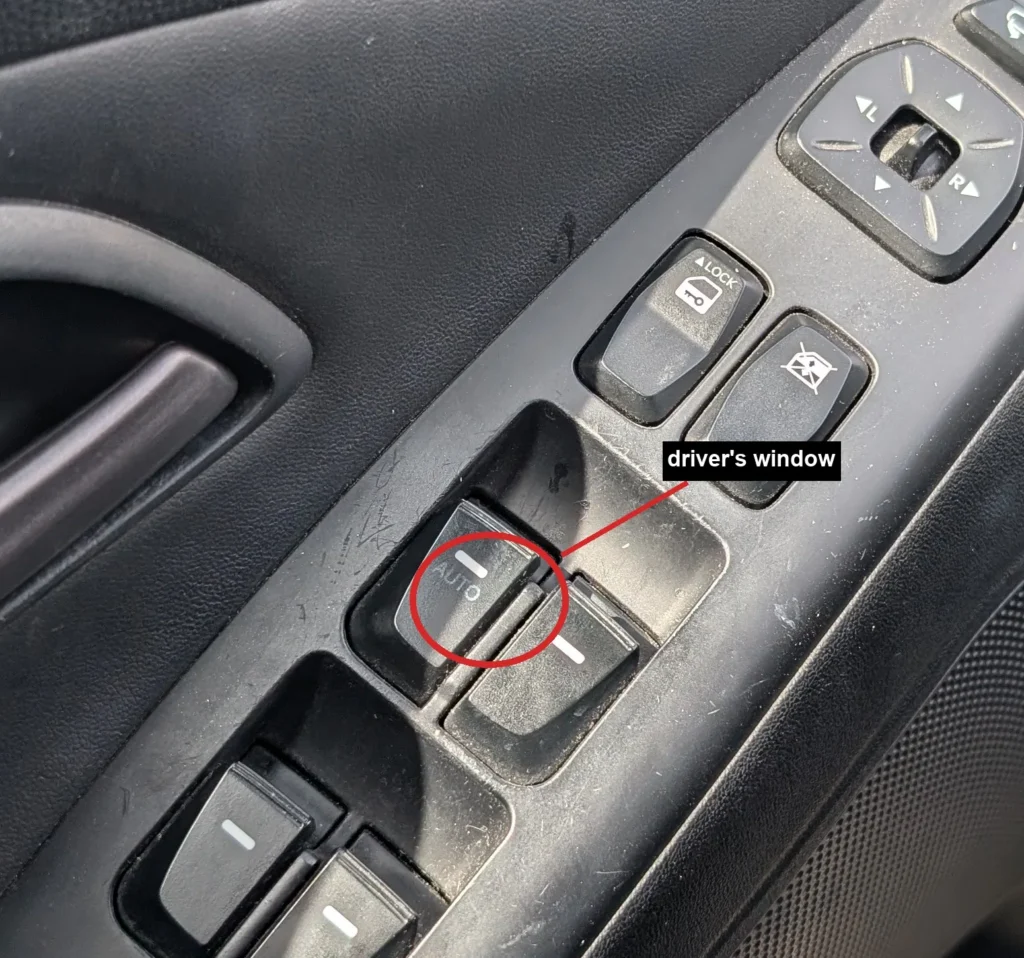
- Turn the ignition switch ON.
- Press and hold the power-window CLOSE switch and keep holding it until the window is fully closed.
- Keep holding the switch for 1 more second after the window is shut.
- Release the switch.
- Check that one-touch up and down now work correctly, then repeat the whole procedure for the passenger’s window and any other one-touch windows.
Good to know
Re-initialising is the usual fix straight after the 12V battery has been disconnected and reconnected, so it pairs naturally with a battery replacement or a jump-start. If you have just been under the bonnet, expect to redo this on each affected window.
If one-touch still will not work once you have re-initialised, the fault is no longer the setting. At that point the window switch or the window motor may need checking.
FAQ
Why did my ix35 windows stop going up in one touch?
They lost their stored fully-closed position, usually after a battery disconnect or a flat battery. Re-initialising each window teaches it that position again and restores one-touch and anti-pinch.
How do I fix the one-touch windows?
With the ignition ON, hold the CLOSE switch until the window is fully shut, keep holding for 1 more second, then release. Repeat for the driver’s window first, then the passenger’s and any other one-touch windows.
Do I need any tools?
No. The whole procedure is done from the door switches with the ignition on. No tools and no workshop equipment are needed.
It still will not auto-close after re-initialising. What now?
If a window refuses one-touch up even after re-initialising, have the switch and window motor checked, as one of those is the likely cause rather than the setting.
Independent guide — not affiliated with Hyundai. Always follow your official service manual and safety precautions. Read our full disclaimer.