These instructions apply to the Honda CR-V Mk3 (RE) 2007-2012.
For other models, please choose your vehicle here.
VSA (Vehicle Stability Assist) is the Honda CR-V (RE, 2007-2012) stability and traction control system. It is on every time you start the car; you can switch it off temporarily when you need extra wheelspin.
Turn VSA off and on
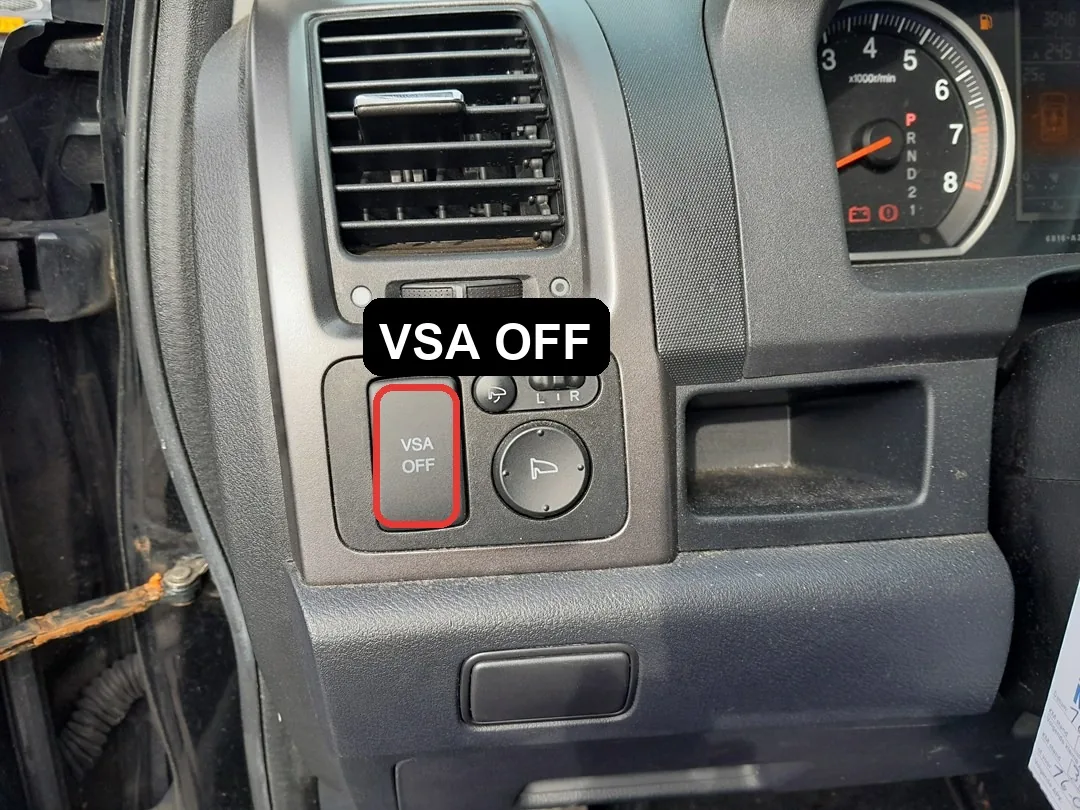
- With the engine running, find the VSA OFF button on the dashboard, to the lower-left of the steering wheel.
- Press and release it — the VSA OFF indicator lights in the instrument cluster to confirm the system is disabled.
- To switch it back on, press the button again, or simply restart the engine — VSA always defaults to ON at start-up.
Switch VSA off only to rock the car free of mud, sand or snow. For normal driving, leave it on.
Frequently asked questions
The VSA light came on by itself while driving. A flashing VSA symbol means the system is actively working. A steady VSA (triangle) light with the system not deliberately switched off indicates a fault — have it scanned.
Does turning VSA off disable the ABS? No. The anti-lock brakes always remain active.
Looking for a fault code instead of a procedure? Decode it on autodtcs.com.
Independent guide — not affiliated with Honda. Always follow your official service manual and safety precautions. Read our full disclaimer.