These instructions apply to the Mazda 2 Mk3 (DJ/DL) 2015-2022.
For other models, please choose your vehicle here.
The Mazda 2 (DJ, 2015–2022) uses an indirect tire-pressure monitoring system (TPMS) — it watches each wheel’s rolling speed through the ABS sensors rather than reading a pressure in each tire, so there’s no per-wheel PSI display. After you adjust the pressures or change a wheel, you re-teach the system its baseline by holding the SET switch. Set the pressures from the table below first, then run the reset.
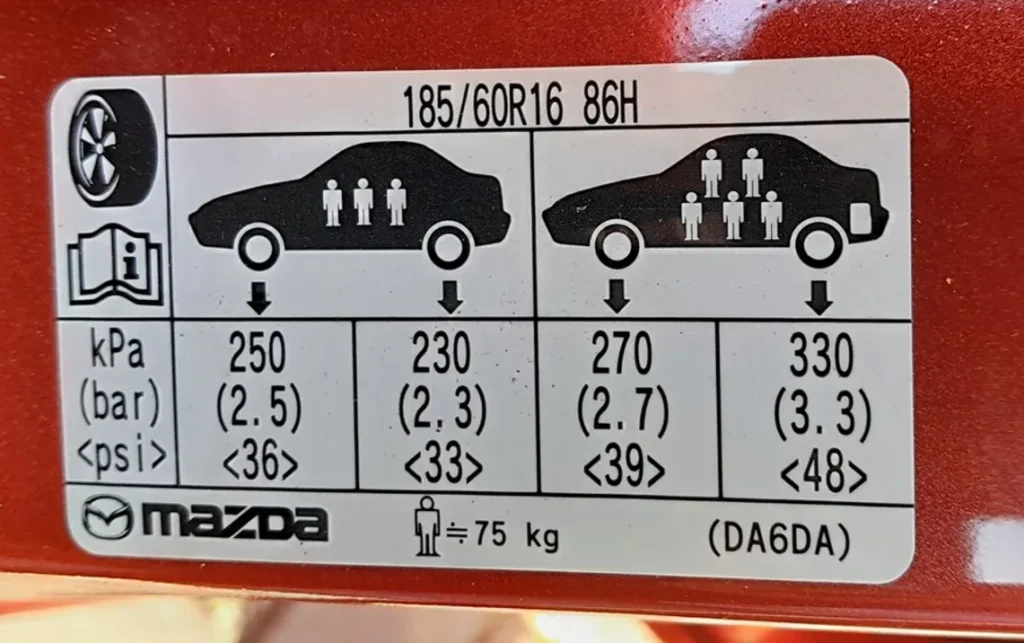
Mazda 2 (DJ) Tire Pressures by Wheel Size
Cold pressures (set them before driving, or at least three hours after). “Normal” is up to three occupants; “Full load” is a full car with luggage. Figures are from this car’s door-pillar placard and the owner’s manual — they agree.
| Wheel / tire size | Load | Front | Rear |
|---|---|---|---|
| 185/60 R16 (16-inch) | Normal (≤3 people) | 2.5 bar / 250 kPa / 36 psi | 2.3 bar / 230 kPa / 33 psi |
| Full load | 2.7 bar / 270 kPa / 39 psi | 3.3 bar / 330 kPa / 48 psi | |
| 185/65 R15 (15-inch) | Normal (≤3 people) | 2.6 bar / 260 kPa / 38 psi | 2.3 bar / 230 kPa / 33 psi |
| Full load | 2.7 bar / 270 kPa / 39 psi | 3.2 bar / 320 kPa / 46 psi | |
| Space-saver spare | Any | 4.2 bar / 420 kPa / 60 psi | |
Trims vary (the manual lists several “Type” sub-variants that all point back to the pillar label), so if your door-pillar figures differ from the table, use the label on your car. Never exceed the maximum pressure moulded on the tire sidewall.
How to Reset (Re-initialise) the TPMS
Because the system is indirect, the reset is a baseline re-learn: you set the correct cold pressures, then tell the car “these are now correct” with the SET switch. There is no per-wheel relearn and no driving sequence.

- Park safely and firmly apply the parking brake.
- With the tires cold, set all four to the correct pressure from the table above (match the size on your car, and check your door-pillar label).
- Switch the ignition ON (engine does not need to be running).
- With the car parked, press and hold the SET switch until the TPMS warning light in the instrument cluster blinks twice and the buzzer sounds once. Release the switch — the baseline is stored.
⚠️ The reset will not run if you press SET while driving. And if you re-initialise without first correcting the pressures, the system learns the wrong baseline and may not warn you properly — always set the pressures first.
When You Need to Re-initialise
- After adjusting the tire pressures.
- After rotating the tires front-to-rear.
- After fitting a new tire or wheel (including switching to winter wheels).
- After the 12V battery is disconnected, renewed, or fully discharged.
- Any time the TPMS warning light is on and you’ve confirmed the pressures are correct.
Frequently Asked Questions
Where is the TPMS reset button on a Mazda 2?
It’s the SET switch on the lower-dash switch panel to the right of the steering column, marked with a tire-and-exclamation-mark icon, next to the DSC OFF and i-stop OFF buttons. Hold it with the ignition on until the cluster light blinks twice and the buzzer sounds.
Why won’t my Mazda 2 TPMS light go off?
The most common reason is that a tire is genuinely low — set all four to the table pressures (cold) first. If the light stays on after the pressures are correct, run the SET re-initialisation above. If it blinks for about a minute and then stays on, the system has detected a fault (a sensor or the spare in use), which needs a workshop check.
Does the Mazda 2 have a sensor in each wheel?
No. The DJ Mazda 2 uses an indirect system based on the ABS wheel-speed sensors, so there are no battery-powered pressure sensors in the wheels and no live per-tire PSI readout. That’s why the reset is a baseline re-learn rather than a per-wheel programming.
What pressure should I run with a full car?
Use the “Full load” row for your wheel size — on 16-inch wheels that’s 2.7 bar front and 3.3 bar rear; on 15-inch wheels, 2.7 bar front and 3.2 bar rear. The rear goes up the most because that’s where the extra passengers and luggage sit.
Do I need a diagnostic tool?
No. The re-initialisation is done entirely with the SET switch. A scan tool is only needed if the system reports a hardware fault. For fault-code lookups see autodtcs.com.
Independent guide — not affiliated with Mazda. Always follow your official service manual and safety precautions. Read our full disclaimer.