These instructions apply to the Suzuki Swift Mk4 (A2L) 2017-Present.
For other models, please choose your vehicle here.
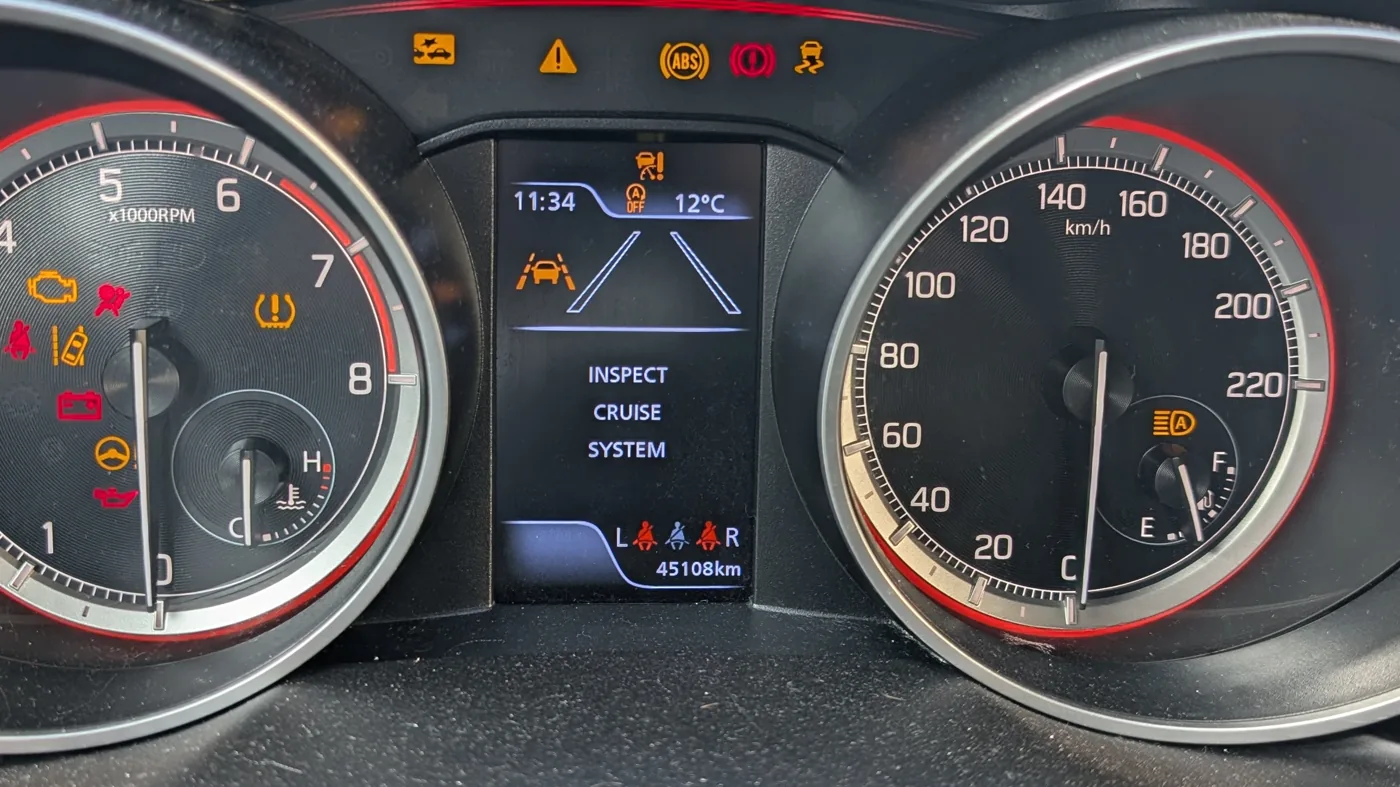
The Suzuki Swift (2017-present) shows two kinds of alert: the familiar symbol lights (telltales) and text messages on the central display. The messages that worry owners most — Inspect Cruise System, System Warning, LDP System Requires Inspection and Hill Hold Disable — usually share one simple cause. Here is what each means and what to do.
First, the usual cause: a dirty camera or a weak battery
The Swift’s driver-assist systems read the road through a camera behind the rear-view mirror and a radar behind the front emblem. Anything that blinds them — a dirty, fogged or iced windshield in front of the camera, heavy rain, strong low sun, or a knock to the front — makes the car suspend the cruise, lane and collision systems and show a warning.
A tired 12-volt battery does the same. Low voltage makes the assist modules drop offline, which can light up the cruise, ESP and hill-hold messages all together.
The good news: when the cause is environmental, the message clears on its own once you fix it. There is no hidden “reset” in the menu — you clean the glass, let it demist, or sort the battery, and it comes back on the next drive.
What to do first, which covers most cases: clean the windshield in front of the camera (behind the mirror) and wipe the area behind the front emblem; demist the inside of the glass; and have the 12-volt battery tested if it is a few years old. If a message stays on after all that, it is a stored fault that needs an OBD scan — and the camera or radar often needs recalibrating after a windshield change or a front-end knock.
Inspect Cruise System
The (adaptive) cruise control has switched itself off because the radar or camera that feeds it cannot see properly or has logged a fault. Usual triggers are a blocked or misaligned front radar or camera, a weak 12-volt battery (fault code U1093, “lost communication”), or a related brake-switch or wheel-speed fault.
Clean the front sensor areas and check the battery; it clears once the cause is gone. There is no owner menu to “reset” it — if it persists, a Suzuki scan tool reads the code and, often, recalibrates the sensor.
LDP System Requires Inspection

LDP (Lane Departure Prevention) uses the windshield camera to watch the lane lines. The message means the camera cannot read them — usually a dirty, fogged, iced or chipped windshield, strong low sun, or a camera that is out of calibration (for example after a windshield replacement).
Clean and demist the glass in front of the camera; it returns when the view is clear. A message that stays on needs a dealer camera calibration.
System Warning
This is a general “something needs checking” notice, shown with other alerts. On the Swift it most often appears alongside the cruise, ESP and hill-hold messages from the same root cause above.
Read whatever specific light or message comes with it. If it stays on by itself, have the car scanned to find the system that triggered it.
Hill Hold Disable

Hill Hold Control — which holds the brakes for a moment on a slope so you do not roll back — is part of the ESP system, so it goes offline whenever ESP does. It is normal and temporary if you have switched ESP off, or after a brief low-grip or low-voltage moment, and it returns on the next clean start.
If it keeps coming back with the ESP light, suspect a wheel-speed (ABS) sensor, a weak battery, or — on manual cars — the clutch-pedal switch. Resting your foot on the clutch pedal is a known trigger.
Ignition Switch Position
This one is not a fault. On keyless push-start cars, pressing the engine button without starting steps the electrics through ACC and ON, and the display simply tells you which mode you are in.
Leaving it in ON with the engine off drains the 12-volt battery — which then triggers the warnings above — so press the button to OFF, or start the engine. Key-start cars do not show this message.
What the warning lights (telltales) mean
Besides the text messages, the Swift uses the usual symbol lights. As a rule, red means stop or act now, and amber means caution — get it checked soon.
| Light | Color | What it means | What to do |
|---|---|---|---|
| Oil pressure | Red | Low oil pressure | Stop the engine as soon as it is safe |
| Battery / charging | Red | Charging-system fault | Serious — limited running time; have it checked |
| Brake | Red | Handbrake on, low brake fluid, or a brake fault | Release the handbrake; if it stays, check the fluid and stop |
| Airbag (SRS) | Red | Airbag system fault | Have it checked — it may not deploy |
| Master warning (triangle) | Red / amber | General fault — read the paired message | Follow the color of the light |
| Check engine | Amber | Engine or emissions fault | Diagnose soon; if flashing, stop (misfire) |
| ABS | Amber | Anti-lock braking off (normal brakes still work) | Have it scanned |
| ESP / ESC (skidding car) | Amber | Stability control off or faulty | Flashing = working; steady = have it scanned |
| Power steering (EPS) | Amber | Steering assist reduced | Steering is heavier; restart, else see a dealer |
| Tire pressure (TPMS) | Amber | A tire is low, or a sensor fault | Inflate to the door-label pressure and reset the TPMS |
| Seatbelt | Red | A belt is not fastened | Fasten the belt |
| Collision / DSBS | Amber | Collision assist off or blocked | Clean the camera; if it stays, see a dealer |
Frequently asked questions
How do I reset the “Inspect Cruise System” warning on a Suzuki Swift?
There is no menu reset. Clean the front camera and radar, have the 12-volt battery tested, and the message clears once the cause is gone. A stored fault needs an OBD scan — and often a sensor recalibration — at a Suzuki specialist.
Why do several warnings come on at once?
Because the cruise, lane, collision and hill-hold systems share the same camera, radar and 12-volt supply. One cause — a blocked camera or a weak battery — knocks them all out together, and they clear together once it is fixed.
Where is the Suzuki Swift’s camera?
Behind the rear-view mirror, looking out through the windshield. The radar that runs the adaptive cruise is behind the front emblem.
Is it safe to drive with these messages showing?
You can usually keep driving, but the assist features (cruise, lane-keep, auto-brake) are switched off until it clears, so drive accordingly. A red light — oil, battery, brake or airbag — is more serious and should be acted on.
Does the Maruti (Indian-market) Swift show these messages?
Mostly no. The camera and radar driver-assist are fitted to UK, European and Australian Suzuki trims, so Maruti Suzuki Swifts generally do not show the cruise, LDP or collision messages.
Independent guide — not affiliated with Suzuki. Always follow your official service manual and safety precautions. Read our full disclaimer.