These instructions apply to the Suzuki Swift Mk4 (A2L) 2017-Present.
For other models, please choose your vehicle here.
The correct cold tire pressures for the Suzuki Swift Mk4 (A2L, 2017–present) depend on wheel size: 2.3 / 2.1 bar (33 / 31 psi) on 16- and 17-inch alloys, or 2.5 / 2.2 bar (36 / 32 psi) on the 15-inch wheel — full figures are in the table. When the warning light shows, you clear it through the cluster menu once the pressures are right; this guide covers both.
Suzuki Swift Mk4 recommended tire pressures (2017–present)
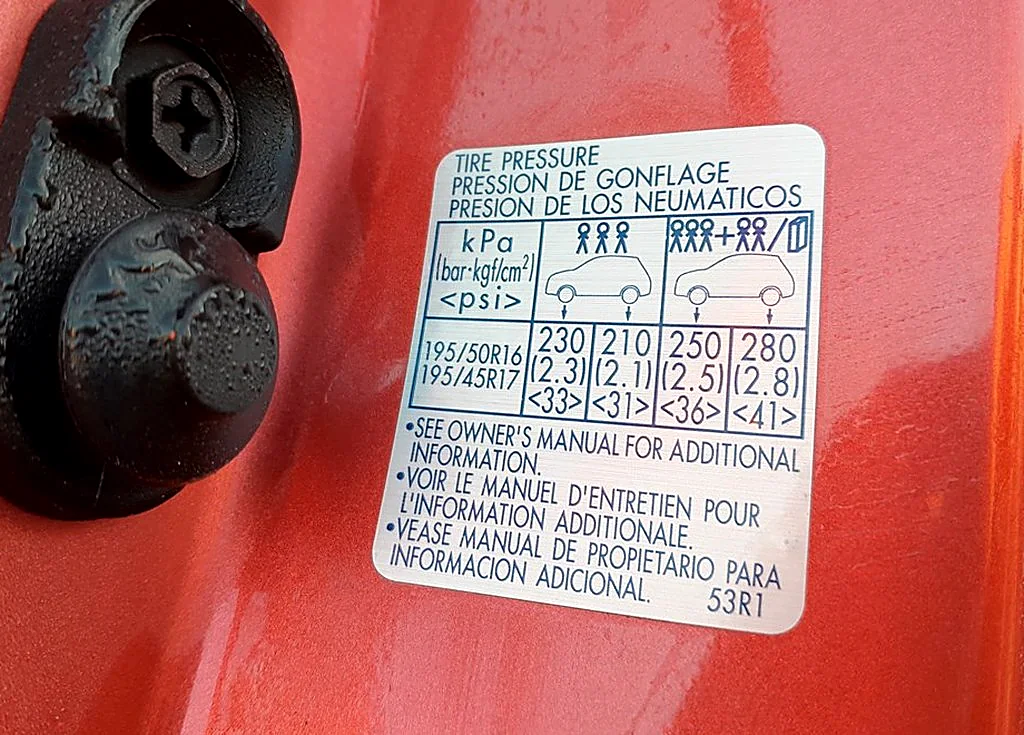
Cold pressures on the Swift Mk4 vary mainly by wheel size. The values below are front / rear, cold, with a higher fully-laden column for a full car or a loaded boot. The placard in the driver’s door jamb is the authority for your exact wheel and trim.
| Tire size | Normal load (front / rear) | Full load (front / rear) |
|---|---|---|
| 175/65 R15 & 185/55 R16 | 2.5 / 2.2 bar (36 / 32 psi) | 2.5 / 2.8 bar (36 / 41 psi) |
| 195/50 R16 & 195/45 R17 | 2.3 / 2.1 bar (33 / 31 psi) | 2.5 / 2.8 bar (36 / 41 psi) |
Cold pressures from the Swift Mk4 door-jamb placard. A space-saver spare (T135/70 R15) takes 4.2 bar (60 psi). Check pressures cold, and use the full-load column when the car is fully laden. These map to the car’s own Comfort (normal) and Load (full-load) settings in the TPMS menu below.
How It Works on This Model
The Swift Mk4 monitors tire pressure through the information display in the middle of the instrument cluster. It holds two reference settings — a normal Comfort Mode and a higher Load Mode for a fully-laden car — and it warns when a tire falls below whichever one is active. That is why the reset is a menu choice rather than a drive: you inflate the tires, then tell the car which mode to measure against, and it stores that as the new baseline. Higher trims and the Sport also show the individual tire pressures on screen; base cars simply confirm the setting.
Before You Start
- Check and set the tires cold — parked a couple of hours, or driven less than a mile. Warm tires read high and hide a slow leak.
- Inflate all four to the figure on the driver’s door-pillar label. One low corner is enough to keep the light on.
- Decide which mode you need: everyday driving uses the normal Comfort Mode figure; carrying a full load or luggage uses the higher Load Mode figure — inflate to match the mode you’ll select.
- Reset the pressure on any tire a fitter has just had off — they often leave it high.
Reset the TPMS (In-Cluster Menu)


- Switch the ignition on with the engine off, so the display is live.
- Open the display menu: press the display button at the lower-right of the instrument cluster until the menu appears, then scroll to Setting mode.
- Select ‘TPMS’ from the list.
- Choose ‘TPMS Mode’, then select ‘Comfort Mode’ for everyday pressures or ‘Load Mode’ for fully-laden pressures — matching how you inflated the tires.
- Switch the ignition off. The warning clears on the next start; drive a short distance so the system confirms the new reference.
If the Warning Stays On
- Re-check every tire with a known-good gauge, including the correct target for the mode you selected.
- Look for one low corner — a slow puncture from a nail or a leaking valve keeps dropping the same tire after each top-up.
- Cold morning? Pressure falls about 1 psi for every 5 °C drop, so a warm-weather setting can trip the light on the first frost.
- Wrong mode? If you set the pressures for a normal load but left the system in Load mode (or vice versa), it judges ‘low’ against the wrong figure — reselect the matching mode.
- A steady-flashing TPMS light (rather than a steady one) points to a sensor fault on cars with in-wheel sensors — a flat sensor battery or an unmatched sensor after a wheel change — and needs a tire shop’s tool.
Frequently Asked Questions
What tire pressure does the Suzuki Swift Mk4 need?
On 15-inch wheels, 2.5 bar (36 psi) front and 2.2 bar (32 psi) rear cold; on 16- and 17-inch alloys, 2.3 bar (33 psi) front and 2.1 bar (31 psi) rear. Raise the rear to 2.8 bar (41 psi) for a full load, and confirm against your door-jamb placard.
How do I reset the tire pressure light on a Suzuki Swift Mk4?
Set all four tires to the correct cold pressure, switch the ignition on, then open the instrument-display menu (button at the lower-right of the cluster) and go to Setting mode → TPMS → TPMS Mode. Select Comfort Mode for everyday pressures or Load Mode for a full load, switch off, and the warning clears on the next start.
What is the difference between Comfort Mode and Load Mode?
They are two reference pressures the TPMS can measure against. Comfort Mode uses the normal door-label figure for everyday driving; Load Mode uses the higher fully-laden figure. Pick the one that matches how you’ve inflated the tires and how the car is loaded, or the system may warn unnecessarily.
Why won’t the light go out after pumping up the tires?
On this Swift, inflating alone doesn’t clear it — you also have to reselect the mode in the TPMS menu so the car stores the new baseline. If you’ve done that and it still returns, one corner is probably losing air through a nail or a leaking valve, which no reset will fix. A persistent flash points to a sensor fault instead.
Where is the button to open the menu?
It’s the small display/selector button at the lower-right corner of the instrument cluster, next to the trip readout. Press it with the ignition on to bring up the menu, then scroll to Setting mode and into TPMS.
Do I need a diagnostic tool?
No — the normal reset is done entirely through the cluster menu. A workshop tool is only needed on sensor-equipped cars if a sensor was replaced or swapped between wheels, or if the TPMS light flashes to signal a sensor fault.
If a fault code is stored, look it up on autodtcs.com. To clear a service reminder, see our Swift Mk4 service reset.
Independent guide — not affiliated with Suzuki. Always follow your official service manual and safety precautions. Read our full disclaimer.