These instructions apply to the Kia Rio Mk3 (UB/QBR) 2011-2018.
For other models, please choose your vehicle here.
The Kia Rio UB/QBR (2011–2018), on ISG-equipped trims, ships with Idle Stop & Go — Kia’s start/stop system. With the car at a complete stop and your foot on the brake (automatic) or the clutch fully out and the gear lever in neutral (manual), the engine cuts to save fuel and emissions, then restarts the moment you press the clutch or lift off the brake.
The feature is on by default every time you start the car, but you can disable it for any individual trip with a single button on the dashboard.
How the System Works
The Rio’s ISG monitors a series of conditions before allowing the engine to cut. All of these must be satisfied:
- Driver’s seat belt fastened.
- Driver’s door fully closed.
- Bonnet fully latched.
- Engine at operating temperature.
- 12V battery state of charge above ~75%.
- Climate control demand within normal range.
- Vehicle stationary for at least a brief moment.
If even one of those conditions isn’t met, the system stays passive — the engine keeps running at idle and no warning is shown. That’s normal behaviour.
Getting Ready
- Park safely before adjusting dashboard controls.
- Disable start/stop before any engine-bay work or before going through an automatic car wash — an unexpected restart can be a real hazard.
Tools Required
None. The whole operation is the single ISG OFF button on the dashboard.
Using the Start/Stop System (Normal Operation)
- Start the engine normally with the key or START button.
- Fasten your seat belt and close the driver’s door.
- Drive until the engine reaches operating temperature (about 3–5 minutes in average conditions).
- At a stop with the conditions above met, the engine will cut on its own — the cluster shows a small green “A” with circular arrow to confirm ISG is active.
- To restart: press the clutch (manual) or release the brake pedal (automatic). The engine restarts before you can engage gear.
Deactivating the Start/Stop System
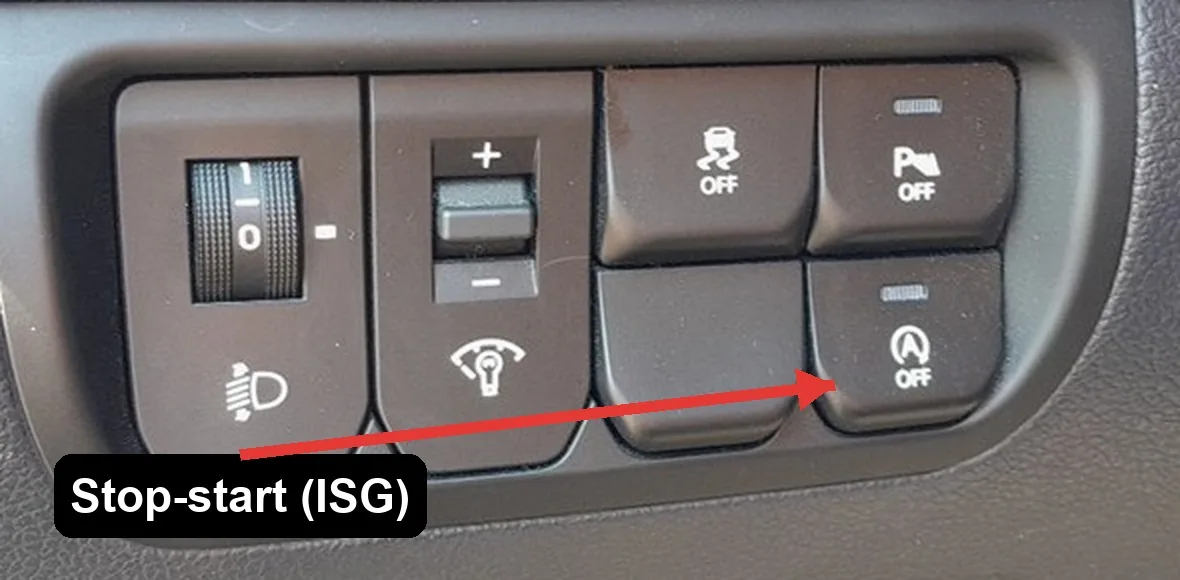
- Locate the ISG OFF button on the dashboard — it’s marked with an “A” in a circle with a slash through it.
- Press the button once.
- The amber ISG OFF indicator illuminates inside the button itself.
- The system is disabled for the rest of this trip. The engine will no longer cut at stops.
Reactivating the Start/Stop System
Press the ISG OFF button a second time — the indicator inside the button goes dark, and the system is enabled again for the rest of the trip. Reactivation also happens automatically every time you restart the car.
When the System May Not Operate
These are normal conditions under which the system holds off — they don’t indicate a fault:
- The 12V battery is freshly disconnected or low on charge.
- The engine isn’t yet warmed up to operating temperature.
- The cabin temperature is far from the climate control setpoint (system runs to bring cabin to comfort).
- The seat belt is unfastened or the driver’s door is open.
- The bonnet isn’t fully closed.
- Recent engine-off period was longer than ~3 minutes — system auto-restarts to keep accessories powered.
- You’re on a steep gradient.
When It Won’t Cooperate
- ISG OFF light stays on permanently. The car has decided start/stop should be disabled — usually a weak 12V battery. Have it load-tested; a battery near end-of-life is the most common cause on a 2011–2018 Rio.
- Engine cuts but won’t restart automatically. Press the start button or turn the key fully on its own. If this happens repeatedly, the ISG-spec starter or the dual-mass flywheel may be worn — the ISG starter is rated for many more cycles than a standard one but does eventually wear.
- Engine cuts then immediately restarts on its own. System detected something out of range (a passing change in steering angle, the bonnet popping ajar) and aborted the stop. If it happens occasionally, ignore it; if every stop, check seat-belt and door sensors.
- Frequent short trips and the car never seems to want to stop the engine. Short trips don’t get the engine and battery to the conditions ISG needs. This is by design.
Frequently Asked Questions
Does ISG damage the starter or battery long-term?
The Rio’s ISG hardware (starter, flywheel, battery) is uprated for the extra cycles. Manufacturer-rated lifespan for the starter is 300,000+ restarts. The battery is a heavy-duty AGM or EFB type, designed for partial-state-of-charge operation. Replacement batteries must match this spec — a standard flooded battery will fail within months.
Will the engine restart if I let off the brake by accident?
Yes — that’s the design. The brake-release-to-restart logic is intentional so the engine is ready before you engage gear. There’s no scenario where the car rolls forward unintentionally just because the engine restarted.
Can I make the OFF state permanent?
Not from the factory — there’s no menu setting. The state resets to ON every ignition cycle. Aftermarket modules (“start/stop memory”) plug into the OBD-II port or the ISG button wiring and hold the OFF state across cycles; they’re widely available and reversible if you ever want OEM behaviour back.
Why does Kia call it ISG and not Start/Stop?
“Idle Stop & Go” is Kia/Hyundai’s brand name for what the rest of the industry calls start/stop or auto-stop/start. Same underlying technology. The “Go” in the name emphasises the smooth restart, which on the Rio is genuinely fast — you won’t normally notice it before pulling away.
Independent guide — not affiliated with Kia. Always follow your official service manual and safety precautions. Read our full disclaimer.