These instructions apply to the Kia Rio Mk3 (UB/QBR) 2011-2018.
For other models, please choose your vehicle here.
The Kia Rio UB/QBR (2011–2018) shows a service reminder on the cluster when it thinks maintenance is due — a mileage-and-time timer, not an oil sensor, so it’s up to you to clear it once the work is done. No scan tool is needed: it’s a button sequence on the cluster itself, using the TRIP button (scroll) and RESET button (confirm).
Before you start
- Do the maintenance first. Reset the reminder only after the oil and filter (or other scheduled item) have actually been changed — clearing it without doing the work just hides the prompt.
- Switch the ignition to ON with the engine off. On keyless-start Rios, press the START button twice without your foot on the brake — the cluster lights up but the engine won’t crank.
- Keep the doors and hood closed, or the maintenance menu can behave oddly. (Doing an auto-box service too? See our A4CF1 transmission fluid change guide.)
Service Indicator Reset — Step-by-Step

- Sit in the driver’s seat with all doors and the hood closed.
- Switch the ignition to ON (engine not running).
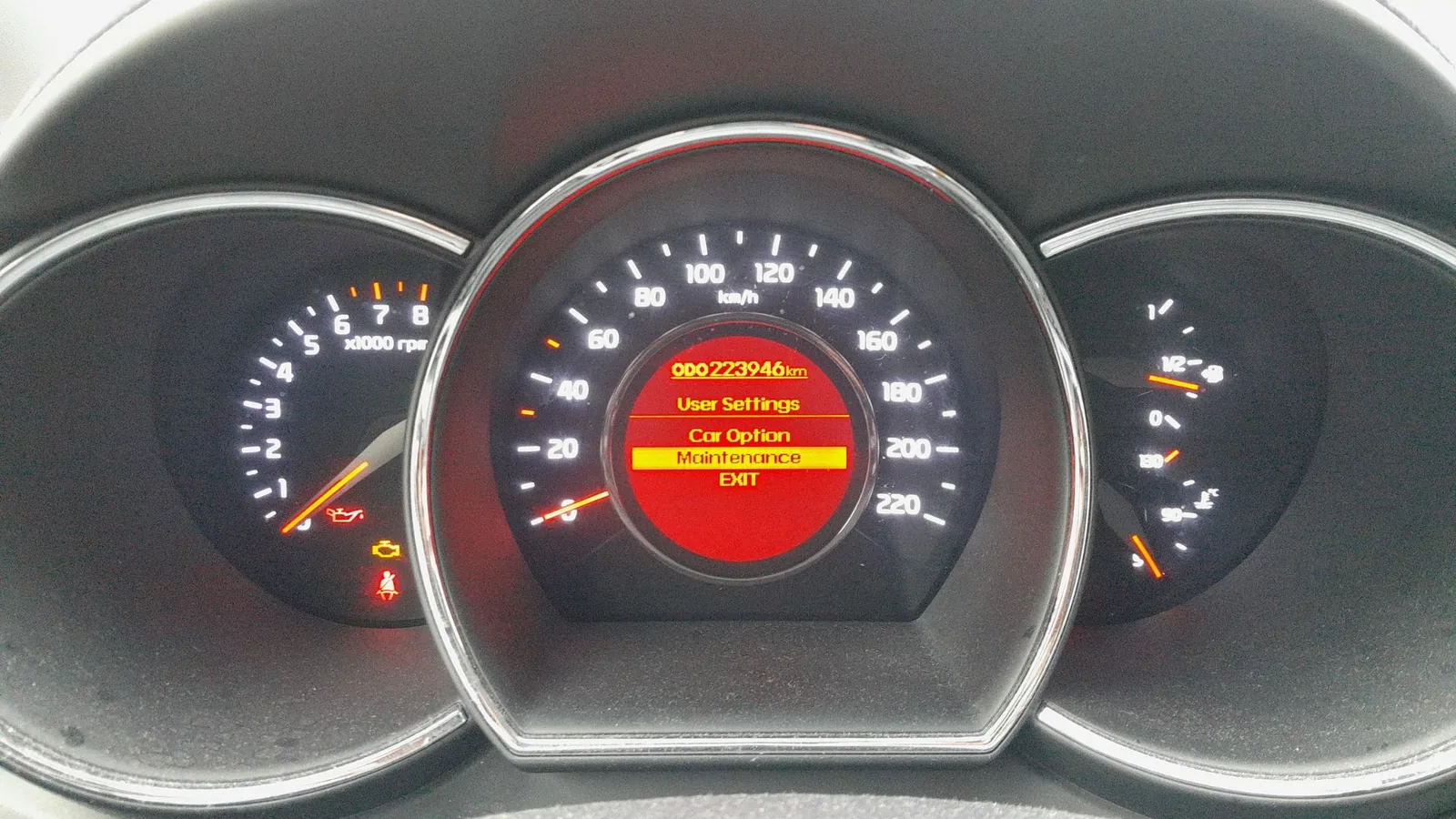
- Press and hold the TRIP button for more than 2 seconds to enter User Setting mode. The cluster display switches to the settings menu.
- Press TRIP briefly, repeatedly, to scroll through the menu items until Maintenance (or the spanner icon) is highlighted.
- Press the RESET button once to enter the Maintenance submenu.
- Use TRIP to highlight the item you want to clear — typically Engine Oil, but the menu may also list Air Filter, Tires, or Brake Fluid depending on trim and market.

Inside the Maintenance submenu, Engine Oil is highlighted (Tire Exchange and other items may also appear depending on trim). - Press and hold the RESET button for more than 1 second. The cluster will display a service-message confirmation screen and reset the counter for that item to zero.
The Engine Oil service-interval screen (OFF / 5,000 km / 7,500 km) — selecting your interval clears and re-arms the reminder countdown. - Exit the User Setting menu by pressing TRIP for more than 2 seconds, or just cycle the ignition off and on.


Verify the Reset Worked
Cycle the ignition off, wait five seconds, then turn it back to ON. The cluster’s default trip display should come up without the service reminder. If the spanner icon or the “Service Due” message stays visible, repeat the procedure — most often the cause is releasing the RESET button too soon at step 7.
Troubleshooting and Common Mistakes
- Menu won’t appear when you hold TRIP. Make sure the ignition is in ON, not ACC. ACC turns the cluster on partially but locks out the User Setting menu.
- Reset doesn’t stick / reminder comes back after a few miles. Either the RESET press was too short (must be >1 second), or the maintenance schedule preset is configured for a very short interval — check User Setting → Maintenance → Schedule and adjust if needed.
- Reset menu is in a language you can’t read. The menu items are in the cluster’s selected language. You can change it from User Setting → Language (older Rios) or via the head-unit settings on infotainment-equipped trims.
- After a battery disconnect, the reminder triggered early. A battery disconnect can scramble the service-distance counter on some Rios. See our Kia Rio battery disconnect / reconnect guide for the recovery procedure; then redo this service-indicator reset.
- “Reset” looks like it worked but the dealer says it didn’t. The Rio stores two parallel counters: the cluster-visible one (cleared by this procedure) and a workshop-only counter accessed with a Kia GDS scan tool. For warranty/service-record purposes the dealer may also clear the workshop counter at the next visit. That’s normal and doesn’t mean your reset failed.
Frequently Asked Questions
Will resetting the service indicator void my warranty?
No. The reset is a documented owner-operation in the Rio’s manual. What can affect warranty is skipping the maintenance and just clearing the reminder — Kia (or any manufacturer) can refuse a warranty claim if scheduled service was missed.
Can I reset the indicator without actually changing the oil?
Mechanically, yes — the car has no way to know whether oil was changed. Practically, don’t. The reminder is the only system tracking your service interval; once you reset it the clock starts again and you lose the trigger that would have reminded you in another 7,500–10,000 miles.
How often does the service reminder appear on a 2011–2018 Rio?
By default the Kia Rio UB/QBR uses a 7,500-mile (12,000 km) or 12-month interval, whichever comes first. The exact preset depends on market and trim — UK and European Rios usually run 12,000-mile / 12-month intervals; some 2015+ trims allow an adjustable schedule under User Setting → Maintenance → Schedule.
What’s the difference between the service reminder and the check-engine light?
The service reminder (spanner icon or “Service Due” text) is a maintenance interval timer — purely informational. The check-engine light (a separate amber engine outline) means the engine management ECU has stored at least one diagnostic trouble code (DTC). Clearing the service reminder won’t clear a DTC. For DTC lookup and reset, see autodtcs.com.
Is this the same as the oil life reset?
Yes. The Rio has no separate oil-life sensor; the service reminder is the scheduled-service countdown, so the same reset also clears what owners call the oil light.
Does this same procedure work on a Kia Rio YB (2017+) or Stonic?
No — this guide is specific to the UB/QBR generation (2011–2018). The Rio YB (2017+) uses a different cluster with a menu-based maintenance reset accessed through the steering-wheel controls rather than the cluster TRIP/RESET buttons. We’ll add a YB guide as a separate article.
Independent guide — not affiliated with Kia. Always follow your official service manual and safety precautions. Read our full disclaimer.