These instructions apply to the Kia Rio Mk3 (UB/QBR) 2011-2018.
For other models, please choose your vehicle here.
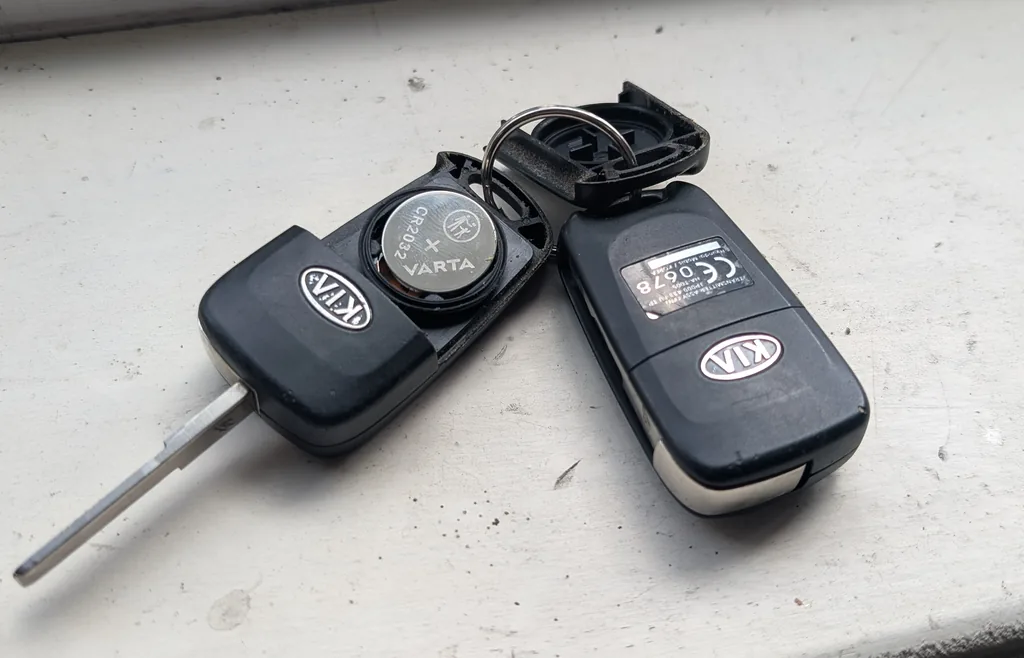
If the remote on your Kia Rio UB/QBR (2011–2018) has stopped working, dropped its range to a few metres, or the LED on the fob no longer blinks when you press a button, the most likely cause is a tired coin-cell battery. The fob takes a standard CR2032 button cell, costs a few euros, and replacement takes about three minutes — no dealer visit required.
When to Replace the Key Fob Battery
- Remote locking / unlocking only works at close range (within a metre) or fails intermittently.
- The LED indicator on the fob (where fitted) is dim or stays off when you press a button.
- The car beeps an audible “low fob battery” warning on some Rio trims with the keyless-entry option.
- After a car battery disconnect or replacement if the remote refuses to pair even after the standard re-sync procedure.
- Preventatively: every 2–3 years of normal use, or every 12 months if the fob lives in a damp pocket or gets wet often.
Tools Required
- One CR2032 3-volt lithium coin cell battery from a sealed pack (cheap “bulk pack” cells from generic suppliers are often half-dead on arrival — buy a sealed pack from a known brand: Panasonic, Energizer, Duracell, Varta).
- A small flat-blade screwdriver or a plastic trim-removal tool. A plastic tool is safer because it won’t scratch the fob casing.
- Optional: a microfibre cloth to wipe the case before re-assembly.
Key Fob Battery Replacement — Step-by-Step
- Slide the mechanical key blade out of the fob: press the small release button on the side of the fob and pull the metal blade straight out.
- Locate the seam between the two halves of the fob casing, near where the mechanical key was sitting. There’s a small slot designed for the trim tool.
- Insert the flat screwdriver or plastic tool into the slot and twist gently — the two halves will separate with a small click. Don’t lever hard against the casing or you’ll scuff the plastic.
- Note the orientation of the existing coin cell. On the Kia Rio fob, the positive (+) side faces away from the circuit board (i.e. the printed “+” is visible to you when the fob is open). Photograph it with your phone if you’re unsure.
- Slide the old battery out from under the metal retaining clip. If it’s a tight fit, ease it out with the flat tool — don’t pry against the circuit board.
- Wipe the new CR2032 with a dry microfibre to remove any skin oils — they can shorten the battery’s life by a few months.
- Insert the new battery in the same orientation as the old one (+ side up, away from the board).
- Hold the two halves of the fob together with the rubber buttons aligned and squeeze firmly until you hear them click back together. Inspect the seam for any visible gap.
- Reinsert the mechanical key blade — it should click home when fully seated.
Verify the Fix
Stand within sight of the car (5–10 metres) and press the lock button. The car’s indicators should flash once and the doors should lock. Test the unlock button next, and the boot release if fitted. If the LED on the fob now lights up brightly with each press but the car still ignores the signal, the fob has lost its pairing — see Troubleshooting below.
When It Won’t Cooperate
- New battery installed but the remote still doesn’t work. First, check polarity — it’s the single most common mistake. The “+” side must face away from the circuit board.
- LED on the fob lights up, but the car doesn’t respond. The fob has lost its pairing with the car’s immobiliser receiver. On the Rio UB/QBR, re-pairing can be done at home for most trims: insert the key in the ignition, turn to ON, press and release the “lock” button on the fob within 10 seconds, and turn the ignition off. The horn should chirp once to confirm pairing. If that doesn’t work, a Kia dealer or independent garage with a Kia GDS scan tool can re-pair it in under five minutes.
- Range is improved but still poor. The CR2032 is fresh but the fob’s transmitter aerial may be cracked from a drop. Hold the fob flat against your chin and press the button — your skull acts as a passive antenna and you’ll see a slight range improvement on a healthy fob. If pressing against your chin doesn’t help, the fob’s internal aerial is damaged.
- Fob feels “loose” after reassembly. Check that the rubber button pad is sitting in its slot inside the fob — it can shift during opening and prevent the two halves from clicking together cleanly.
- Battery drained quickly (within weeks). The fob is being woken up constantly — often by a sticky button pad after coffee/water spills. Clean the button pad with isopropyl alcohol on a cotton bud, let it dry fully, then reassemble.
Frequently Asked Questions
Will replacing the key fob battery affect the car’s immobiliser?
No. The transponder chip inside the fob (the part that talks to the immobiliser when the key is in the ignition) is passive — it draws power from the car’s coil, not the CR2032. The coin cell only powers the buttons and the RF transmitter for remote locking. You can take the battery out for an hour and the car will still start with the mechanical key.
Can I use a CR2025 instead of a CR2032?
It will fit, but don’t. The CR2025 is the same diameter but thinner, which means it holds about 30% less charge and won’t make firm contact with the spring terminal. You’ll see noticeably shorter battery life and intermittent button response. Stick with the CR2032.
The Kia dealer wants €60 to replace the battery. Is that normal?
A Kia dealer’s labour rate plus their margin on the battery accounts for that figure. The job itself is a 3-minute owner procedure. The only reason to take it to a dealer is if the fob also needs re-pairing after a long delay without a battery — and even that’s a 5-minute task with the right scan tool.
Does this same battery work for the secondary key?
The secondary key supplied with the Rio is usually a plain transponder blade with no remote buttons — no battery. The folding/switchblade-style remote key uses the CR2032 like the primary fob. Smart-key (proximity) versions use a different cell — the proximity smart key isn’t covered by this guide.
Independent guide — not affiliated with Kia. Always follow your official service manual and safety precautions. Read our full disclaimer.