These instructions apply to the Hyundai i20 Mk2 (GB) 2014-2020.
For other models, please choose your vehicle here.
Disconnecting the 12 V battery on a Hyundai i20 Mk2 (GB, 2014–2020) is a simple job, but the car loses a few settings while the power is off and needs a couple of quick re-initialisations afterwards — the windows, and on start/stop cars the auto stop/start function. This guide gives the safe order of work and what to reset once the leads are back on.
Reading fault codes before you disconnect? The OBD-II diagnostic port on the i20 (GB) sits just below the fuse panel in the driver’s footwell, above the pedals. See the full car-by-car OBD-II port location guide on autodtcs.com.
Where the Battery Is
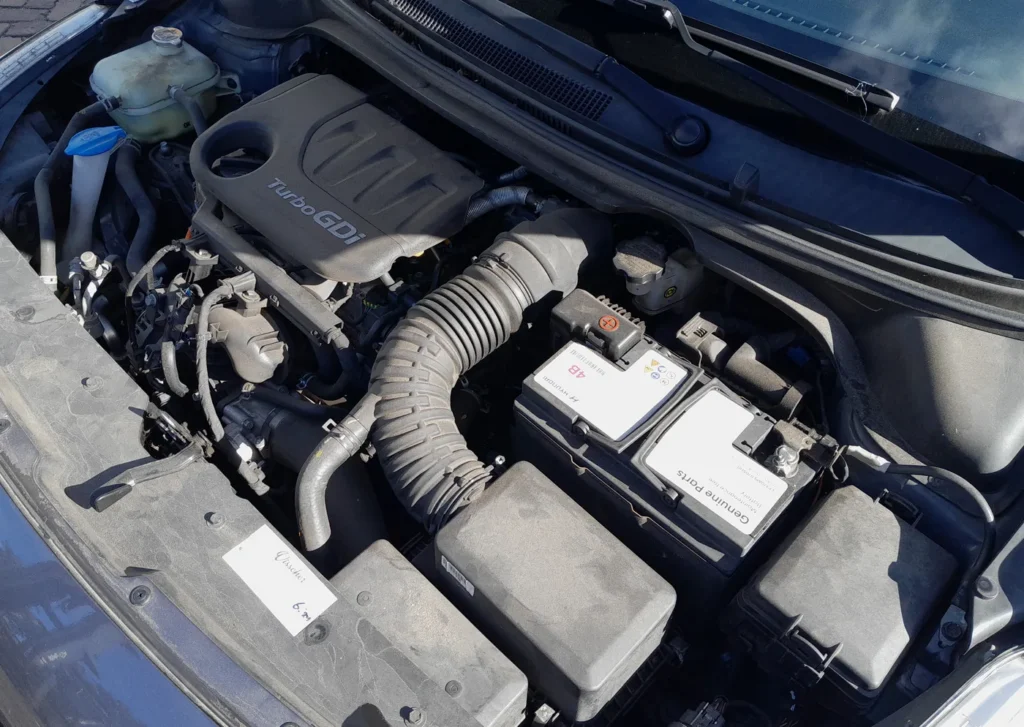
The battery sits in the engine bay under a plastic cover. Lift the cover to reach the two clamps. Cars with Hyundai’s ISG (Idle Stop & Go) start/stop system use an uprated AGM/EFB battery — replace like-for-like, as a standard battery will not survive the stop/start cycling.
Before You Disconnect
- Note your preset radio stations and user preferences — they are wiped when the power goes.
- Make sure the ignition key is in the OFF position (and any keyless fob is away from the car) before you touch the terminals.
- If you want to keep settings alive, plug in a memory-saver. The steps below assume you are not using one.
- If you will work near airbags or seat-belt pretensioners, disconnect the battery and wait at least 3 minutes before handling those parts.
Disconnecting — Correct Order
- Turn the ignition off and remove the key.
- Open the bonnet and lift off the battery cover.
- Slacken the negative (−, earth) terminal first and lift the lead clear, tucking it aside.
- Only undo the positive (+) terminal if you are removing the battery completely.
- If removing the battery, undo the base clamp and lift it out upright.
Reconnecting — Correct Order
- Refit the battery and secure the hold-down clamp.
- Connect the positive (+) lead first, then the negative (−) earth lead last. Tighten both firmly.
- Do not start the engine straight away. Turn the ignition on for a few seconds first so the modules wake up.
What to Reset Afterwards
- Reset the date and time, and re-enter your radio presets and user preferences.
- Re-initialise the electric windows — the one-touch/auto-up function is lost until you re-teach it. With the ignition on, hold the window switch fully up for a couple of seconds after the glass seats, then release; repeat for each window.
- Re-initialise the electric sunroof if fitted, using the roof switch.
- Let the ISG (start/stop) system re-initialise. After a power loss the auto stop/start may not work until the car has been driven and the battery sensor relearns the state of charge — a short drive normally restores it.
If the Dash Still Warns
A light or two right after reconnecting is normal and should clear on a short drive. If the airbag, ABS or engine light remains, a fault code was logged during the power interruption. Reading it needs an OBD scanner; you can look up what an i20 code means on our sister site autodtcs.com.
Tools You Need
- 10 mm spanner/socket for the terminal clamps and hold-down.
- Optional memory-saver to preserve presets and settings.
Frequently Asked Questions
Why doesn’t my start/stop work after reconnecting the battery?
Hyundai’s ISG needs the battery sensor to relearn the state of charge before it will allow auto-stop. Drive the car normally for a while and it should return; a freshly fitted battery may need registering on ISG models.
How long should I leave it disconnected to reset the electronics?
About 15 minutes with the doors shut lets the modules power down fully, clearing most transient electrical glitches.
Why won’t my windows auto-close after reconnecting?
That is expected — the one-touch function disables itself after a power loss. Re-initialise each window and it returns.
Do I need to register a new battery on an i20?
On ISG/start-stop cars it is best to register a new AGM/EFB battery with a Hyundai-capable tool so the charging system manages it correctly. Non-ISG cars are less fussy.
To clear the service reminder after maintenance, see our Hyundai i20 Mk2 service indicator reset guide.
Independent guide — not affiliated with Hyundai. Always follow your official service manual and safety precautions. Read our full disclaimer.