These instructions apply to the Mitsubishi Outlander Mk3 (GF) 2012-2021.
For other models, please choose your vehicle here.
When the tyre-pressure warning light comes on in your Mitsubishi Outlander Mk3 (GF, 2012–2021), it usually just means the system needs to relearn your current pressures after a check, top-up or wheel change. You reset it from the instrument-cluster menu with the INFO button, then a short drive. This guide shows how.
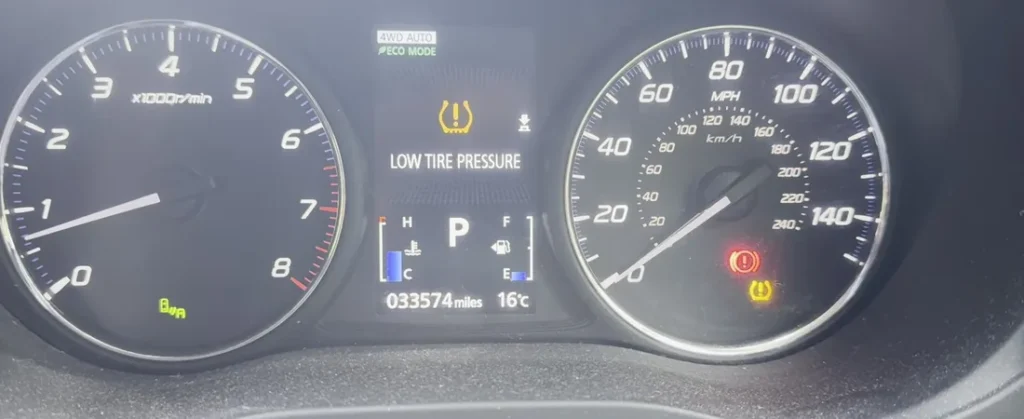
Before You Start
- The reset stores whatever pressures are in the tyres at that moment, so set all four (cold) to the placard in the driver’s door aperture first — use the laden column for a full load, and never reset with a tyre already low.
- Typical triggers: after checking or adjusting pressures (including seasonal changes), after changing wheels or tyres, or after disconnecting the battery.
How to Reset the Outlander TPMS
- Make sure all four tyres are at the correct cold pressure.
- Turn the ignition on and apply the parking brake.
- Press the “INFO” button repeatedly to scroll the cluster menu until “RESET” appears.
- Select “RESET”, then press and hold the INFO button for about 3 seconds — an audible signal sounds and the TPMS warning light flashes slowly.
- Drive the vehicle until the warning light goes out. The new pressures are stored.
If your Outlander has winter wheels with a second set of sensors, use the “Tyre ID set change” menu option to switch between the two registered sets.
Light Won’t Go Out? Work Through This
- A tyre is genuinely low: the system is doing its job — find and fix the leak, re-inflate, then reset.
- Not driven far enough: the light flashes slowly during the relearn and only goes out once the system has read all four sensors — keep driving.
- Light flashes then stays on (not a low tyre): a flashing TPMS light points to a sensor fault, often a flat sensor battery. A code may be stored that you can look up on autodtcs.com.
Frequently Asked Questions
Do I have to drive after resetting?
Yes — the system reads the sensors while the wheels turn, so the light only clears after a short drive.
I have two sets of wheels — how do I switch?
Use the “Tyre ID set change” menu option to select the second registered sensor set (e.g. winter wheels).
Why does the light come back a few days later?
Either a tyre is slowly losing air, or it was a little low when you reset. Re-check all four cold pressures and reset again.
After tyre or seasonal-wheel work it is worth confirming the service reminder is clear — see our Mitsubishi Outlander service indicator reset guide.
Independent guide — not affiliated with Mitsubishi. Always follow your official service manual and safety precautions. Read our full disclaimer.