These instructions apply to the Toyota Yaris Cross Mk1 (XP21) 2021-Present.
For other models, please choose your vehicle here.
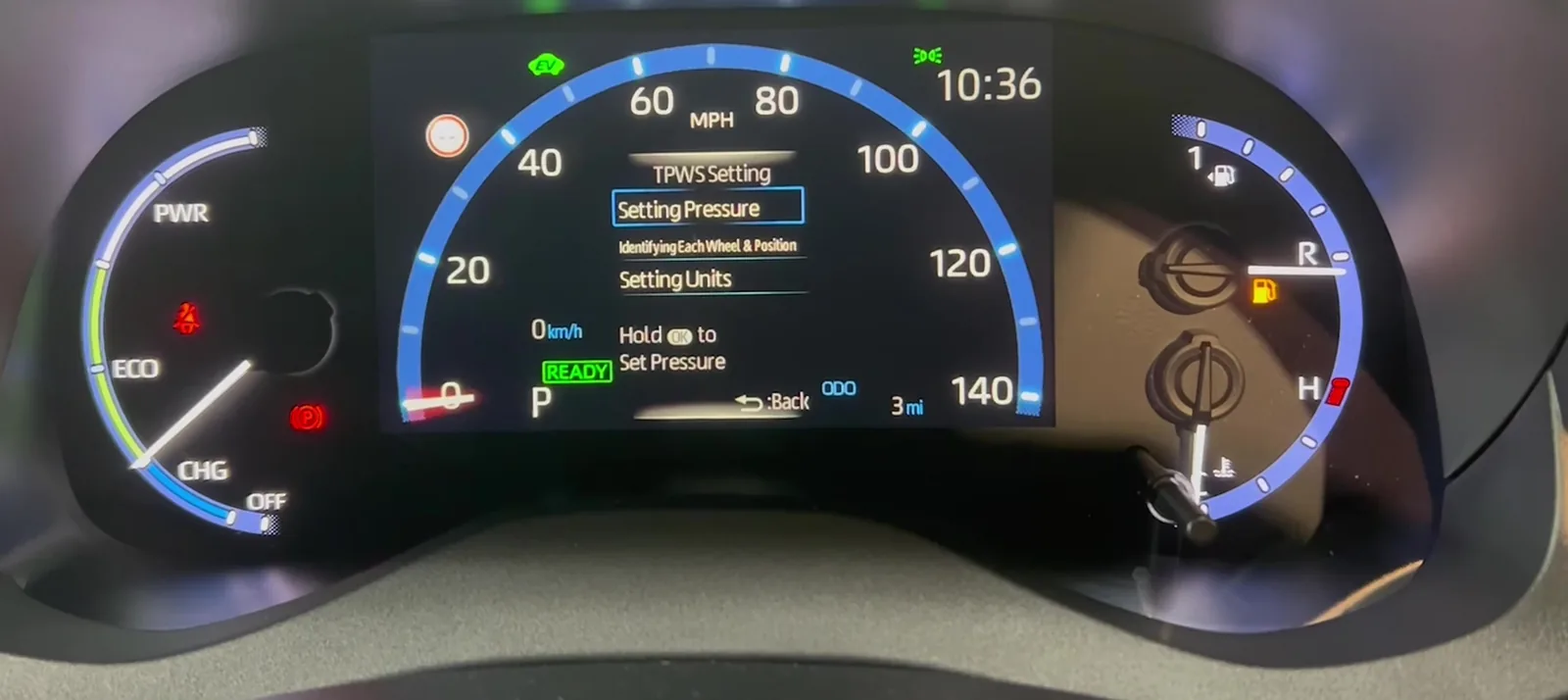
After adjusting the tyre pressures or changing a wheel on your Toyota Yaris Cross (XP21, 2021–present), you store the new values as the reference from the dashboard menu using the steering-wheel controls. Here’s how to clear the tyre-pressure warning. The amber horseshoe-with-exclamation symbol is the tyre-pressure telltale, and on this car it is a routine prompt after any pressure change — not a sign that something has broken. Once the correct pressures are stored and confirmed over a short drive, it goes out and stays out.
How the Yaris Cross Monitors Pressure
The Yaris Cross keeps a stored reference set of pressures and compares what it senses against that baseline. Because you set the reference yourself, the warning is triggered whenever the real pressures drift below what was stored — whether that is a genuine slow leak, a cold snap, or simply because you have just inflated the tyres to a new figure and not yet told the car. That is why the fix is to correct the pressures first and then re-store, rather than to chase the light.
First, a Few Checks
- Check pressures cold — before driving, or at least a couple of hours after the car has been parked, so heat build-up doesn’t give a false-high reading.
- Use the door-pillar figure — the correct pressures are on the label in the driver’s door shut, and they change with load.
- Do all four corners, including the spare if your car carries a full-size one.
- Only store once the pressures are right — storing while a tyre is low simply saves a bad baseline.
- Have the car stationary with the ignition on before you open the menu.
Toyota Yaris Cross Recommended Tire Pressures
The recommended cold tire pressures for the Toyota Yaris Cross (XP21, 2021–present) depend on your wheel size. The values below are front / rear at normal load; there is a higher fully-laden figure, so the exact numbers for your car are on the tire placard in the driver’s door shut. Set them cold — parked at least three hours, or driven under a mile.
| Tire size | Front / Rear (cold) |
|---|---|
| 205/65 R16 | 2.3 / 2.2 bar (33 / 32 psi) |
| 215/55 R17 | 2.2 / 2.0 bar (32 / 29 psi) |
| 215/50 R18 | 2.2 / 2.0 bar (32 / 29 psi) |
These are the Toyota-recommended figures; always confirm against the placard on your own car, as spec can vary by market and trim. Once all four tires are at the correct cold pressure, store the new reference as below.
Set the Pressures First
Park on level ground and inflate all four tyres cold to the figure on the driver’s door-pillar label, then store the reference.
How to Reset the Yaris Cross TPMS
- Turn the ignition on with the car stationary.
- Using the multifunction steering-wheel controls, scroll the instrument-display menu.
- Select ‘Tyre pressure’, then ‘Set indicated air pressure’ (or ‘Set’).
- The TPMS warning light flashes a few times to confirm the system has stored the new pressures.
The light then goes out once the car confirms the readings over a short drive.
If the Light Stays On
- Re-check every tyre — one low corner keeps the warning on even if the other three are perfect.
- Re-store after any change — the Yaris Cross needs the new baseline set whenever pressures change.
- Give it a drive — the confirmation isn’t instant; a few minutes at road speed lets the system settle.
- Cold mornings can drop pressure enough to re-trigger the light; top up to the label figure and re-store.
- After a wheel swap or seasonal tyre change, always run ‘Set’ again so the moved corners become the baseline.
- A slow puncture will keep dropping a corner back below the threshold — if one tyre needs topping up repeatedly, have it inspected.
- A steady-flashing TPMS light points to a sensor fault (flat sensor battery, or an unmatched sensor after a wheel change) and needs a tyre shop’s tool.
Once It’s Done
With the pressures correct and stored, the light clears within a short drive and stays off for the rest of the journey and beyond. If it returns days later, that is the system doing its job — a real pressure loss has happened, so re-check the tyres rather than just re-storing.
Frequently Asked Questions
How do I reset the tyre pressure light on a Toyota Yaris Cross?
Set the pressures, then on the dash menu choose Tyre pressure → Set indicated air pressure; the TPMS light flashes to confirm.
Do I need a tool?
No — the Yaris Cross stores the new reference from its own menu. A tool is only needed if a sensor was replaced.
Why does the light come on when it’s cold?
Pressures fall as temperature drops — roughly a little for every ten-degree fall — so an overnight cold spell can push a corner below the stored reference. Top up to the label figure while the tyres are cold and re-store; the warning should clear on the next drive.
It came on after a wheel change — why?
The reference moved. Run ‘Set indicated air pressure’ so the new pressures become the baseline.
Do I have to reset it every time I inflate the tyres?
Only if you have changed the target pressure or the light has come on. If you simply top up to the same stored figures and the light was already off, there is nothing to re-store. Re-store any time you deliberately raise the pressures for a heavy load and want that treated as the new normal.
Can I still drive with the light on?
You can drive to somewhere safe to check the tyres, but treat the warning as real. A significantly under-inflated tyre affects handling, braking and wear, and can overheat at speed. Check and correct the pressures at the first opportunity, then re-store.
If a fault code is stored, look it up on autodtcs.com. To clear a maintenance reminder, see our Yaris Cross service reset.
Independent guide — not affiliated with Toyota. Always follow your official service manual and safety precautions. Read our full disclaimer.