These instructions apply to the Jaguar F-Type Mk1 (X152) 2013-Present.
For other models, please choose your vehicle here.
If the smart key for your Jaguar F-Type (X152, 2013–present) only unlocks the car when you are standing right beside it, feels intermittent, or has stopped talking to the car altogether, the coin cell buried inside it has almost certainly run flat. The F-Type uses Jaguar’s jewel-like keyless smart fob — the rounded, badge-shaped remote with a chrome sliding cover and a hidden metal emergency blade — and some cars were also supplied with the optional Activity Key wristband. The battery is one of the most common cells there is and the swap takes a couple of minutes on the driveway. Here is how to tell a dying cell from a real fault, the battery you need, the right way to crack the case open, and why the Activity Key is a different animal entirely.

How to Tell the Fob Battery Is Dying
- Shrinking range. You have to be almost touching the car — or hold the fob right against the door handle — before it will lock or unlock. This gradual loss of range is the classic first warning.
- Keyless entry gets fussy. The passive “walk up and the handles present themselves” behaviour becomes hit-and-miss, and you find yourself pressing the buttons manually instead.
- A “smart key battery low” message. The F-Type’s instrument cluster will flag a low key-battery warning when the fob’s cell is on its way out — treat that as your cue to fit a fresh one rather than waiting for a total failure.
- Cold-weather dropouts. A near-flat lithium cell sags further when it is cold, so a fob that works in a warm garage but not on a frosty morning is usually just tired.
A CR2032 in an F-Type fob typically lasts two to four years. If yours is around that age and showing any of the signs above, change the cell before you start suspecting the receiver, the aerials or the immobiliser.
The Battery You Need
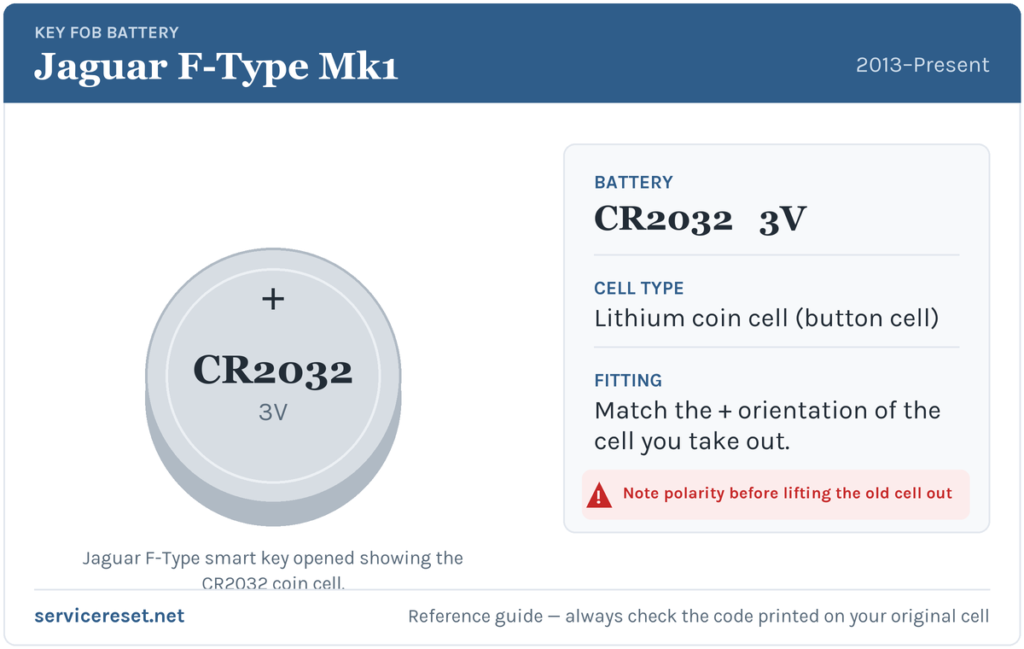
The F-Type smart key uses a single CR2032 — a 3-volt lithium coin cell, roughly 20 mm across and 3.2 mm thick. It is the same cell Jaguar uses across the XE, XF, XJ, XK and F-Pace family, so it is stocked everywhere: supermarkets, hardware shops and any pharmacy. Buy a good-quality branded cell (Panasonic, Energizer, Duracell, Sony/Murata). Cheap no-name cells can sag under the brief burst of current the transmitter draws and give you disappointing range even straight out of the packet.
Method 1 — Jaguar Smart Key (the Standard F-Type Fob)
- Release and remove the chrome cover. Press the small catch on the side of the fob and slide the shiny outer cover away from the body. Lift it off completely — underneath you will find the metal emergency key blade.
- Pull out the emergency key blade. Slide the metal blade out of the fob. You will use it as your prying tool, so there is no need to hunt for a coin or screwdriver.
- Prise the case apart. Turn the blade so it lines up with the direction shown on the fob, then slot its tip into the seam that the cover left behind and gently lever the two halves of the case apart until the battery compartment is exposed. Work slowly — the case is plastic and only needs light pressure.
- Swap the cell. Note which way the old CR2032 sits, then ease it out. Fit the new cell with the positive (+) face upward — the writing and the plus symbol should be looking back at you. Avoid touching both faces of the cell at once, and try not to leave greasy fingerprints on the contact faces.
- Reassemble. Click the two halves of the case back together, slide the metal emergency blade home until it latches, then refit the chrome cover so it snaps back into place.
⚠️ Get the orientation right. A coin cell fitted upside down makes no proper contact and can even drain itself against the terminals, leaving you convinced the “new” battery is a dud. If in doubt, copy the exact orientation of the cell you removed — positive side up on this fob.
Confirm It Worked
Step back a few metres and lock, then unlock, the F-Type from a distance to confirm full range has returned. If the car has passive keyless entry, give it a few minutes after the swap before judging it — Jaguar notes the smart-key system can take around ten minutes to fully re-establish itself with a fresh cell, so an initial hesitation is normal. The low-key-battery warning in the cluster will clear once the car has read a healthy fob, sometimes only after the next drive cycle rather than instantly.
If a Fresh Cell Doesn’t Fix It
- Re-check the polarity and seating. An upside-down or loosely seated cell is by far the most common reason a “new battery” changes nothing. The CR2032 must sit flat, positive side up, firmly under its clip.
- Confirm it is a true CR2032. A CR2025 or CR2016 will physically fit but is thinner, so it may not touch both contacts reliably. Check the code printed on the cell you fitted.
- Clean the contacts. A film of finger grease or light corrosion on the terminals is enough to cause dropouts; wipe them with a dry cloth.
- Rule out the car’s own battery. A weak 12 V vehicle battery can mimic key faults — slow to wake, erratic locking. If the F-Type itself feels sluggish to come alive, the starter battery is worth checking too.
- Still dead with a known-good cell? If the fob refuses to respond at all, the transmitter or the buttons may have failed, which is a fob-replacement job rather than a battery one — but that is rare compared with a simple flat or upside-down cell.
The Activity Key — No Battery to Change
Some F-Types were ordered with the optional Activity Key, the waterproof wristband that lets you lock the conventional fob inside the car and get back in after a swim, run or ride. Do not go looking for a coin cell in it: the wristband is a sealed unit with no user-replaceable battery. Early (pre-2021 model year) Activity Keys use a passive design that draws no power at all — there is genuinely nothing to charge or replace — while the later revised wristband is rechargeable from inside the car using Jaguar’s dedicated charger rather than by swapping a cell. If an Activity Key stops working, it is a case for the dealer, not a battery swap.
New Key or Spare — Why It’s a Dealer Job
Changing the coin cell does not touch the fob’s coding, so your smart key keeps working immediately with no reprogramming. Cutting and coding a brand-new or spare key is a different matter: the F-Type’s immobiliser has to be accessed with Jaguar diagnostic equipment, and blank smart fobs must be ordered against the car’s VIN and married to it electronically. That makes adding a spare, or replacing a lost key, a job for a Jaguar dealer or a specialist auto-locksmith. The cheap insurance is simple — keep the battery in your spare fob fresh too, so you are never down to a single working key.
Frequently Asked Questions
What battery does a Jaguar F-Type key fob take?
A single CR2032 3-volt lithium coin cell. It is the same battery used across most of the Jaguar range, so it is easy to find anywhere.
Which way does the battery go in?
Positive (+) side facing up — the printed side with the plus symbol should be visible as you drop it in. Matching the orientation of the old cell you removed is the safest check.
Do I need to reprogram the F-Type key after changing the battery?
No. A battery swap leaves the fob’s coding untouched, so it works straight away. Only a genuinely new key needs programming to the car.
How do I open the F-Type smart key?
Slide the chrome cover off, pull out the metal emergency blade, then use that blade to gently prise the two halves of the plastic case apart at the seam.
How long should the F-Type fob battery last?
Usually two to four years. Heavy remote use, or leaving a keyless fob sitting close to the car so it keeps waking, will shorten that.
Can I still get into and start the F-Type if the fob is completely dead?
Yes. Use the hidden metal emergency blade to unlock the driver’s door, and the keyless start system is designed to recognise the fob even with a flat cell — typically by holding it against or very near the marked start location — so a dead battery will not strand you.
If the remote died suddenly right after the 12 V battery was disconnected, rather than fading gradually, the pairing rather than the cell is the likelier culprit — and any related warning can leave a stored fault code you can look up on autodtcs.com.
Independent guide — not affiliated with Jaguar. Always follow your official service manual and safety precautions. Read our full disclaimer.