These instructions apply to the Mercedes C-Class Mk4 (W205) 2014-2023.
For other models, please choose your vehicle here.
The Mercedes C-Class (W205, 2014–2023) hides a workshop “engineering” menu inside the instrument cluster that you can open with nothing more than the steering-wheel buttons — no diagnostic tool, no garage visit. It shows live readouts the normal trip computer never exposes: actual battery voltage, coolant temperature, and the car’s VIN and software data. It is genuinely useful for checking a tired battery or watching warm-up temperatures, and it is completely reversible because it only displays data.
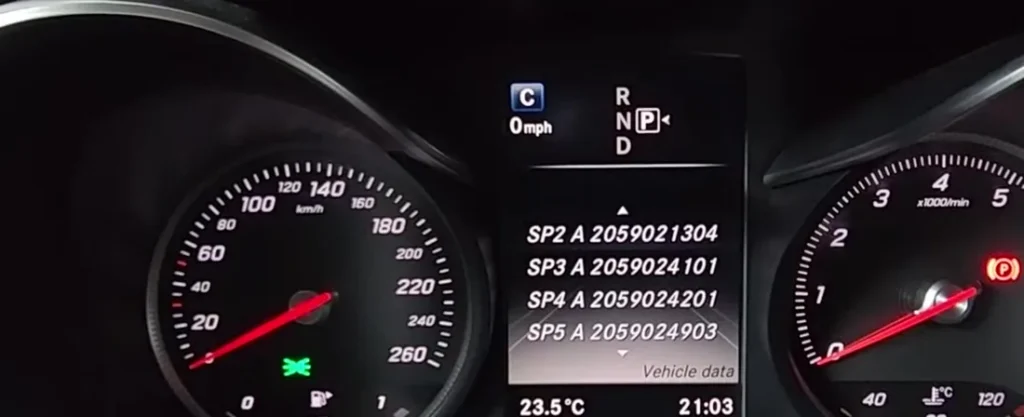
What the Hidden Menu Shows
Once open, the cluster cycles through pages of raw vehicle data, including:
- Battery voltage (UB) — the actual 12 V system voltage, far more precise than the dashboard battery symbol.
- Coolant temperature in degrees, useful for spotting a slow warm-up or a sticking thermostat.
- VIN and chassis code, plus software/part numbers for the cluster and other modules.
- Service and consumption data the standard menus summarise but don’t show numerically.
How to Open It
The W205 uses the left-hand cluster controls on the multifunction steering wheel. Make sure the engine is off but the ignition is on (position 1 or 2), and that the cluster is showing the main trip view.
- Switch the ignition on without starting the engine.
- Use the left steering-wheel pad to bring up the standard trip/odometer display.
- Press and hold the OK button (left pad) and the telephone call-answer button (right pad) together.
- Keep both held for around 10 seconds until the cluster changes and the first item, Vehicle data, appears.
- Release the buttons — you are now in the engineering menu.
Reading Voltage and Temperatures
Scroll with the left pad’s up/down (or arrow) keys to step through the data pages. Battery voltage is shown as a figure like 12.4 V with the engine off, typically rising to roughly 13.8–14.6 V once running as the alternator charges. A resting reading below about 12.4 V points to a battery that needs charging or testing. Coolant temperature climbs to a normal operating band of roughly 85–105 °C once warm. Note the figures are diagnostic readouts, so treat them as a guide rather than calibrated lab values.
How to Exit
The menu is read-only, so you cannot break anything by browsing it. To leave, simply switch the ignition off, or use the back/return key on the left pad to step out to the normal trip display. Nothing is saved and no settings are changed.
Frequently Asked Questions
Will the hidden menu work on every W205 C-Class?
It works on standard W205 clusters with the multifunction steering wheel, including the facelift cars. Very early or non-European-spec clusters can label items slightly differently, but the OK + call-answer hold is the documented method across the range.
Can I turn off ESP or change settings from here?
On the W205 this owner-level menu is essentially a data display. Deeper service functions (like dyno modes on older Mercedes) are not exposed to owners here, so use it for readouts, not configuration.
Is the battery voltage reading accurate?
It is accurate enough to judge battery health — a healthy resting reading is around 12.5 V or above. For a definitive verdict, confirm with a multimeter across the terminals.
Could opening this menu drain my battery or void anything?
No. It draws negligible power and changes nothing, so it neither drains the battery meaningfully nor affects your warranty.
Why does my coolant temperature look high in traffic?
Brief rises in slow traffic are normal as airflow drops; the figure should settle once you move again. A reading that keeps climbing toward 120 °C is a cooling-system concern worth investigating.
If a warning light is what sent you into this menu, the next step is reading the actual fault code — you can look up what any Mercedes code means on our sister site autodtcs.com.
Independent guide — not affiliated with Mercedes. Always follow your official service manual and safety precautions. Read our full disclaimer.