These instructions apply to the BMW X1 Mk2 (F48) 2015-2022.
For other models, please choose your vehicle here.
BMW’s Condition Based Servicing (CBS) on the BMW X1 (F48, 2015–2022) tracks each service item separately. When “Engine oil” or another item is due, you can reset it from the dashboard with the trip button — no garage tool needed. Do the work first; a CBS item only resets when it’s at 90% of its life or less. The service message is a maintenance reminder rather than a fault: it means one of the tracked items has counted down to zero, not that anything has broken.
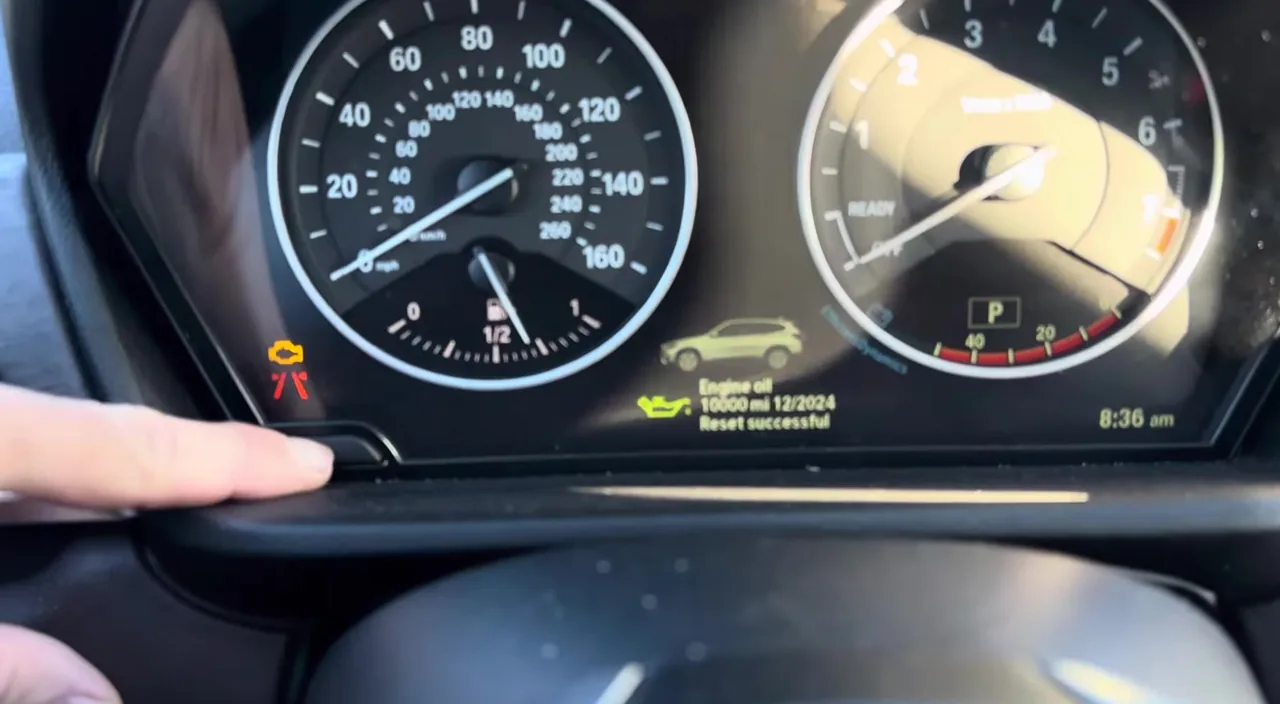
How Condition Based Servicing Works
Unlike a single service light, CBS treats each maintenance item as its own countdown. Engine oil, the vehicle check, brake pads and fluid, and other items each have their own remaining life, and the car works out that life from real use — distance covered, time elapsed, cold starts, and driving conditions — rather than a fixed mileage figure. When you look at the service menu you’ll see each item listed with how long or how far is left, and the ones nearest the end shown first. A service message appears when an item reaches its limit; because they run independently, oil can fall due well before or after the general vehicle check.
This is a reminder system, not a fault system. It doesn’t measure your current oil level or oil pressure — it simply counts down to the next scheduled change. If a red oil-pressure symbol or the engine-management light is lit instead of the CBS service note, that’s a genuine fault to look into rather than something the trip button will clear.
Before You Start
- Do the actual work first, then reset the matching item — reset ‘Engine oil’ only after the oil and filter are changed.
- A CBS item will only accept a reset once it has dropped to 90% of its life or below, so you can’t clear a nearly-new item early.
- Make sure the clock and date are set correctly — CBS uses them to log the reset, and they can reset themselves if the battery has been disconnected.
- You need the ignition on with the engine off, and no tools of any kind.
Reset After the Service Only
Reset ‘Engine oil’ first if both oil and a vehicle check are due. The clock must be set correctly for CBS to log the reset.
How to Reset CBS on the X1 F48
- Close all the doors.
- Switch the ignition on without pressing any pedal — on keyless cars, press the start/stop button twice (don’t touch the brake).
- Press and hold the trip-reset button on the cluster until the first service symbol appears.
- Release, then press the button to select the item to reset; hold again when ‘RESET’ shows to confirm.
- Repeat for each item you’ve serviced, then switch off.
You can also view the items under iDrive → Vehicle → Vehicle status → Service required.
If It Won’t Reset
- The item is above 90% life — CBS won’t let you reset it early. Only items at or below 90% can be cleared.
- You didn’t confirm — selecting the item isn’t enough; you have to hold the button again at the ‘RESET’ prompt.
- The engine started — you only want ignition on. On keyless cars, press start twice without the brake so the engine stays off, then try again.
- No symbols appear when you hold the button — the ignition probably isn’t fully on; wake it properly and hold the trip button again.
- The reset won’t stick after battery work — check the clock and date first, as CBS needs them to be right.
What to Expect After Resetting
Once an item is reset, its remaining life returns to full and the service message for it clears. If several items were due, only the ones you actually reset will refresh — the others stay as they were, which is exactly why CBS lists them separately. Nothing else on the car changes; the reset touches only the service counters, not your settings, trip data, or driver profiles. You can open the service menu again afterwards to confirm each item now shows a full interval.
How Often to Reset It
Reset each CBS item as and when you complete the matching work — oil after an oil and filter change, the vehicle check after that inspection, and so on. Because CBS is condition-based, the intervals aren’t fixed numbers; the car decides them from how it’s driven, and your owner’s handbook explains the maximum time limits that also apply. Follow that guidance rather than guessing a mileage, and only ever reset an item once its service has genuinely been done.
Frequently Asked Questions
How do I reset the service light on a BMW X1?
Close the doors, ignition on without pedals, hold the trip button, then select and confirm each CBS item.
Do I need a diagnostic tool?
No — the trip-button CBS reset is built in.
Why won’t it let me reset?
A CBS item only resets once it’s at 90% of its life or below.
Does the clock matter?
Yes — CBS uses the clock; set it correctly (it stops if the battery was disconnected).
Can I reset just the oil and leave the other items?
Yes. CBS items are independent, so you select and confirm only ‘Engine oil’ and leave the rest untouched until their own work is done.
Do I have to reset it from the cluster, or can iDrive do it?
The trip-button method on the cluster is the reset itself. iDrive’s Vehicle status → Service required screen lets you view what’s due, which helps you decide which items to clear.
If a warning light appeared with the service message, look it up on autodtcs.com. After battery work, see our X1 F48 battery guide.
Independent guide — not affiliated with BMW. Always follow your official service manual and safety precautions. Read our full disclaimer.